Video editing demands fast storage, dependable drive management, and enough capacity for large project files, proxies, and media libraries. The best NAS enclosure for video editing can also simplify collaboration, backups, and long-term archive management.
We compared 10 multi-bay options across network performance, direct-attached connectivity, expansion, RAID support, and workflow flexibility. Whether you edit alone or manage a production team, this roundup highlights practical storage choices for different budgets and studio sizes.
Best 10 Nas Enclosure for Video Editing Picks for 2026
Top Enterprise Pick

- Eight SATA bays plus two M.2 NVMe bays
- Dual 10GbE ports with up to 20G aggregation
- Intel Core i5 platform for large-team workflows
Best For: Large studios and collaborative editing teams
Hybrid DAS Pick

- Four SATA bays and four NVMe slots
- USB 3.2 Gen 2 up to 10Gbps
- Eight independent disks with no built-in RAID
Best For: Direct-attached hybrid HDD and SSD editing storage
RAID DAS Pick

- Four bays with hardware RAID 0, 1, and 5
- USB Type-C direct attachment
- Works with Windows, macOS, and Linux
Best For: Single workstations needing simple hardware RAID
Simple Expansion Pick

- Six SATA bays support up to 132TB
- USB 3.2 Gen 2 up to 10Gbps
- Hot-swappable individual disks
Best For: Solo editors needing simple high-capacity expansion
Creator Powerhouse

- 16GB ECC DDR5 and AMD Ryzen processing
- Four M.2 NVMe slots for flexible acceleration
- Dual 5GbE and 10GbE networking
Best For: Creators and businesses with demanding editing and virtualization workloads
Team Editing Workstation

- Eight bays support flexible RAID configurations
- Dual 10GbE networking for fast shared access
- Ultra 9 CPU, 32GB RAM, and PCIe expansion
Best For: Creative teams and advanced users needing high-capacity, expandable shared storage
Best Budget DAS Alternative

- USB 3.2 Gen 2 up to 10Gbps
- Four individual drives, up to 120TB
- Tool-free, hot-swappable trays
Best For: Direct-attached editing storage on Mac, Windows, or Linux
Best Thunderbolt RAID Pick
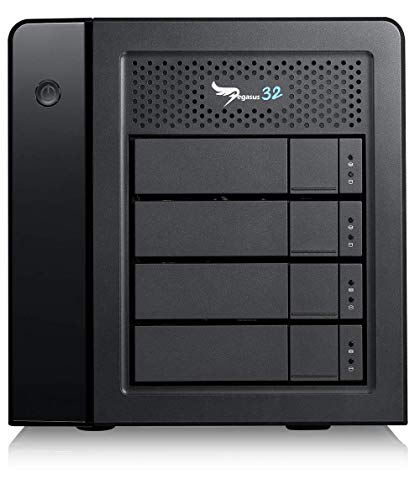
- 16TB with four installed 4TB drives
- Thunderbolt 3 up to 40Gbps
- Also supports USB 3.2 Gen 2
Best For: High-throughput multimedia editing with a ready-to-use RAID unit
Best Connected Expansion Enclosure

- Four SATA bays up to 128TB
- 10Gbps USB-C connectivity
- 4K HDMI and temperature-controlled fans
Best For: Local storage and display expansion at an editing workstation
Top Enterprise Pick – UGREEN NAS DXP8800 Plus
For teams seeking a true NAS enclosure for video editing, the UGREEN NAS DXP8800 Plus combines eight SATA bays, dual 10GbE networking, and a 12th Gen Intel Core i5 processor. It is designed for large studios and businesses that need substantial shared storage, though drives must be purchased separately.
Best For: Large studios, IT teams, and collaborative editing workflows requiring high capacity and fast wired networking.
Pros:
- Dual 10GbE ports can be aggregated for up to 20G bandwidth.
- Eight SATA bays plus two M.2 NVMe bays support up to 272TB with compatible drives.
- Supports multiple RAID levels, Docker, virtual machines, and broad operating-system compatibility.
- Includes an Intel 10-core processor, 8GB DDR5 RAM, HDMI, Thunderbolt 4, and SD 4.0.
Cons:
- Hard drives and SSDs are not included.
- Wired Ethernet is required; Wi-Fi is not supported.
- Actual transfer speeds depend on the network, drives, CPU, and file sizes.
This is the most capable option here for a shared, expandable editing library. Its networking and processing hardware suit demanding production environments, but the total system cost rises after adding compatible storage.
Hybrid DAS Pick – TERRAMASTER D8 Hybrid 2
The TERRAMASTER D8 Hybrid 2 is a flexible alternative to a traditional NAS enclosure for video editing. It connects directly over USB-C and provides four independent SATA drive bays alongside four independent M.2 NVMe slots, letting editors combine high-capacity disks with faster SSD storage.
Best For: Editors who want direct-attached hybrid HDD and NVMe storage without a built-in RAID system.
Pros:
- Supports four SATA HDDs or SSDs and four M.2 2280 NVMe SSDs.
- USB 3.2 Gen 2 provides up to 10Gbps connectivity, with claimed single-SSD reads up to 1,020MB/s.
- Eight drives operate independently, simplifying flexible storage expansion and maintenance.
- Plug-and-play compatibility with macOS, Windows, Linux, and NAS operating systems.
Cons:
- It has no built-in RAID; third-party RAID software is needed if required.
- Drives are not included.
- USB direct attachment is less suited to native multi-user network sharing than a dedicated NAS.
Choose this enclosure when local editing speed and mixed media are more important than built-in network services. Its independent disks offer flexibility, while the lack of hardware RAID places more responsibility on your computer or software.
RAID DAS Pick – QNAP TR-004
QNAP TR-004 4 Bay USB Type-C Direct Attached Storage (DAS) with hardware RAID (Diskless)
Check Price On AmazonThe QNAP TR-004 is a compact four-bay direct-attached option for buyers comparing a NAS enclosure for video editing. It connects by USB Type-C, supports hardware RAID 0, 1, 5, JBOD, and individual-disk modes, and works with Windows, macOS, and Linux.
Best For: Individual editors and small workflows that need simple four-drive USB storage with hardware RAID options.
Pros:
- Four 3.5-inch SATA bays support RAID 0, 1, 5, JBOD, or individual disks.
- USB Type-C connection works with Windows, macOS, and Linux.
- Lockable drive bays and a metal enclosure provide a practical desktop design.
- Can also serve as external storage for QNAP NAS backup or capacity expansion.
Cons:
- It is a DAS rather than a network-attached NAS.
- Drives are not included.
- Its listed data transfer rate is 5Gbps, slower than the 10Gbps alternatives here.
The TR-004 is a straightforward choice when hardware RAID matters more than maximum throughput or network sharing. It is well suited to a single editing workstation, but its USB connection limits its role in collaborative studio environments.
Simple Expansion Pick – TERRAMASTER D6-320
The TERRAMASTER D6-320 offers six bays for editors who need straightforward expansion rather than a full NAS enclosure for video editing. This diskless DAS uses USB 3.2 Gen 2, supports individual SATA drives up to 22TB each, and works with Mac, Windows, and Linux systems.
Best For: Editors who need high-capacity, directly attached storage with hot swapping and simple plug-and-play operation.
Pros:
- Six bays support 3.5-inch or 2.5-inch SATA HDDs and SSDs.
- Up to 132TB is supported using six 22TB drives.
- USB 3.2 Gen 2 offers up to 10Gbps and claimed read speeds up to 1,030MB/s with six HDDs.
- Hot swapping and temperature-controlled fan management add convenience for ongoing storage use.
Cons:
- It does not support RAID or drive arrays; disks work individually.
- It is a DAS, not a network-attached NAS.
- Drives are not included.
The D6-320 makes sense for a solo editor who wants lots of removable storage without configuring RAID. Its individual-disk design is simple and flexible, but users should maintain separate backups because the enclosure does not provide array-level redundancy.
Creator Powerhouse – Asustor Lockerstor 4 Gen3
If you need a nas enclosure for video editing that can also handle demanding workstation tasks, the Asustor Lockerstor 4 Gen3 is a strong enthusiast and small-business option. It combines 16GB of ECC DDR5 memory, an AMD Ryzen embedded processor, four drive bays, and four M.2 NVMe slots for flexible storage and caching configurations.
Best For: Video editors, creators, and businesses needing a capable NAS for editing, virtualization, Docker, AI workloads, and backup.
Pros:
- 16GB ECC DDR5 RAM supports demanding multitasking.
- Four M.2 NVMe slots add fast storage or caching flexibility.
- Dual 5GbE and 10GbE networking suits high-speed workflows.
- Compact desktop design with a four-bay layout.
Cons:
- Diskless design requires separate drives.
- Four bays provide less raw expansion than larger NAS systems.
- Advanced hardware may be more than basic backup users need.
The Lockerstor 4 Gen3 is a well-rounded choice when editing performance and expansion matter more than entry-level pricing or maximum bay count. Its NVMe support and fast networking give creators room to build a responsive storage workflow.
Direct-Attach Editing Hub – WAVLINK 4-Bay Enclosure
For shoppers comparing a nas enclosure for video editing with a simpler direct-attached solution, the WAVLINK 4-Bay enclosure offers four SATA bays and USB-C 3.2 connectivity. It supports up to four 22TB drives, making it useful for expanding a desktop or laptop editing setup without configuring a full networked NAS.
Best For: Editors who want large, directly connected storage with USB-C transfers, drive hot-swapping, and an integrated display connection.
Pros:
- Four bays support both 3.5-inch and 2.5-inch SATA drives.
- USB-C 3.2 offers data rates up to 10Gbps.
- Temperature-controlled fans help cool drives during intensive use.
- HDMI supports up to 4K at 60Hz when the host supports video output.
Cons:
- It is a USB enclosure rather than a network-attached NAS.
- 2.5-inch drives need separate mounting brackets.
- HDMI functionality depends on a compatible host USB-C video output.
This WAVLINK model is best viewed as a flexible desktop storage dock rather than a shared network server. It makes sense for an individual editor who values quick USB-C access, removable drives, and a compact aluminum enclosure.
Team Editing Workstation – Thdeukoty Desktop NAS 8-Bay
The Thdeukoty Desktop NAS is built for demanding teams looking for a nas enclosure for video editing with substantial capacity and high-speed networking. Its eight SATA bays, dual M.2 slots, Ultra 9 processor, 32GB of LPDDR5X memory, and dual 10GbE ports target collaborative editing and data-intensive workflows.
Best For: Creative teams, offices, and advanced users who need large RAID storage, fast network access, and room for expansion.
Pros:
- Eight SATA bays support large RAID 0, 1, 5, 6, and 10 configurations.
- Dual 10GbE ports support aggregation and listed speeds up to 2500MB/s.
- 32GB LPDDR5X RAM and a 16-core Ultra 9 CPU suit demanding workloads.
- PCIe 4.0 x8 slot allows graphics, networking, or computing expansion.
Cons:
- Its large desktop chassis needs considerable workspace.
- Diskless configuration requires purchasing drives separately.
- High-end features may be excessive for basic file storage.
With eight bays and enterprise-leaning connectivity, this is the most expansion-focused option in the group. It is a compelling fit when multiple editors or intensive workloads require fast shared access, RAID flexibility, and future hardware upgrades.
Best Budget DAS Alternative – TerraMaster D4-320
If you are searching for a nas enclosure for video editing, the TerraMaster D4-320 is worth considering as a direct-attached storage alternative. It connects over USB 3.2 Gen 2 at up to 10Gbps and can deliver up to 1,016 MB/s combined read/write performance with four compatible hard drives, but it is not a network-attached storage device.
Best For: Editors who want a straightforward, high-capacity USB enclosure for organizing footage and project files on a Mac, Windows, or Linux computer.
Pros:
- Supports four individual SATA HDDs or SSDs, with up to 120TB total capacity based on supported drive sizes.
- Tool-free trays, hot swapping, and plug-and-play compatibility simplify drive management.
- USB-C connectivity works with USB 3.0 through Thunderbolt 4 host interfaces.
- Temperature-controlled cooling, sound-absorbing panels, and vibration damping help reduce operating noise.
Cons:
- It is a DAS rather than a NAS, so it does not provide network storage or built-in RAID.
- The four disks operate individually because RAID is not supported.
The D4-320 makes sense when your editing workstation is close to the storage and you value simple expansion over network access or redundancy. Plan your backup strategy separately, since the enclosure does not combine the drives into a RAID array.
Best Thunderbolt RAID Pick – Promise Pegasus32 R4 16TB
For editors who need a fast, preconfigured enclosure, the Promise Pegasus32 R4 combines four 4TB drives into a 16TB hybrid Thunderbolt 3 or USB 3.2 Gen 2 direct-attached storage system. Its Thunderbolt connection reaches up to 40Gbps, making it a strong option for demanding multimedia workflows.
Best For: Mac and PC video editors who want a ready-to-use 16TB RAID storage unit with Thunderbolt 3 connectivity.
Pros:
- Includes four 4TB drives for 16TB of installed storage.
- Supports Thunderbolt 3 at up to 40Gbps or USB 3.2 Gen 2 at up to 10Gbps.
- Can deliver host power of up to 85W through Thunderbolt 3.
- Includes a Thunderbolt 3 cable and carries a three-year manufacturer warranty.
Cons:
- It is direct-attached storage, not a network-attached NAS.
- The installed mechanical 7,200 rpm drives may be less responsive than an all-SSD editing array.
- Storage is fixed at 16TB in this R4 configuration.
The Pegasus32 R4 is the most purpose-built choice here for high-throughput editing, especially on a Thunderbolt-equipped workstation. Its included drives and RAID-focused design reduce setup work, while USB compatibility preserves flexibility for systems without Thunderbolt 3.
Best Connected Expansion Enclosure – WAVLINK 4-Bay USB-C Enclosure
The WAVLINK 4-Bay is a flexible alternative to a traditional nas enclosure for video editing when you want local USB-C storage plus display connectivity. It accepts four 3.5-inch or 2.5-inch SATA drives, supports up to 128TB with four 32TB drives, and includes 4K HDMI output when the host USB-C port supports video.
Best For: Desktop editors who want expandable direct-attached storage, peripheral connectivity, and an integrated 4K display option.
Pros:
- Four SATA bays support both 3.5-inch and 2.5-inch HDDs or SSDs.
- USB 3.2 Type-C provides transfer speeds up to 10Gbps.
- HDMI supports up to 4K at 60Hz under DisplayPort 1.4, with a compatible host connection.
- Aluminum construction and dual temperature-activated fans support cooling during intensive work.
Cons:
- It is an enclosure and docking station rather than a network-attached NAS.
- 2.5-inch drives require separate 2.5-to-3.5-inch mounting brackets, which are not included.
- It does not list RAID functionality in the supplied specifications.
This WAVLINK model suits a compact editing desk where storage and display expansion are useful together. Verify that your computer’s USB-C port supports video output before relying on the HDMI feature, and treat the four bays as local expansion rather than network storage.
How We Picked the Best Nas Enclosure for Video Editing
We evaluated these enclosures for the demands of modern editing workflows rather than raw drive-bay count alone. Key considerations included connection speed, RAID or storage-management features, drive compatibility, expansion options, cooling, capacity, and whether a model functions as a true network-attached storage system or a direct-attached storage device.
That distinction matters. A NAS connects over a network and can serve multiple editors, while a DAS typically connects directly to one computer over USB or Thunderbolt. Some products in this roundup are best for local high-speed editing, while others are better suited to shared storage, backup, or hybrid workflows.
Quick Comparison
- Best for large studios: UGREEN NAS DXP8800 Plus and the Thdeukoty 8-bay desktop NAS offer high capacity and workstation-oriented expansion.
- Best for hybrid storage: TERRAMASTER D8 Hybrid combines four HDD bays with four NVMe SSD slots.
- Best network-focused option: Asustor Lockerstor 4 Gen3 provides ECC memory, NVMe slots, and multi-gigabit networking.
- Best simple DAS choices: QNAP TR-004, TERRAMASTER D4-320, and D6-320 are straightforward options for local storage and backup.
- Best Thunderbolt workflow: Promise Technology Pegasus32 R4 is designed for fast direct-attached RAID storage.
Key Buying Factors for a Nas Enclosure for Video Editing
Connection Speed
Check the interface used by your computer and network. USB 3.2, 10GbE, 5GbE, and Thunderbolt can provide substantially different real-world performance. A fast enclosure will not reach its potential if your computer, switch, cable, or drives are slower.
RAID and Drive Configuration
RAID can improve redundancy or performance, but it is not a substitute for backup. RAID 5 or RAID 6 may suit larger arrays, while RAID 10 can favor performance and fault tolerance. Smaller DAS units may offer hardware RAID or software-managed configurations.
HDD, SSD, and NVMe Support
Hard drives provide economical bulk capacity for footage and archives. SATA SSDs can improve responsiveness, while NVMe SSDs are useful for caches, active projects, proxies, and scratch workloads. Hybrid designs let you separate high-speed editing media from large archives.
Capacity, Cooling, and Noise
Estimate current footage needs, then leave room for growth, backups, and RAID overhead. Temperature-controlled fans and adequate airflow are especially important in continuously running systems, although larger and faster enclosures may produce more noise.
Who Should Buy Which Nas Enclosure for Video Editing?
Choose a multi-bay NAS with 10GbE or faster networking if several editors need shared access or you are building a central studio media server. Select a hybrid NAS when you want network sharing alongside fast NVMe storage. For one editor working at a single desk, a DAS with USB-C or Thunderbolt can be simpler, quieter to configure, and more cost-effective.
Four-bay models are a sensible balance for home studios and small teams, while six- and eight-bay enclosures make more sense for growing libraries, larger RAID sets, and longer project retention. Before buying, confirm operating-system support, maximum drive sizes, included software, cable requirements, and whether drives are included. Most models here are diskless, so budget separately for compatible NAS or enterprise-rated drives and maintain an independent backup.