Finding the right motherboard under $200 means balancing processor compatibility, expansion options, memory support, and connectivity without paying for features you will not use.
This roundup compares 10 budget-friendly boards across AMD AM4, AMD AM5, and Intel platforms, helping you match a dependable foundation to your build plan.
Best 10 Computer Motherboards Under 200 Picks for 2026
Best AM4 Value

- AM4 support for Ryzen 3000, 4000 G, and 5000 processors
- PCIe 4.0, Gen 4 M.2, Wi-Fi, and Bluetooth
- Flash BIOS Button and support for up to 128GB DDR4
Best For: Feature-rich compact AMD Ryzen builds
Best Legacy Intel Budget Pick

- Supports 6th- and 7th-generation Intel Core processors
- Four DDR4 slots and up to 64GB listed capacity
- PCIe Gen3 x4 M.2 connector and UEFI Dual BIOS
Best For: Older LGA1151 replacement builds
Best Modern AM5 Entry

- Supports Ryzen 9000, 8000, and 7000 processors
- DDR5 support up to 8000+ OC and two Gen4 M.2 slots
- 2.5G LAN, USB-C, and BIOS Flashback
Best For: Compact, upgrade-ready AMD AM5 builds
Best 8th/9th Gen Intel Option
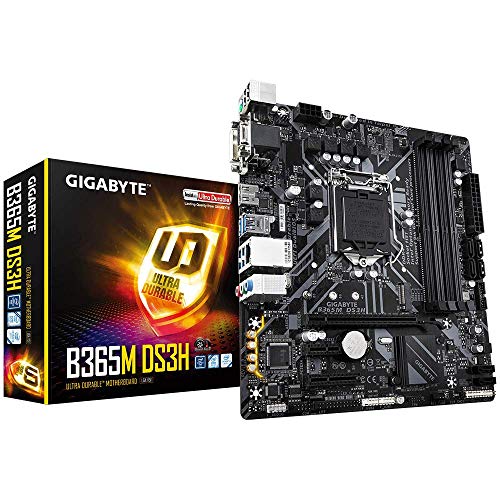
- Supports 8th- and 9th-generation Intel Core processors
- Four DDR4 slots with dual-channel support
- PCIe Gen3 x4/SATA M.2 and enhanced audio features
Best For: Compatible LGA1151 Intel replacement systems
Compact Connectivity Pick

- AM4 and PCIe 4.0 support
- Built-in WiFi 6 and dual M.2
- Micro-ATX design with four DDR4 slots
Best For: Compact AMD Ryzen systems with wireless networking
ATX Upgrade Choice

- Supports Ryzen 5000/4000/3000 CPUs
- Two M.2 slots and PCIe 4.0
- Q-Flash Plus and front USB-C
Best For: Full-size AMD Ryzen gaming and expansion-focused builds
Intel Storage Specialist

- Supports 10th/11th Gen Intel Core
- Eight SATA3 ports and dual M.2
- Integrated WiFi and Bluetooth 5.1
Best For: Storage-heavy Intel Micro-ATX systems
Best Budget AM4 Pick

- Supports Ryzen 3000, 4000 G-Series, and 5000-series CPUs
- DDR4 support up to 4600 MHz (OC)
- PCIe Gen3 x4 M.2 slot for NVMe storage
Best For: Affordable compact AM4 builds
Best Value PCIe 4.0 Board

- Supports Ryzen 3000, 4000, and 5000-series processors
- PCIe 4.0 x16 support with compatible CPUs
- HDMI, DVI-D, and VGA display outputs
Best For: Flexible budget Ryzen systems
Best Expansion-Friendly Choice

- Four DDR4 slots support up to 128GB
- Two M.2 slots, including PCIe 4.0
- PCIe 4.0 x16 slot for compatible graphics cards
Best For: Upgradeable compact Ryzen builds
Best AM4 Value – MSI B550M PRO-VDH WiFi
For shoppers comparing computer motherboards under 200, the MSI B550M PRO-VDH WiFi is a well-equipped Micro-ATX option for AMD Ryzen 3000-, 4000 G-, and 5000-series desktop processors. It combines DDR4 support, PCIe 4.0, built-in Wi-Fi, Bluetooth, and a Flash BIOS Button in a practical budget-focused platform.
Best For: AMD Ryzen builders who want integrated wireless connectivity, PCIe 4.0, and flexible display outputs.
Pros:
- Supports up to 128GB of dual-channel DDR4 memory at speeds up to 4400MHz.
- Includes PCIe 4.0, a Gen 4 M.2 slot with Shield Frozr, and USB 3.2 connectivity.
- Built-in Wi-Fi and Bluetooth reduce the need for add-in cards.
- Flash BIOS Button can update the BIOS without a CPU or memory installed.
Cons:
- AM4 platform compatibility does not extend to every older Ryzen APU; the notes specifically exclude Ryzen 5 3400G and Ryzen 3 3200G.
- Micro-ATX expansion and four SATA ports may be limiting for larger builds.
This is one of the more complete computer motherboards under 200 for a compact Ryzen system, especially when onboard wireless features and straightforward BIOS updating matter.
Best Legacy Intel Budget Pick – GIGABYTE GA-B250M-DS3H
The GIGABYTE GA-B250M-DS3H is a basic Micro-ATX choice for older Intel systems. Among computer motherboards under 200, it makes sense primarily for a low-cost LGA1151 rebuild using a 6th- or 7th-generation Intel Core processor and DDR4 memory.
Best For: Existing LGA1151 systems that need a replacement motherboard with four memory slots and an M.2 connector.
Pros:
- Supports 6th- and 7th-generation Intel Core processors.
- Four DDR4 DIMM slots support dual-channel memory, with up to 64GB listed.
- Includes a PCIe Gen3 x4 M.2 connector with data transfer up to 32Gb/s.
- UEFI Dual BIOS adds a second BIOS configuration for added convenience.
Cons:
- Its LGA1151 and B250 platform is intended for older Intel generations rather than current processors.
- Memory speed is listed at up to 2400MHz.
- It lacks the newer PCIe 4.0 and wireless features found on more modern boards.
This board is best evaluated as a platform-specific replacement, not a modern foundation. Verify your processor generation and case compatibility before choosing it.
Best Modern AM5 Entry – ASRock A620AM-X
The ASRock A620AM-X brings the current AMD AM5 platform to the budget segment. For shoppers seeking computer motherboards under 200, it offers Ryzen 7000-, 8000-, and 9000-series support, DDR5 compatibility, 2.5G LAN, and two PCIe Gen4x4 M.2 slots in a compact Micro-ATX design.
Best For: New AMD AM5 builds using DDR5 memory and a compact chassis.
Pros:
- Supports AMD Ryzen 9000, 8000, and 7000 series processors.
- Two Hyper M.2 PCIe Gen4x4 slots and four SATA3 ports provide flexible storage options.
- Realtek 2.5G LAN offers faster wired networking than standard gigabit Ethernet.
- BIOS Flashback supports updates without CPU installation.
Cons:
- Only two DDR5 DIMM slots are available.
- Micro-ATX compatibility should be checked carefully with pre-built systems and chassis.
- The board uses integrated graphics outputs only when paired with a compatible AMD processor.
With current AM5 processor support and fast storage and networking options, this is a forward-looking pick for computer motherboards under 200. Confirm case fit and memory expansion needs before buying.
Best 8th/9th Gen Intel Option – GIGABYTE B365M DS3H
GIGABYTE B365M DS3H (LGA1151/Intel/Micro ATX/USB 3.1 Gen 1 (USB3.0) Type A/DDR4/Motherboard)
Check Price On AmazonThe GIGABYTE B365M DS3H is a Micro-ATX motherboard for 8th- and 9th-generation Intel Core processors. It is worth considering among computer motherboards under 200 when you are reusing compatible LGA1151 hardware and want DDR4 support plus an M.2 slot.
Best For: Budget upgrades or replacements built around compatible 8th- or 9th-generation Intel Core CPUs.
Pros:
- Supports 9th- and 8th-generation Intel Core processors.
- Four DDR4 memory slots support dual-channel, non-ECC unbuffered memory.
- Ultra-fast M.2 storage support includes PCIe Gen3 x4 and SATA interfaces.
- Audio features include high-quality capacitors and an audio noise guard.
Cons:
- It is limited to the older LGA1151/B365 platform.
- Memory speed is listed at up to 2666MHz.
- Verify the listed port and expansion details against your planned peripherals before purchase.
This board can be a sensible value replacement for an existing compatible Intel system, but it is not intended for current-generation processors. Check CPU, case, and memory compatibility carefully.
Compact Connectivity Pick – ASUS Prime B550M-A WiFi II
For shoppers comparing computer motherboards under 200, the ASUS Prime B550M-A WiFi II is a practical Micro-ATX option for an AM4-based build. It combines PCIe 4.0 support, built-in WiFi 6, dual M.2 slots, and multiple display outputs in a compact layout.
Best For: Compact AMD Ryzen systems that need built-in wireless networking and flexible storage.
Pros:
- Supports 3rd Gen AMD Ryzen processors with an AM4 socket and PCIe 4.0.
- Includes WiFi 6, 1Gb LAN, dual M.2 slots, and USB 3.2 Gen 2 Type-A connectivity.
- Offers four DDR4 memory slots, support for up to 128GB, and HDMI 2.1 output.
- Includes VRM and chipset heatsinks plus ASUS Fan Xpert 2 support.
Cons:
- Its Micro-ATX form factor provides less expansion space than a full ATX board.
- Compatibility is limited to the AM4 platform and DDR4 memory.
This board is a well-rounded choice when a smaller AMD build needs modern storage, wireless connectivity, and PCIe 4.0 without adding separate adapters.
ATX Upgrade Choice – GIGABYTE B550 Gaming X V2
Among computer motherboards under 200, the GIGABYTE B550 Gaming X V2 stands out for builders who want a full ATX layout and strong connectivity for an AMD AM4 system. Its 10+3 power phase, two M.2 slots, PCIe 4.0, and front USB-C header support a versatile desktop build.
Best For: Full-size Ryzen gaming and general-purpose PCs with multiple expansion and storage needs.
Pros:
- Supports Ryzen 5000, 4000, and 3000 Series processors with DDR4 memory.
- Provides one PCIe 4.0 M.2 slot, one PCIe 3.0 M.2 slot, and a PCIe 4.0 x16 slot.
- Features a digital 10+3 power phase design and an enhanced VRM heatsink.
- Q-Flash Plus allows BIOS updates without installing the CPU, RAM, or graphics card.
Cons:
- It uses the older AM4 and DDR4 platform rather than newer socket standards.
- Built-in networking includes GbE LAN and Bluetooth 5.3, but the supplied notes do not list built-in WiFi.
Choose this model when ATX expansion room, front USB-C, and easy BIOS updating matter more than integrated WiFi or a compact footprint.
Intel Storage Specialist – ASRock B560M-C
For buyers seeking computer motherboards under 200 for an Intel DDR4 build, the ASRock B560M-C offers broad storage and peripheral support in a Micro-ATX format. It supports 10th and 11th Gen Intel Core processors, includes two M.2 slots, and provides eight SATA3 ports.
Best For: Intel-based home, business, or storage-heavy systems using an appropriately sized Micro-ATX or larger case.
Pros:
- Supports 10th and 11th Gen Intel Core processors on the LGA1200 socket.
- Offers four DDR4 slots, up to 128GB of memory, and speeds up to 4800MHz with overclocking.
- Combines one PCIe Gen4x4 M.2 slot, one PCIe Gen3x4/SATA M.2 slot, and eight SATA3 ports.
- Includes Intel WiFi, Bluetooth 5.1, Gigabit LAN, and a front USB Type-C header.
Cons:
- It is a refurbished product with a stated 90-day warranty.
- The white-box package does not include a user manual; documentation must be downloaded from ASRock.
- Verify that the case supports the 9.6-by-9.6-inch Micro-ATX form factor.
The B560M-C is compelling for an Intel system that prioritizes storage capacity and integrated wireless features, but its refurbished status and shorter warranty deserve consideration.
Best Budget AM4 Pick – MSI A520M-A PRO
For shoppers comparing computer motherboards under 200, the MSI A520M-A PRO is a straightforward Micro-ATX option for an affordable AMD Ryzen build. It supports Ryzen 3000, 4000 G-Series, and 5000-series processors, DDR4 memory, and PCIe 3.0 storage expansion.
Best For: Budget-focused AM4 systems using a compatible Ryzen processor and compact Micro-ATX case.
Pros:
- Supports a broad range of AMD Ryzen 3000-, 4000 G-Series, and 5000-series processors.
- DDR4 support reaches up to 4600 MHz when overclocked.
- Includes a PCIe Gen3 x4 Turbo M.2 slot for NVMe SSDs.
- Provides HDMI and DVI video outputs plus Audio Boost features.
Cons:
- Only two memory slots are available.
- Uses the older PCIe 3.0 platform rather than PCIe 4.0.
- Maximum listed memory capacity is 64GB.
The MSI A520M-A PRO keeps the essentials focused and affordable. It is a sensible choice when you need a compact AM4 motherboard with M.2 storage support but do not require PCIe 4.0 or extensive expansion.
Best Value PCIe 4.0 Board – ASRock B550M-HDV
Among computer motherboards under 200, the ASRock B550M-HDV stands out for pairing a compact Micro-ATX design with AMD B550 features. It supports Ryzen 3000, 4000, and 5000-series processors, PCIe 4.0 graphics, and fast M.2 storage with a compatible CPU.
Best For: Value-oriented Ryzen builds that need PCIe 4.0 and flexible display connectivity.
Pros:
- Supports AMD Ryzen 3000, 4000, and 5000-series processors.
- Primary PCIe x16 slot supports PCIe 4.0 with compatible third-generation Ryzen CPUs and newer.
- Hyper M.2 slot supports PCIe Gen4x4 and SATA3 storage.
- Offers HDMI, DVI-D, and VGA outputs for broad monitor compatibility.
Cons:
- Has only two DDR4 memory slots.
- Maximum listed memory capacity is 64GB.
- Micro-ATX dimensions may not suit every case, so chassis compatibility should be checked.
The B550M-HDV is a practical step up from entry-level A520 boards. Its PCIe 4.0 support, four SATA ports, Gigabit LAN, and multiple display outputs make it versatile for everyday, office, and budget gaming systems.
Best Expansion-Friendly Choice – GIGABYTE B550M K
The GIGABYTE B550M K is a strong contender among computer motherboards under 200 for builders who want more memory and storage flexibility. This Micro-ATX AMD B550 board supports Ryzen 3000, 4000, and 5000-series processors, four DDR4 slots, and two M.2 connectors.
Best For: Compact Ryzen systems that may benefit from four memory slots and dual M.2 storage.
Pros:
- Provides four DDR4 DIMM slots and supports up to 128GB of memory.
- Includes one PCIe 4.0 M.2 slot and one PCIe 3.0 M.2 slot.
- Supports PCIe 4.0 x16 graphics connectivity.
- Features Q-Flash, Gigabit LAN, and chipset heatsinks for added practicality.
Cons:
- The listed 3+3 power-phase design is more modest than that of higher-end boards.
- Only one HDMI output is listed.
- Its compact form factor may provide less expansion room than a full-size ATX board.
With four DIMM slots and dual M.2 support, the B550M K is particularly appealing for upgrade-friendly builds. It offers a useful balance of compact size, modern PCIe connectivity, and storage expansion for compatible Ryzen processors.
How We Picked the Best Computer Motherboards Under 200
We focused on boards that offer a sensible combination of compatibility, core features, upgrade potential, and value. The selection includes Micro-ATX and ATX models for AMD and Intel systems, with attention to socket support, chipset capabilities, memory type, PCIe generation, M.2 storage, networking, and rear I/O.
Because motherboard value depends heavily on the processor and other components, we did not rank specifications in isolation. A board with Wi-Fi may be more useful than one with extra expansion slots for a compact home PC, while a gaming build may benefit more from stronger power delivery, multiple M.2 slots, and PCIe 4.0 support.
Quick Comparison
| Build Type | What to Prioritize | Best-Fit Options |
|---|---|---|
| AMD AM4 budget build | DDR4 support, Ryzen compatibility, M.2 storage | MSI B550M PRO-VDH WiFi, ASUS Prime B550M-A WiFi II |
| AMD AM5 upgrade build | DDR5, current socket support, BIOS Flashback | ASRock A620AM-X |
| Intel legacy upgrade | Exact LGA socket and processor-generation support | GIGABYTE B250M-DS3H, B365M DS3H, ASRock B560M-C |
| Feature-focused gaming PC | VRM capacity, PCIe 4.0, multiple M.2 slots | GIGABYTE B550 Gaming X V2 |
| Basic value build | Low cost, essential display and storage connections | MSI A520M-A PRO, ASRock B550M-HDV, GIGABYTE B550M K |
Key Buying Factors for Computer Motherboards Under $200
Socket and Processor Compatibility
Check the CPU socket first. AM4 boards support selected Ryzen generations and use DDR4, while the A620 AM5 option requires DDR5 and a compatible AM5 processor. Intel LGA1151 and LGA1200 boards are limited to their supported CPU generations. A BIOS update may also be required for newer processors.
Memory and Expansion
Confirm whether the board uses DDR4 or DDR5 and check its maximum supported capacity and rated speeds. For storage, two M.2 slots provide more flexibility than one, especially if you plan to add a second SSD. PCIe 4.0 can improve compatibility with newer graphics cards and NVMe drives, although real-world gains depend on the hardware installed.
Connectivity and Layout
Built-in Wi-Fi and Bluetooth can eliminate adapter costs and simplify compact builds. Also count the USB ports, video outputs, fan headers, Ethernet speed, and internal headers before buying. Micro-ATX boards fit smaller cases but generally offer fewer expansion slots than ATX models.
Power Delivery and Upgrade Plans
For mainstream processors, a competent budget VRM is usually sufficient. If you plan to install a higher-power CPU, use sustained workloads, or upgrade later, favor a board with stronger power delivery and adequate heatsinks. Verify case clearance and cooling support as well.
Who Should Buy Which Computer Motherboards Under 200?
Choose an AM4 B550 board if you already own compatible DDR4 memory or want a cost-effective Ryzen gaming system. Select the MSI or ASUS options when wireless connectivity matters, and consider the GIGABYTE ATX model when you need more expansion room. The ASRock A620AM-X is the forward-looking choice for a new AM5 build, provided you budget for DDR5 memory.
Intel LGA1151 and LGA1200 models make sense mainly for upgrading an existing system or reusing compatible parts; they are not interchangeable. For the lowest-cost basic PC, A520 or entry-level B550 boards can work well, but compare their display outputs, M.2 count, and upgrade limits before choosing.