A standing gaming desk can make it easier to alternate between sitting and standing without sacrificing the space, stability, or features your setup needs. The right model depends on your monitor count, PC and accessory load, available floor space, and preferred gaming layout.
We selected 10 options ranging from compact electric desks to wide and L-shaped workstations with storage, power outlets, lighting, and deeper desktops. Use the guide below to narrow the list by size, features, and budget priorities.
Best 10 Standing Gaming Desks Picks for 2026
Best Overall Value
ErGear 48-Inch Electric Standing Desk

- Electric adjustment with four memory presets
- Stable alloy-steel frame rated for 176 pounds
- Compact 48 x 24-inch workspace
Best For: Compact gaming and home-office setups
Best Storage Layout
AODK 61-Inch L-Shaped Gaming Desk
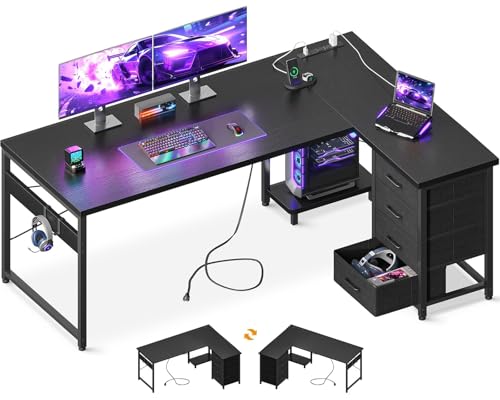
- Four drawers and two storage hooks
- Three AC outlets plus two USB ports
- Reversible corner layout with PC stand
Best For: Organized corner gaming stations
Best Large Surface
Veken 55-Inch Electric Standing Desk

- Spacious 55-inch desktop for multiple monitors
- 28.3- to 46.5-inch electric height range
- Quiet motor, presets, and cable management
Best For: Roomy multi-monitor gaming setups
Best Heavy-Duty Build
DeskShow 60-Inch Electric Standing Desk

- One-inch-thick 60 x 28-inch desktop
- Double-beam frame supports up to 220 pounds
- Quiet motor with three memory buttons
Best For: Heavy gaming and multi-monitor equipment
Best for Easy Setup
Furmax 55-Inch Electric Standing Desk

- 55-by-24-inch desktop for work or gaming gear
- Two memory presets with 28.7–46.4-inch adjustment
- Quiet motor with anti-collision and overheat protection
Best For: Budget-conscious home offices and casual gaming setups
Best Corner Setup
Acrolix Reversible L-Shaped Standing Desk

- Reversible L-shaped layout fits left or right corners
- 176-pound capacity for multi-monitor equipment
- Three presets, quiet lift, cup holder, and headphone hook
Best For: Gaming corners and large multi-monitor workstations
Best Built-In Power
Huuger 47-Inch Electric Standing Desk

- Four AC outlets, USB, and USB-C charging built in
- Three presets with digital height display
- Quiet under-35 dB motor and 220-pound capacity
Best For: Compact gaming or office setups with multiple devices
Wide Workspace Pick
Veken 63-Inch Electric Standing Desk

- 63-by-28-inch desktop for multiple monitors
- Electric adjustment with memory preset
- Dual-beam frame helps limit wobble
Best For: Multi-monitor gaming and home-office setups
Feature-Packed Gaming Pick
SEDETA 79-Inch LED Standing Desk

- Large wing-shaped surface for gaming or streaming
- Monitor stand, keyboard tray, drawers, and power strip
- App-controlled RGB lighting with music sync
Best For: Gamers and creators wanting an all-in-one station
Practical Adjustable Pick
Huuger 55-Inch Electric Standing Desk

- 55-by-27.6-inch desktop with useful depth
- Three height presets and quiet electric motor
- Hooks, cable management, and anti-collision protection
Best For: Everyday gaming or office setups needing practical features
Best Overall Value – ErGear 48-Inch Electric Standing Desk
The ErGear 48 x 24-inch desk is a practical pick among standing gaming desks for shoppers who want electric height adjustment, programmable presets, and a compact footprint. Its steel frame and 176-pound stated capacity suit everyday gaming, work, studying, and home-office use.
Best For: Gamers and remote workers who want a straightforward electric sit-stand desk with memory settings.
Pros:
- Electric adjustment from 28.35 to 46.46 inches with four memory presets.
- Heavy-duty alloy-steel frame and aerospace-grade lifting columns are tested for 100,000 lift cycles.
- Compact 48 x 24-inch surface works well in smaller rooms and gaming setups.
- Low-VOC materials and included assembly tools add practical convenience.
Cons:
- The desktop is smaller than the surfaces on several larger standing desks.
- Assembly is recommended for two people.
Choose this model when reliable height presets and a sturdy, space-conscious design matter more than maximum desktop area. It is a balanced option for a basic gaming or productivity workstation.
Best Storage Layout – AODK 61-Inch L-Shaped Gaming Desk
The AODK 61-inch L-shaped desk stands out among standing gaming desks for its built-in storage and gaming-oriented organization features. Four drawers, hooks, a host stand, and integrated charging outlets help keep peripherals and everyday supplies close at hand.
Best For: Gamers who prioritize storage, corner placement, and convenient device charging over sit-stand adjustment.
Pros:
- Four drawers and two iron hooks provide dedicated storage for accessories and personal items.
- Built-in charging includes three AC outlets and two USB ports.
- Reversible L-shaped layout includes a host stand for a PC tower.
- Waterproof engineered-wood boards, metal framing, and adjustable foot pads support daily use.
Cons:
- This is not an adjustable-height standing desk; its listed height is about 30 inches.
- The L-shaped design requires more floor planning than a rectangular desk.
- The listed desktop depth is relatively limited in some sections.
This AODK model is best viewed as a feature-rich gaming desk rather than a true sit-stand workstation. It makes sense for corner setups where drawers, charging access, and a reversible layout are more important than height changes.
Best Large Surface – Veken 55-Inch Electric Standing Desk
The Veken 55-inch desk is a strong choice among standing gaming desks when you need room for multiple monitors and gaming gear. Its quiet electric motor, four memory presets, and cable-management features make switching positions and maintaining a tidy setup straightforward.
Best For: Multi-monitor gaming, studying, and home-office setups that need a broad desktop.
Pros:
- 55-inch surface provides more workspace for monitors, peripherals, and accessories.
- Electric height adjustment runs from 28.3 to 46.5 inches with memory presets.
- Motor operates below 52 dB for relatively quiet adjustments.
- Includes cable clips, two headphone hooks, and a two-year warranty.
Cons:
- The desktop is composed of two boards, which may be noticeable across the surface.
- Its stated 154-pound capacity is lower than some heavier-duty alternatives.
- Assembly is recommended for two people.
For shoppers who want a roomy, adaptable workstation without moving to an L-shaped design, the Veken offers a useful combination of size, presets, and cable organization. Consider the stated load limit when planning a particularly equipment-heavy setup.
Best Heavy-Duty Build – DeskShow 60-Inch Electric Standing Desk
The DeskShow 60 x 28-inch model is one of the more substantial standing gaming desks in this roundup, pairing a one-inch tabletop with a reinforced double-beam steel frame. Its 220-pound stated capacity and wide surface are suited to gaming equipment, monitors, and office accessories.
Best For: Equipment-heavy gaming or office setups that need a deep desktop and higher load capacity.
Pros:
- One-inch-thick, 60 x 28-inch desktop offers substantial working space.
- Heavy-duty 2.5mm steel base and double-beam frame support up to 220 pounds.
- Electric adjustment from 27.95 to 45.67 inches includes three programmable memory buttons.
- Quiet motor operates below 45 dB, and the desk includes a cable-management tray and hooks.
Cons:
- Its 74.3-pound desk weight may make repositioning difficult.
- Only three memory buttons are listed, fewer than some alternatives.
- The large, deep footprint may not suit compact rooms.
This DeskShow model is a compelling fit when stability, depth, and load capacity are the main priorities. Its substantial construction is especially useful for users running multiple displays or heavier gaming hardware.
Best for Easy Setup – Furmax 55-Inch Electric Standing Desk
The Furmax 55-inch desk is a practical option for shoppers comparing standing gaming desks on a budget. Its electric height adjustment, memory buttons, spacious desktop, and T-shaped steel legs make it suitable for switching between sitting and standing while keeping a computer and everyday accessories organized.
Best For: Home-office users and casual gamers who want a roomy, straightforward electric sit-stand desk.
Pros:
- 55-by-24-inch desktop offers useful room for a monitor, computer, notebooks, and office supplies.
- Two memory keys make it easy to return to preferred sitting and standing heights.
- Quiet motor adjusts from 28.7 to 46.4 inches and includes safety, anti-collision, and overheat protection.
- Wide T-shaped feet and steel legs are designed for stability at higher settings.
Cons:
- The desktop is split into two pieces rather than being a single solid panel.
- It has only two memory presets.
- The 24-inch depth may feel limited for especially large gaming setups.
Choose the Furmax if you want essential electric adjustment and a generous work surface without moving into a more specialized gaming-desk design. It is a solid everyday choice, though users with extensive multi-monitor equipment may prefer a deeper or L-shaped desk.
Best Corner Setup – Acrolix Reversible L-Shaped Standing Desk
The Acrolix stands out among standing gaming desks for its reversible L-shaped layout. The 59-by-40-inch configuration can place the longer side on either the left or right, creating room for dual or triple monitors, peripherals, and accessories while fitting a variety of corner arrangements.
Best For: Gamers and home-office users who need a flexible corner workstation with substantial monitor space.
Pros:
- Reversible L-shaped design adapts to left- or right-sided room layouts.
- 176-pound capacity and reinforced steel frame support heavier multi-monitor setups.
- Three memory presets and a 28.3-to-46.4-inch range simplify sitting-to-standing transitions.
- Included cup holder, headphone hook, and cable clips help organize gaming accessories.
Cons:
- The larger L-shaped footprint requires more floor space than a rectangular desk.
- Assembly may be easier with two people, despite the supplied guidance.
- The desktop uses a splice-board design rather than one uninterrupted surface.
The Acrolix is the strongest fit here for a dedicated gaming corner or a workstation that needs several screens. Its reversible layout adds flexibility, while the quiet lift and accessory organization keep the design practical for daily use.
Best Built-In Power – Huuger 47-Inch Electric Standing Desk
The Huuger is a compact choice among standing gaming desks, with a built-in charging station and cable-management system that reduce desktop clutter. Its three height presets, digital display, quiet motor, and reinforced frame make it useful for gaming, studying, or working in a smaller room.
Best For: Users who want integrated device charging and a stable sit-stand desk in a compact footprint.
Pros:
- Built-in station provides four AC outlets, one USB port, and one USB-C port for up to six devices.
- Three presets and a digital display support precise adjustments from 28.7 to 46.5 inches.
- Motor operates under 35 dB for quiet adjustments during calls or late-night use.
- Reinforced steel frame, T-support bar, adjustable feet, and 220-pound capacity are designed for stability.
Cons:
- The 47.2-by-23.6-inch surface is smaller than the other desks in this group.
- It is a rectangular desk, so it offers less corner workspace than an L-shaped model.
- The supplied details do not specify a separate headphone hook or cup holder.
Pick the Huuger when convenient charging is a priority and you want to keep the setup relatively compact. It offers useful gaming and office features, although users with multiple large monitors may need the larger surface of an L-shaped desk.
Wide Workspace Pick – Veken 63-Inch Electric Standing Desk
For shoppers comparing standing gaming desks, the Veken offers a generous 63-by-28-inch work surface for multiple monitors, gaming accessories, or office equipment. Its electric adjustment, memory preset, and dual-beam frame make it a practical sit-stand workstation, though the desktop arrives as joined pieces rather than one solid panel.
Best For: Gamers and home-office users who need a wide, straightforward sit-stand desk with room for multiple monitors.
Pros:
- Spacious 63-by-28-inch desktop supports multiple monitors and accessories.
- Electric height adjustment ranges from 28.3 to 46.5 inches and includes a memory preset.
- Dual-beam metal construction is designed to reduce wobble during adjustments.
- Includes two headphone hooks, cable clips, and feet pads.
Cons:
- The desktop is built from joined pieces rather than one whole piece.
- It does not list integrated outlets, USB ports, drawers, or lighting.
The Veken is a solid choice when workspace and basic electric height adjustment matter more than gaming-specific extras. Its clean feature set suits a flexible gaming or work setup.
Feature-Packed Gaming Pick – SEDETA 79-Inch LED Standing Desk
The SEDETA stands out among standing gaming desks with a 78.7-inch wing-shaped surface, monitor stand, keyboard tray, storage drawers, power strip, and RGB lighting. It is designed for gamers, streamers, and multitaskers who want a highly equipped workstation rather than a minimalist desk.
Best For: Gamers and creators who want integrated storage, charging, monitor support, and customizable RGB lighting.
Pros:
- Large 78.7-by-23.6-inch wing-shaped workspace accommodates gaming or streaming equipment.
- Includes a monitor stand, keyboard tray, and three fabric drawers.
- Built-in power strip provides three outlets and two USB ports.
- RGB lighting offers app control, more than 60,000 colors, 29 modes, music sync, and a timer.
Cons:
- The desk is 78 pounds and includes many components, which may make assembly more involved.
- Only two height presets are listed.
- The fabric drawers may be less substantial than hard-sided storage.
Choose the SEDETA if you value an all-in-one gaming station with atmosphere and organization. Its broad feature set is appealing for elaborate setups, while users seeking a simple desk may find it more than necessary.
Practical Adjustable Pick – Huuger 55-Inch Electric Standing Desk
The Huuger is a practical option for shoppers seeking standing gaming desks with a balanced footprint and useful organization features. Its 55-by-27.6-inch desktop leaves room for a gaming monitor and essentials, while three height presets, cable management, headphone hooks, and anti-collision protection support everyday use.
Best For: Gamers and office users who want a moderately sized electric desk with basic accessory organization and safety features.
Pros:
- 55-by-27.6-inch desktop provides a useful balance of width and depth.
- Three programmable height presets support quick sitting-to-standing changes.
- Quiet motor operates below 45 dB and adjusts from 28.3 to 46.5 inches.
- Includes two hooks, cable managers, adjustable feet, and anti-collision technology.
Cons:
- The listed version has no outlets or USB charging ports.
- No drawers, monitor stand, or built-in lighting are included.
- The notes list a 220-pound frame capacity and a 176-pound maximum weight recommendation, so buyers should check the applicable limit.
The Huuger focuses on core sit-stand functionality instead of decorative gaming extras. It is a sensible fit for compact-to-medium gaming setups where quiet operation, presets, and cable organization are priorities.
How We Picked These Standing Gaming Desks
We focused on practical features that matter during everyday gaming and work: electric height adjustment, desktop dimensions, frame stability, usable weight capacity, control convenience, cable-management potential, and included accessories. We also considered different room layouts, from compact 47- or 48-inch desktops to wide 63-inch and 79-inch workstations.
Because product specifications and availability can change, verify the current dimensions, height range, weight limit, warranty, and included accessories before ordering. A desk that looks ideal on paper still needs to fit your chair, monitor arms, PC tower, and room.
Quick Comparison
| Best For | Look For |
|---|---|
| Compact setups | 47- to 48-inch desktops and a stable two-leg frame |
| Dual-monitor gaming | 55 inches or more, with adequate depth for monitor stands |
| Ultrawide or multi-monitor setups | 60- to 63-inch widths and a thicker, rigid tabletop |
| Corner rooms | Reversible L-shaped designs with a suitable return orientation |
| Accessory-heavy setups | Drawers, keyboard trays, outlets, USB ports, or integrated lighting |
Key Buying Factors for Standing Gaming Desks
Desktop Size and Depth
Width determines how many displays and accessories you can place side by side, while depth affects viewing distance and keyboard comfort. A 24-inch depth can work for a compact setup, but 27 to 28 inches gives monitors, speakers, and a large mouse pad more room.
Height Range and Adjustment
Check whether the lowest and highest settings suit everyone who will use the desk. Electric controls are generally more convenient than manual adjustment, especially when switching positions several times a day. Preset buttons can make frequent changes faster.
Stability and Load Capacity
Look for a rigid frame, level-adjustment feet, and a stated weight capacity that exceeds the combined weight of your monitors, computer, speakers, and accessories. Wider desktops may need especially careful leveling to minimize movement at standing height.
Features and Cable Management
Power outlets and USB ports can reduce cable clutter, while drawers and keyboard trays preserve desktop space. LED lighting may improve the look of a gaming setup, but it should not outweigh stability, motor performance, or a suitable desktop size.
Who Should Buy Which Standing Gaming Desks?
Choose a compact electric desk if you have limited space or a single-monitor setup. A wider rectangular model is better for dual monitors, a large mouse pad, and a desktop PC. Select an L-shaped desk when you need separate zones for gaming, streaming, paperwork, or a second computer.
Buy a feature-rich model with drawers, outlets, USB-C, or lighting if those additions solve a real setup problem. If you primarily want healthy position changes and a clean workspace, prioritize a stable frame, a comfortable height range, and enough depth over decorative extras.