A gaming desk with a monitor shelf can make a setup feel more organized while giving your screens, speakers, accessories, and collectibles a dedicated place. The right design also helps you use limited floor space more efficiently.
We compared 10 gaming desks with monitor shelves across sizes, layouts, storage options, power features, lighting, and practical workstation details. Use the guide below to narrow your choices by room, equipment, and budget.
Best 10 Gaming Desks with Monitor Shelves Picks for 2026
Best Storage Pick

- Monitor stand for two monitors or laptops
- Two drawers and two adjustable shelves
- Power outlets, USB ports, and app-controlled LEDs
Best For: Gamers and home-office users who need flexible storage
Best Display Hutch

- Three hutch compartments and acrylic display cabinets
- Separate monitor and printer stands
- Four outlets, two USB ports, and LED lighting
Best For: Gamers who want display storage and a tall workstation
Best Corner Configuration

- Reversible L-shaped design for corner placement
- Two-tier rack can serve as storage or monitor stand
- Outlets, USB ports, LEDs, and accessory holders
Best For: Compact corner gaming and work areas
Best for Large Setups

- Wide desktop designed for two computers
- Three shelves for towers, consoles, and accessories
- Monitor stand, charging ports, RGB LEDs, and holders
Best For: Multi-device gaming stations with ample room
Best RGB Value

- Full-length monitor shelf
- Reversible adjustable storage
- 10 colors and 10 LED modes
Best For: Compact gaming setups with flexible storage
Best Large L-Shaped Setup

- Reconfigures for two-person use
- Power station with 4 outlets and 2 USB ports
- Pegboard and three-tier storage
Best For: Multi-monitor or shared gaming workspaces
Best Storage Capacity
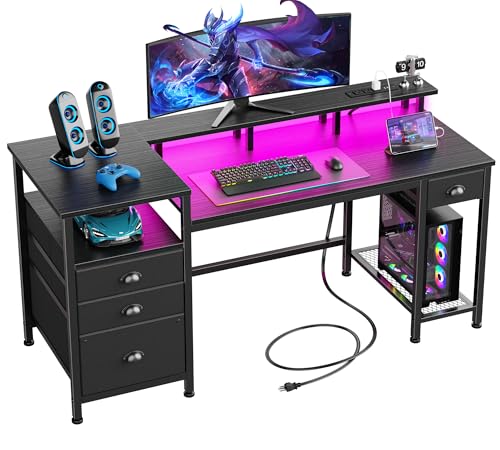
- Full-size monitor stand
- Three drawers and file cabinet
- Outlets, USB ports, and RGB lighting
Best For: Gaming and home-office storage needs
Compact Storage Pick

- Movable monitor stand and five adjustable shelves
- Reversible layout for small spaces
- LED lighting plus three outlets and two USB ports
Best For: Small rooms needing vertical gaming storage
Corner Setup Choice
Aheaplus Reversible L-Shaped Desk

- Reversible L-shaped layout with movable monitor stand
- Four shelves, storage bag, and headphone hook
- Three outlets and two USB charging ports
Best For: Flexible corner gaming and work setups
Large Display Setup
AODK 63-Inch L-Shaped Gaming Desk

- Extra-deep desktop for dual monitors and large mouse pads
- Display cabinet, pegboard, and PC tower shelf
- Three AC outlets, two USB ports, and LED lighting
Best For: Large, organized gaming or streaming stations
Best Storage Pick – Pamray 58-Inch Gaming Desk
The Pamray S15 is a practical choice for shoppers seeking gaming desks with monitor shelves and built-in organization. Its 58-inch surface includes a monitor stand, two drawers, two adjustable open shelves, power outlets, USB ports, and app-controlled LED lighting.
Best For: Gamers or home-office users who want broad storage and a charging station in one desk.
Pros:
- Monitor stand can hold two monitors or laptops while freeing desktop space.
- Two drawers and two adjustable side shelves provide flexible storage.
- Built-in outlets, USB ports, and customizable LED lighting add convenience.
Cons:
- The 18.9-inch depth may feel limited for larger setups.
- Assembly is required.
With a 200-pound stated weight capacity and reinforced X-shaped braces, this desk emphasizes stability while still offering useful gaming-focused features. It is a strong fit when storage matters as much as the monitor shelf.
Best Display Hutch – SEDETA 60-Inch Gaming Desk
The SEDETA 60-inch desk combines gaming desks with monitor shelves with a tall hutch, acrylic display cabinets, and dedicated storage. It is designed for users who want their gaming gear, collectibles, and larger equipment organized around a spacious workstation.
Best For: Gamers who want prominent display storage, a separate monitor stand, and extensive charging capacity.
Pros:
- Three hutch compartments and two acrylic display cabinets showcase and organize gear.
- Separate monitor and printer stands help divide equipment across the workspace.
- Four power sockets, two USB ports, and a power switch support multiple devices.
Cons:
- The 60.4-inch overall height may require substantial vertical clearance.
- Its many components may make assembly more involved.
The tall hutch and 75-gallon listed storage volume make this a storage-forward workstation rather than a minimalist desk. Its LED system, with multiple colors and flashing modes, also reinforces its modern gaming-room style.
Best Corner Configuration – AODK Reversible L-Shaped Desk
The AODK is a flexible option among gaming desks with monitor shelves, especially for corner setups. Its reversible L-shaped design lets you position the upper rack on either side, while the two shelves can function as display storage or a monitor stand.
Best For: Small rooms, corner workspaces, and users who want a reversible layout with accessory storage.
Pros:
- Reversible configuration helps adapt the desk to different room layouts.
- Two shelves, a CPU stand, headphone hook, and storage bag keep accessories organized.
- Three outlets, two USB ports, and adjustable LED modes support a gaming setup.
Cons:
- The L-shaped layout may not suit users who prefer a straight desk.
- It has no drawers.
At 53 inches wide and 18.9 inches deep, this AODK model prioritizes efficient use of space. Its adaptable rack and built-in accessory holders make it particularly useful when flexibility is more important than a large uninterrupted desktop.
Best for Large Setups – SEDETA 70.8-Inch Gaming Desk
For shoppers comparing gaming desks with monitor shelves for a larger setup, the SEDETA 70.8-inch model offers a wide desktop, an integrated monitor stand, and three storage shelves. Its layout is intended to accommodate multiple computers along with gaming accessories and larger equipment.
Best For: Multi-device users who need a wide work surface and dedicated storage for PCs, consoles, and peripherals.
Pros:
- The 55-by-21.6-inch desktop is designed to hold two computers.
- Three shelves can store a PC tower, books, speakers, consoles, and game gear.
- Integrated monitor stand, cup holder, headphone hook, and CPU holder add functionality.
Cons:
- The 70.8-inch width requires a relatively large room or dedicated area.
- Only two outlets and two USB ports are listed.
This desk balances a generous operating area with ergonomic positioning for the monitor shelf and extensive accessory storage. Its app-controlled RGB lighting, music sync, and timer functions make it especially suited to an immersive gaming station.
Best RGB Value – AODK 55-Inch Gaming Desk
The AODK 55-inch desk is a practical choice among gaming desks with monitor shelves, combining a full-length monitor shelf with reversible storage and built-in LED lighting. Its carbon-fiber-textured surface and metal frame suit gaming, studying, or everyday office use.
Best For: Gamers who want a compact desk with customizable lighting, a full monitor shelf, and flexible side storage.
Pros:
- Full-length monitor shelf helps raise screens for a more comfortable viewing angle.
- Reversible storage shelf can be installed on either side, with two adjustable upper-shelf heights.
- LED strip offers 10 static colors and 10 dynamic modes.
- Carbon-fiber-textured desktop is described as scratch-resistant, water-resistant, and supported by a metal frame.
Cons:
- The listed maximum weight recommendation is 33 pounds, so heavier setups require care.
- At 18.9 inches deep, the desktop may feel limited for especially large peripherals.
This AODK model focuses on the essentials: monitor elevation, simple storage, and gaming-focused lighting. It is a straightforward option for smaller rooms or setups that do not need an extensive shelving system.
Best Large L-Shaped Setup – SEDETA Reversible Gaming Desk
The SEDETA L-shaped desk stands out among gaming desks with monitor shelves for its expansive, configurable layout. It includes a monitor shelf, pegboard, storage shelves, a keyboard tray, and an integrated charging station for multi-device work or gaming spaces.
Best For: Users who need a large workstation for multiple monitors, computers, accessories, or two-person use.
Pros:
- L-shaped design can be reconfigured into a long two-person desk.
- Three-tier storage is reversible and designed to accommodate monitors, a notebook, printer, files, and books.
- Charging station provides four outlets and two USB ports for up to six devices.
- Includes RGB lighting with app control, more than 60,000 colors, 29 flashing modes, and music synchronization.
Cons:
- The large 77-pound desk may require more space and effort to position or assemble.
- Its extensive configuration and storage features may be more than needed for a simple single-monitor setup.
With its reversible layout and substantial storage, the SEDETA is geared toward elaborate work and gaming environments. Consider it when desk flexibility and device organization matter more than a minimal footprint.
Best Storage Capacity – Furologee 60-Inch Gaming Desk
The Furologee 60-inch desk is one of the more storage-focused gaming desks with monitor shelves, pairing a full-size monitor stand with drawers, a file cabinet, open shelving, LED lighting, and built-in charging ports. Its reversible storage arrangement adds flexibility for home offices and gaming rooms.
Best For: Gamers, students, and home-office users who need organized storage for files, peripherals, and office equipment.
Pros:
- Full-size monitor stand helps position the screen closer to eye level.
- Includes three fabric drawers, a file cabinet, and three open shelves for supplies or office machines.
- Built-in charging station has three power outlets and two USB ports.
- RGB lighting provides 20 colors, 22 dynamic modes, five brightness levels, and 10 lighting rhythms.
Cons:
- The fabric drawers may be less rigid than hard-sided drawers.
- Its 18.8-inch depth may not provide extensive front-to-back space for large accessories.
The Furologee is a strong fit when storage and organization are central priorities. Its monitor stand, reversible configuration, and file storage make it useful beyond gaming, while the lighting and charging features preserve its gaming-desk appeal.
Compact Storage Pick – Cyclysio 39-Inch Gaming Desk
If you need gaming desks with monitor shelves for a compact room or corner, the Cyclysio combines a movable monitor stand with a tall hutch and reversible five-tier shelving. Its 39-inch footprint keeps the setup relatively compact while adding storage vertically.
Best For: Small-space gaming, studying, or home-office setups that need substantial vertical storage.
Pros:
- Includes a movable monitor stand to raise the viewing position.
- Five adjustable shelves can be installed on either side.
- Built-in LED lighting, three outlets, and two USB ports add convenience.
- Metal frame and X-shaped supports are designed to improve stability.
Cons:
- The 19.7-inch depth provides less work surface than larger desks.
- The tall 58.1-inch design may not suit rooms with limited vertical clearance.
- Assembly requires two people according to the supplied details.
The Cyclysio is a practical choice when storage capacity matters more than a wide desktop. Its reversible shelving and compact width make it flexible, while the monitor stand, charging ports, and lighting support a tidy gaming or work area.
Corner Setup Choice – Aheaplus Reversible L-Shaped Desk
The Aheaplus is one of the more adaptable gaming desks with monitor shelves for a corner setup. Its reversible L-shaped design includes a movable monitor stand, four open shelves, and a hutch that can be positioned on either side.
Best For: Corner gaming or workstations that need flexible placement and built-in charging.
Pros:
- Reversible L-shaped configuration fits different corner layouts.
- Four open shelves, a storage bag, and a headphone hook provide organization.
- Three power outlets and two USB ports can charge up to five devices simultaneously.
- LED lighting offers multiple colors and modes, including timing and music sync.
Cons:
- The desk has no drawers, so smaller items rely on the open storage accessories.
- Its nearly 59-inch height may be too tall for some spaces.
- The L-shaped footprint needs sufficient corner and floor space.
This Aheaplus model balances corner efficiency with useful accessories. Choose it if you want a reversible layout, open shelving, and integrated power rather than a traditional rectangular desk with drawers.
Large Display Setup – AODK 63-Inch L-Shaped Gaming Desk
For expansive gaming desks with monitor shelves, the AODK offers a 63-inch L-shaped workspace with an extra-deep 21.65-inch main desktop. Its display hutch, pegboard, PC tower shelf, and under-desk storage are built for a highly organized battle station.
Best For: Gamers, streamers, or creators who need a large corner workstation with display and accessory storage.
Pros:
- Extra-deep desktop supports large mouse pads and dual-monitor layouts.
- Four-compartment display cabinet keeps collectibles visible and protected.
- Pegboard, PC tower shelf, side shelves, and under-desk rack expand organization.
- Includes three AC outlets, two USB ports, and LED lighting.
Cons:
- The 62.99-inch-wide, 43.31-inch-deep footprint requires substantial room.
- At 62.2 inches tall, the hutch needs adequate vertical clearance.
- The extensive storage configuration may be more than a minimalist setup requires.
The AODK is the strongest fit here for a full-size, display-oriented setup. Its deep desktop and dedicated PC shelf prioritize a substantial workstation, while the cabinet and pegboard help keep gaming accessories accessible and organized.
How We Picked the Best Gaming Desks with Monitor Shelves
We evaluated these desks by looking at the features that matter most in a real gaming or work-from-home setup: desktop dimensions, monitor-shelf design, storage capacity, layout flexibility, cable and power management, lighting, and overall suitability for different room sizes. We also considered whether each desk is better suited to a single-monitor station, a dual-monitor setup, a console area, or a hybrid gaming and office workspace.
Because listed configurations can vary by model and seller, check the current product specifications for exact measurements, weight limits, assembly requirements, outlet details, and whether the monitor shelf is fixed or reversible.
Quick Comparison
| Best For | Recommended Style | What to Look For |
|---|---|---|
| Compact rooms | Straight desk | Shorter width, vertical shelving, and a raised monitor platform |
| Multiple monitors | Large or L-shaped desk | Wide desktop, reinforced corners, and adequate shelf depth |
| Storage-heavy setups | Hutch or shelving desk | Drawers, cabinets, pegboards, and adjustable storage |
| Clean cable management | Power-equipped desk | Built-in outlets, USB ports, cable openings, and accessible routing |
| Immersive gaming rooms | LED-equipped desk | Adjustable lighting, concealed cables, and a stable surface |
Key Buying Factors for Gaming Desks with Monitor Shelves
Measure the Desktop and Shelf Together
Do not judge capacity by width alone. Confirm the usable desktop depth, shelf depth, leg clearance, and the distance between the shelf and desktop. A shallow shelf may suit a monitor but leave little room for speakers or larger displays. Also measure your room, doorway, chair clearance, and nearby outlets before ordering.
Choose the Right Layout
A straight desk is usually easiest to place and works well in bedrooms or smaller offices. L-shaped models create more surface area for streaming, schoolwork, and multiple screens, but they need a suitable corner and careful attention to the reversible configuration. Hutch-style desks maximize vertical storage, while open shelving makes frequently used accessories easier to reach.
Check Storage and Equipment Support
Drawers and cabinets are useful for controllers, documents, and peripherals; open shelves are better for consoles, speakers, and display items. If you use a desktop tower, verify the CPU-stand dimensions and ventilation clearance. A monitor shelf should also be strong and deep enough for your display without blocking ports or stands.
Prioritize Practical Power and Cable Features
Integrated outlets and USB ports can reduce cable clutter, but they do not replace a properly rated surge protector. Look for cable grommets, rear routing space, and a power module positioned where you can reach it without stretching cords. Confirm the outlet count and port types before relying on them for high-draw equipment.
Consider Stability, Lighting, and Assembly
LED strips add atmosphere but should not outweigh frame strength or usable storage. Check the construction materials, cross-support, adjustable feet, and user-reported assembly complexity. Larger L-shaped and hutch desks may require two people to assemble and more wall clearance than expected.
Who Should Buy Which Gaming Desks with Monitor Shelves?
Choose a compact straight desk if you need an efficient station for one monitor and limited floor space. Pick a wide desk when you use two monitors, a microphone arm, large speakers, or several peripherals. An L-shaped model is the better fit for multitasking, streaming, or separating gaming from paperwork. Choose a hutch or cabinet design if vertical organization matters most, and prioritize a power-equipped model if you want a cleaner everyday setup. Before buying, match the desk’s dimensions and storage layout to your equipment rather than choosing based only on LED styling or advertised width.