The best corner gaming desks turn unused room space into a focused gaming, streaming, or work area. These L-shaped models vary widely in footprint, storage, lighting, power features, and desktop thickness.
Our selection includes compact desks for smaller rooms, larger workstations for multi-monitor setups, and feature-rich options with shelves, drawers, LED lighting, and built-in outlets.
Best 10 Corner Gaming Desks Picks for 2026
Best Compact Pick
TIQLAB 40-Inch Reversible L-Shaped Gaming Desk

- Built-in AC, USB, and USB-C charging
- Reversible design for flexible corner placement
- Shelves and drawers suit compact rooms
Best For: Small-space gaming, studying, and home-office setups
Best Storage Setup
ODK 53-Inch L-Shaped Gaming Desk with Hutch

- Convertible upper rack works as shelf or monitor stand
- Includes CPU stand and headphone hook
- Adjustable pads help stabilize the metal frame
Best For: Organized gaming and home-office setups with multiple accessories
Best Large Work Surface
Huuger 63-Inch Reversible L-Shaped Desk

- Spacious 63-inch layout for larger setups
- Four AC outlets plus USB and USB-C charging
- Thick desktop and reinforced steel frame
Best For: Multi-monitor gaming, study, and home-office workstations
Best Ambience Features
Bestier 42-Inch L-Shaped Desk with LED

- Compact 42-inch corner-friendly footprint
- LED strip adds gaming or study ambience
- Reversible storage with monitor-stand option
Best For: Small rooms, students, and casual gaming setups
Most Versatile
SEDETA Reversible L-Shaped Gaming Desk

- Reversible corner or extended configurations
- Five drawers, cabinet, pegboard, and hutch
- Four outlets, two USB ports, and RGB lighting
Best For: Gamers and home-office users needing extensive storage
Best Compact Setup
Aheaplus 49-Inch L-Shaped Gaming Desk

- Compact 48.82-inch-wide footprint
- Four shelves, storage bag, and headphone hook
- Three outlets, two USB ports, and LED lighting
Best For: Small bedrooms, dorms, and compact gaming spaces
Best Streamlined Design
AODK 53-Inch Reversible Gaming Desk

- Reversible 53-inch L-shaped configuration
- Two shelves, CPU stand, bag, and headphone hook
- Three outlets, two USB ports, and customizable LEDs
Best For: Users wanting essential features without drawers or bulky storage
Compact Corner Power Station

- Reversible L-shaped layout with two shelves and CPU stand
- Three AC outlets, two USB ports, and cable management
- RGB lighting with 10 colors and dynamic modes
Best For: Compact gaming rooms, study spaces, and home offices needing built-in storage and charging
Most Adaptable Corner Setup
PRAISUN 66" L-Shaped Gaming Desk
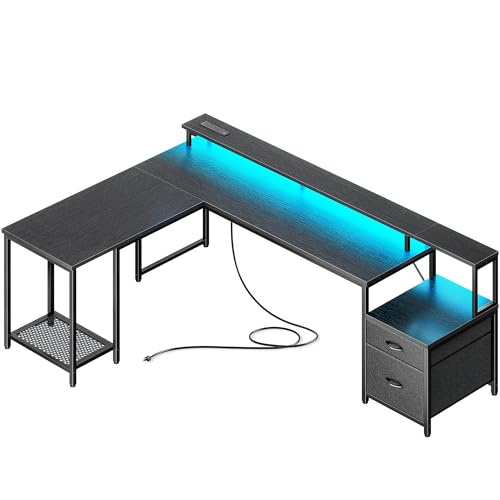
- Converts from an L-shaped desk to a long straight table
- Four outlets plus USB-C and USB-A charging ports
- Includes drawers, printer stand, monitor riser, and CPU stand
Best For: Large gaming rooms, home offices, and multipurpose workstations needing flexible layouts
Small-Space Monitor Hub

- Corner-friendly 48-inch layout for compact rooms
- Three outlets, two USB ports, shelves, and storage bag
- Surface designed to accommodate up to three monitors
Best For: Dorms, bedrooms, and compact gaming or home-office corners
Best Compact Pick – TIQLAB 40-Inch Reversible L-Shaped Gaming Desk
For shoppers comparing corner gaming desks for a bedroom, dorm, or compact home office, the TIQLAB combines a small 40-inch footprint with useful built-in charging. Its reversible layout lets you position the shorter side on either the left or right.
Best For: Small-space gaming, studying, and home-office setups that need integrated charging and storage.
Pros:
- Built-in charging includes two AC outlets, one USB port, and one Type-C port.
- Reversible L-shaped design adapts to different corner layouts.
- Two-tier shelves and three drawers provide storage without taking up much room.
- Metal X-frame and FSC-certified wood construction support a stable workspace.
Cons:
- The 40-inch surface is more suitable for compact setups than expansive multi-monitor arrangements.
- Assembly is required.
The TIQLAB is a practical choice when floor space is limited and convenient charging matters. Its compact proportions and flexible orientation make it easy to fit into a variety of corners.
Best Storage Setup – ODK 53-Inch L-Shaped Gaming Desk with Hutch
The ODK is one of the more storage-focused corner gaming desks, pairing a 53-inch L-shaped work surface with an upper rack, CPU stand, and headphone hook. Its hutch can be installed as storage or used as a monitor stand.
Best For: Gamers and home-office users who want dedicated places for a monitor, tower, headphones, and accessories.
Pros:
- Two-tier upper rack can function as storage or a monitor stand.
- Dedicated CPU stand keeps the computer tower off the main work surface.
- Iron headphone hook helps keep accessories within reach.
- Adjustable leg pads and a metal frame improve stability on uneven floors.
Cons:
- The hutch and accessories may require more planning during assembly.
- It does not list built-in power outlets or USB charging in the supplied details.
Choose the ODK when organization is a higher priority than a minimalist desktop. The included storage components make it easier to create a dedicated gaming or work zone around the corner.
Best Large Work Surface – Huuger 63-Inch Reversible L-Shaped Desk
Among these corner gaming desks, the Huuger offers the largest listed footprint and a thicker 0.95-inch desktop. The 63-inch reversible L-shaped design provides room for multiple monitors, notebooks, and other work or gaming essentials.
Best For: Larger gaming, study, and home-office setups that need generous surface space and built-in charging.
Pros:
- Four AC outlets, one USB port, and one USB-C port support multiple devices.
- Thick, scratch-resistant, waterproof desktop is rated for up to 220 pounds.
- Reversible configuration can adapt to different corners and can support a two-person setup when combining desks.
- Reinforced steel frame, crossbars, and adjustable feet help reduce wobble.
Cons:
- Its 63-inch size requires more available wall and floor space than compact alternatives.
- Assembly is required.
The Huuger stands out for buyers who want a roomier corner workstation without giving up integrated power access. Confirm your available dimensions before choosing this larger design.
Best Ambience Features – Bestier 42-Inch L-Shaped Desk with LED
The Bestier is a compact option for shoppers seeking corner gaming desks with more than a basic work surface. Its 42-inch L-shaped layout includes reversible shelves, a convertible monitor stand or display shelf, LED lighting, and a hook for headphones or bags.
Best For: Students, casual gamers, and apartment dwellers who want a compact desk with lighting and flexible storage.
Pros:
- Compact footprint fits bedrooms, kids’ rooms, apartments, and other tight corners.
- Reversible shelves accommodate different room layouts and cable-routing needs.
- Upper section can serve as a monitor stand or display shelf.
- Built-in LED strip and side hook add ambience and organization.
Cons:
- The 42-inch surface is best suited to compact equipment layouts.
- The supplied notes do not specify the full power-strip outlet configuration.
The Bestier is a good fit when atmosphere and adaptability are important alongside basic workspace function. Its compact design makes it easier to create a defined gaming or study nook in a smaller room.
Most Versatile – SEDETA Reversible L-Shaped Gaming Desk
For shoppers seeking corner gaming desks that can adapt as needs change, the SEDETA offers a reversible L-shaped setup with substantial storage. Its five fabric drawers, display cabinet, pegboard, hutch, integrated power strip, and RGB lighting make it suited to both gaming and home-office use.
Best For: Gamers or home-office users who need flexible orientation and extensive organization.
Pros:
- Reversible 62-inch corner configuration, with options for longer desk arrangements.
- Includes five fabric drawers, a display cabinet, pegboard, and hutch storage.
- Built-in power strip provides four outlets and two USB ports.
- RGB lighting supports app control, music sync, multiple colors, and timer functionality.
Cons:
- Its 62 x 43.3 x 64.7-inch footprint may be large for compact rooms.
- Fabric drawers may not offer the rigidity of conventional wood or metal drawers.
- The extensive storage and lighting features may make assembly more involved.
This is the most feature-rich option in the group, especially for buyers who want corner gaming desks with serious storage and customization. Check the available space carefully before choosing it.
Best Compact Setup – Aheaplus 49-Inch L-Shaped Gaming Desk
The Aheaplus is a compact choice among corner gaming desks, combining a reversible L-shaped layout with open shelving and a monitor stand. Its integrated charging ports, LED strip, storage bag, and headphone hook help keep a smaller gaming or study area organized.
Best For: Dorms, bedrooms, and other space-limited gaming or work areas.
Pros:
- Compact 48.82-inch-wide design is suitable for smaller rooms.
- Reversible layout and adjustable placement of the hutch support flexible setups.
- Four open shelves, a storage bag, and headphone hook provide accessible organization.
- Includes three outlets, two USB ports, and app-controlled LED lighting.
Cons:
- No drawers are included.
- Its 18.9-inch depth offers less surface area than larger desk designs.
- Open shelving leaves stored items visible rather than enclosed.
Choose this model when floor space is a priority but you still want built-in charging, lighting, and storage. The compact surface is better suited to a focused single-user setup than a large multi-monitor workstation.
Best Streamlined Design – AODK 53-Inch Reversible Gaming Desk
The AODK provides a straightforward corner gaming desk setup with a reversible L-shaped design, two-tier storage, a CPU stand, and dedicated accessory hooks. It also adds three power outlets, two USB ports, and customizable LED lighting without the bulk of a drawer-equipped workstation.
Best For: Users who want a simple gaming or work desk with essential storage and charging.
Pros:
- Reversible layout works well in different corner configurations.
- Two shelves can function as display storage or a monitor stand.
- Includes a CPU stand, headphone hook, and storage bag.
- LED system offers static colors, brightness levels, dynamic modes, and memory.
Cons:
- Only two shelves are provided, with no drawers or enclosed cabinet.
- The 18.9-inch depth may feel limited for larger equipment layouts.
- Its storage-focused design may be less suitable for users needing a broad desktop.
This AODK model is a practical middle ground for buyers who want corner gaming desks with flexible orientation and useful accessories. It is particularly appealing when a clean, uncomplicated setup matters more than maximum storage.
Compact Corner Power Station – ODK 53" L-Shaped Gaming Desk
For corner gaming desks that combine storage and convenient power access, the ODK 53-inch L-shaped model is a practical option. Its reversible layout, shelves, CPU stand, and built-in charging ports help organize a compact gaming room, study area, or home office.
Best For: Gamers and remote workers who need a reversible corner desk with integrated storage and device charging.
Pros:
- Reversible side modules allow left- or right-side configuration.
- Includes three AC outlets, two USB ports, cable management channels, and a headset hook.
- Two shelves, a CPU stand, and a tool bag provide useful organization.
- RGB lighting offers 10 colors, multiple brightness levels, dynamic modes, and memory function.
Cons:
- The 18.9-inch desk depth may feel limited for larger accessories.
- Assembly is required.
- The supplied dimensions and storage configuration should be checked against your room before ordering.
The ODK 53-inch desk stands out when you want a structured corner setup without adding separate shelves or a power strip. Its steel frame and adjustable foot pads support stability, while the reversible design makes placement more flexible.
Most Adaptable Corner Setup – PRAISUN 66" L-Shaped Gaming Desk
Among corner gaming desks, the PRAISUN 66-inch model is notable for changing from an L-shaped corner configuration to a long straight table. It also adds a charging station, monitor riser, printer stand, drawers, and app-enabled RGB lighting for a flexible workstation or gaming setup.
Best For: Users who want a large, reconfigurable desk for gaming, remote work, studying, or creative equipment.
Pros:
- Converts between an L-shaped layout and a 94.9-inch straight configuration.
- Charging station includes four AC outlets, one USB-C port, and two USB-A ports.
- Provides two fabric drawers, a printer stand, monitor riser, and mesh CPU stand.
- RGB lighting includes dynamic modes, adjustable brightness and speed, app color control, and music-reactive mode.
Cons:
- Its large footprint may be excessive for smaller rooms.
- Assembly is required.
- It offers a rectangular, multi-piece configuration rather than a fixed traditional L-shaped surface.
The PRAISUN is the strongest fit for buyers who value flexibility over a minimal footprint. Its convertible design can adapt as your room or routine changes, while the storage and charging features reduce the need for additional furniture and extension cords.
Small-Space Monitor Hub – ODK 48" L-Shaped Gaming Desk
The ODK 48-inch model is a space-conscious choice among corner gaming desks. Its L-shaped surface is designed to fit into a corner, while the shelves, storage bag, power outlets, USB ports, and LED strip help keep a compact gaming or work area organized.
Best For: Dorms, bedrooms, offices, and other smaller spaces where corner placement and monitor capacity matter.
Pros:
- L-shaped design makes efficient use of corner space.
- Main surface is designed to hold up to three monitors and laptops.
- Includes three power outlets, two USB charging ports, two shelves, and a side storage bag.
- LED lighting provides 10 static colors, brightness controls, dynamic modes, and memory function.
Cons:
- There is no drawer for concealed storage.
- Assembly is required.
- The 19.7-inch depth may limit space for oversized peripherals.
This ODK desk makes sense when you need a dedicated corner workstation without moving up to a larger model. Its monitor-friendly surface and integrated shelf storage offer practical utility, while the metal frame, MDF top, and adjustable foot pads support everyday stability.
How We Picked the Best Corner Gaming Desks
We compared these Corner Gaming Desks by evaluating the features that matter most in daily use: usable desktop area, overall dimensions, reversible orientation, storage, power access, cable organization, construction, and setup flexibility. We also considered whether each desk suits gaming alone or can comfortably support schoolwork, office tasks, streaming, or creative projects.
Because room layouts differ, measurements and configuration options matter as much as headline features. Confirm the desk’s width, depth, height, and return orientation before ordering, especially if you plan to place it beside a door, window, radiator, or wall-mounted equipment.
Quick Comparison
- Best for small rooms: TIQLAB 40-inch reversible desk and Bestier 42-inch desk.
- Best for balanced storage and gaming: ODK 53-inch models and the AODK L-shaped desk.
- Best for larger setups: Huuger 63-inch and PRAISUN 66-inch desks.
- Best for organization: SEDETA’s drawers, hutch, and shelving configuration.
- Best for integrated convenience: Models with built-in outlets, USB charging, LED lighting, or headphone hooks.
Key Buying Factors for Corner Gaming Desks
Size and Layout
Measure both walls and leave room for your chair to move freely. A compact L-shaped desk can fit a bedroom or apartment, while 63- to 66-inch designs provide more space for multiple monitors, speakers, and accessories. Check whether the return can be installed on either side if your layout may change.
Desktop Capacity and Stability
Thicker desktops and reinforced frames generally provide better support for heavy monitors, desktop PCs, and accessories. Look for a stable base, levelers, and enough legroom. A desk that looks large on paper may feel cramped if shelving or drawers occupy the primary knee area.
Storage, Power, and Cable Management
Built-in outlets and USB ports keep chargers within reach, but they do not replace a properly rated surge protector for a full gaming system. Shelves and hutches help organize consoles, books, and peripherals; drawers are more useful for keeping smaller items concealed. Check the location of outlets and cable openings before finalizing your setup.
Lighting and Materials
LED lighting can add ambience, but treat it as a convenience feature rather than a performance benefit. Review the finish, edge quality, frame material, and assembly requirements. Protect the desktop from moisture and avoid exceeding the manufacturer’s stated weight limits.
Who Should Buy Which Corner Gaming Desks?
Choose a compact 40- to 42-inch model if you need a functional workstation in a tight corner. Move up to a 48- or 53-inch desk for a more balanced single- or dual-monitor setup with useful shelving. Larger 63- to 66-inch desks are better for expansive gaming stations, work-and-play arrangements, or users who need room for multiple screens and peripherals.
If organization is your priority, select a model with drawers, a hutch, or dedicated shelves. If convenience matters most, prioritize built-in power outlets and charging ports. For a clean gaming aesthetic, LED-equipped models can complement your setup, while a simpler desk may be the better value if you already own lighting and cable-management accessories.