A gaming mouse with charging dock keeps your desk tidy while making wireless play more convenient. Instead of plugging in a cable after every session, you can return the mouse to its dock between matches or workdays.
Our roundup covers lightweight tri-mode models, feature-rich MMO mice, and premium options with high polling rates, RGB docks, and long battery life. Use the guide below to narrow your choices by comfort, sensor performance, connectivity, and charging design.
Best 10 Gaming Mouse with Charging Dock Picks for 2026
Best Stylish Pick
DAREU Sakura Pink Wireless Mouse

- Magnetic dock stays securely attached
- 12,000 DPI sensor with 1ms wireless transmission
- Lightweight 85g design with dual RGB lighting
Best For: Pink-themed gaming and office setups
Best Premium Performance

- 35,000 DPI Focus Pro optical sensor
- Up to 140 hours of wireless battery life
- 13 customizable controls and 13-zone Chroma
Best For: Feature-rich PC gaming and extensive customization
Best Lightweight Value
ATTACK SHARK X11 Wireless Mouse

- 59g-class lightweight construction
- Magnetic RGB dock with rapid charging claim
- Tri-mode wired, 2.4GHz, and Bluetooth connectivity
Best For: Fast movement and flexible multi-device use
Best for On-Desk Status Display
EPOMAKER NEX Lite Wireless Mouse

- OLED screens show DPI, battery, and connection status
- Tri-mode wireless and wired connectivity
- 65g ergonomic design with five programmable buttons
Best For: Users who want visible settings without opening software
Lightweight Tri-Mode Pick

- Tri-mode wireless and USB-C connectivity
- 62g design with magnetic RGB charging dock
- Five programmable buttons and up to 24,000 DPI
Best For: Flexible gaming and everyday use across multiple devices
Premium Razer Dock

- Magnetic charging for select Razer mice
- Integrated HyperPolling transceiver
- Eight-zone Chroma RGB and anti-slip base
Best For: Compatible Razer mouse owners upgrading their desk setup
MMO Control Center

- 12 programmable buttons with six side controls
- Magnetic dock and up to 67-hour battery
- 19,000 DPI sensor with dual-mode connectivity
Best For: Right-handed MMO and MOBA gaming
Best Lightweight RGB Dock

- 66g ergonomic body with PAW3311 sensor
- RGB magnetic dock and 500mAh battery
- 2.4GHz, Bluetooth, and USB-C modes
Best For: Lightweight gaming and mixed PC/Mac use
Best Grip-Tape Bundle

- 62g body with included anti-slip grip tape
- RGB dock stores the USB receiver
- 22,000 DPI sensor and tri-mode connectivity
Best For: Players seeking extra grip and desk organization
Best Full-Palm Comfort
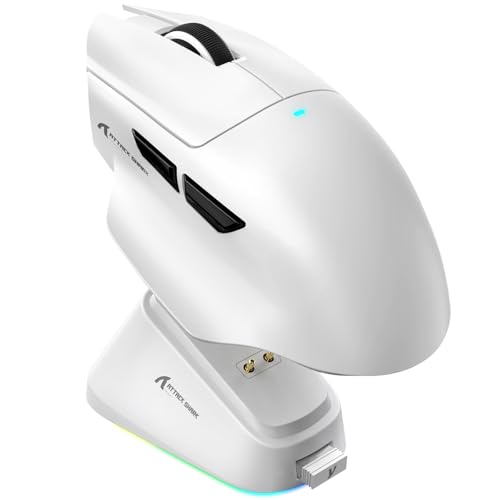
- Ergonomic palm-support design for medium-to-large hands
- 25,000 DPI sensor with 50-step tuning
- RGB magnetic dock and 1,000Hz polling
Best For: Long gaming and productivity sessions
Best Stylish Pick – DAREU Sakura Pink Wireless Mouse
If you want a gaming mouse with charging dock that adds personality to your setup, the DAREU Sakura Pink combines a lightweight 85g design with a magnetic charging connection. Its 12,000 DPI sensor, 1ms wireless transmission, and rechargeable battery make it suitable for everyday gaming and office use.
Best For: Gamers and office users who want a pink, lightweight mouse with dependable dock-based charging.
Pros:
- Strong magnetic dock aligns quickly and stays securely attached.
- 12,000 DPI sensor and 1ms wireless transmission support responsive play.
- Symmetrical, sweat-resistant 85g design with claw-grip shaping.
- RGB lighting appears on both the mouse and charging dock.
Cons:
- Its 24-hour listed battery life is shorter than some competing options.
- The right-hand orientation may not suit left-handed users.
- The pink limited-edition styling may not fit every setup.
The DAREU is a practical choice when appearance matters as much as convenience. Its secure magnetic dock and lightweight shell are the highlights, while the moderate battery rating makes regular docking part of the routine.
Best Premium Performance – Razer Basilisk V3 Pro 35K
The Razer Basilisk V3 Pro 35K is a high-end gaming mouse with charging dock compatibility, although the Mouse Dock Pro is sold separately. It stands out with a 35,000 DPI sensor, up to 140 hours of battery life, 13 customizable controls, and extensive Chroma lighting.
Best For: Right-handed PC gamers who want extensive customization, long battery life, and premium tracking performance.
Pros:
- Focus Pro 35K sensor offers granular 1-DPI adjustments and tracking on more surfaces, including glass.
- Up to 140 hours of HyperSpeed wireless battery life.
- 13 customizable controls include a multifunction trigger.
- 13-zone Chroma lighting provides extensive RGB customization.
Cons:
- The charging dock is sold separately.
- Its 0.43 kg listed weight is substantially heavier than the lightweight alternatives here.
- Advanced configuration depends on Razer Synapse and Windows settings.
This is the strongest performance-oriented option for users willing to invest in the broader Razer ecosystem. It delivers the most controls and longest listed battery life, but dock-based charging requires an additional purchase.
Best Lightweight Value – ATTACK SHARK X11 Wireless Mouse
For shoppers seeking a lightweight gaming mouse with charging dock, the ATTACK SHARK X11 offers a 59g-class build, magnetic RGB dock, and three connection modes. Its PAW3311 sensor reaches 22,000 DPI, while USB-C wired, 2.4GHz, and Bluetooth connectivity improve flexibility.
Best For: Medium-to-large-handed gamers who prioritize low weight, flexible connectivity, and quick dock charging.
Pros:
- Ultra-lightweight construction is listed at 59±3g.
- Magnetic RGB dock can provide 5 hours of use from a 10-minute charge.
- Tri-mode connectivity supports wired USB-C, 2.4GHz, and Bluetooth use.
- PAW3311 sensor offers up to 22,000 DPI and a 1000Hz/1ms polling rate.
Cons:
- The ergonomic shape is designed primarily for medium-to-large right hands.
- Its listed battery life is up to 65 hours, below the longest-lasting option here.
- Only five buttons are programmable.
The X11 is a compelling value when low weight and charging convenience are priorities. Its three connection modes also make it more versatile than a purely wireless gaming mouse, though the shape may be less suitable for smaller hands.
Best for On-Desk Status Display – EPOMAKER NEX Lite Wireless Mouse
The EPOMAKER NEX Lite is a gaming mouse with charging dock built around convenience and visible status information. Its mouse and dock each include an OLED screen for DPI, battery, connection mode, and polling-rate information, while tri-mode connectivity and a 65g ergonomic body support both gaming and general use.
Best For: Medium-to-large-handed users who want on-device status screens, lightweight comfort, and customizable controls.
Pros:
- Dual OLED screens show key settings without opening software.
- Tri-mode support covers 2.4GHz, Bluetooth 5.0, and USB-C wired use.
- 65g right-handed design supports claw and palm grips.
- Online software allows remapping, DPI adjustment, and saved onboard settings.
Cons:
- Its listed battery life is up to 55 hours.
- The five-button layout offers fewer controls than the Razer alternative.
- Online software recommends Chrome for optimal compatibility.
The NEX Lite is a smart pick for users who value immediate access to mouse status and settings. Its screens add useful convenience, while the modest battery rating means the included dock is best used consistently.
Lightweight Tri-Mode Pick – SOLAKAKA SM822
The SOLAKAKA SM822 is a practical gaming mouse with charging dock for shoppers who want flexible connectivity without a heavy design. It supports 2.4GHz wireless, Bluetooth 5.0, and USB-C wired modes, while its PAW3311 sensor offers adjustable sensitivity up to 24,000 DPI.
Best For: PC, laptop, mobile, and tablet users who want a lightweight, versatile mouse with a magnetic RGB charging base.
Pros:
- Tri-mode connectivity works with Windows, Mac, iOS, and Android devices.
- Lightweight 62-gram design with a contoured, tapered-waist grip.
- Magnetic charging dock helps keep the wireless receiver connected and reduces cable swapping.
- Five programmable buttons and adjustable DPI, polling rate, and macros through Windows software.
Cons:
- Driver software is limited to Windows and requires wired mode to run.
- Its five-button layout may be less suitable for MMO players needing many controls.
The SM822 stands out for combining a low weight, broad device compatibility, and dock-based charging at once. It is a strong fit for everyday gaming and work, especially if you regularly switch between computers and mobile devices.
Premium Razer Dock – Razer Mouse Dock Pro
The Razer Mouse Dock Pro is a charging accessory for compatible Razer mice rather than a standalone mouse. As a gaming mouse with charging dock solution, it adds magnetic wireless charging, an integrated high-speed transceiver, and customizable Chroma RGB lighting.
Best For: Owners of the Razer Basilisk V3 Pro, Cobra Pro, or Naga V2 Pro who want a polished charging and wireless setup.
Pros:
- Magnetic charging puck makes placing the compatible mouse on the dock simple.
- Integrated HyperPolling transceiver supports up to 4K Hz with compatible Razer mice.
- Eight Chroma RGB lighting zones offer extensive color and effect customization.
- Anti-slip base helps keep the dock stable during use.
Cons:
- Compatible only with select Razer mouse models.
- It is a dock and charging accessory, not a complete mouse by itself.
- The listed transceiver capability requires a compatible mouse.
The Mouse Dock Pro makes the most sense within an existing Razer setup. Its strongest advantages are convenient magnetic charging, status lighting, and an integrated transceiver, but buyers should confirm mouse compatibility before purchasing.
MMO Control Center – ASUS ROG Spatha X
The ASUS ROG Spatha X is a gaming mouse with charging dock built for players who need numerous controls. Its 12 programmable buttons, including six side buttons, pair with dual-mode 2.4GHz wireless and USB-C connectivity, while the magnetic dock supports quick charging.
Best For: Right-handed MMO and MOBA players who value extensive button customization and a large ergonomic shape.
Pros:
- Twelve programmable buttons provide substantial control for MMO and MOBA keybinds.
- Dual-mode wireless and USB-C wired connectivity supports low-latency play.
- Up to 67 hours of battery life with RGB off; a 15-minute charge can provide up to 12 hours.
- Includes hot-swappable ROG Micro Switches, replacement switches, and a travel pouch.
Cons:
- The 168-gram design is substantially heavier than lightweight gaming mice.
- Its large right-handed shape may not suit smaller hands or left-handed users.
- It is listed for Windows 10 and Windows 11 rather than broad multi-platform support.
The Spatha X prioritizes buttons, battery endurance, and customization over minimal weight. It is a compelling dock-equipped choice for MMO-focused players, but its large, heavy design is best considered by users comfortable with substantial mice.
Best Lightweight RGB Dock – AJAZZ AJ139 V2 MC
The AJAZZ AJ139 V2 MC is a strong option if you want a gaming mouse with charging dock that stays light during long sessions. Its 66g body, PAW3311 sensor, adjustable sensitivity up to 24,000 DPI, and tri-mode connectivity cover both competitive gaming and everyday PC or Mac use.
Best For: Gamers who prioritize a lightweight right-handed design, flexible connectivity, and a high-capacity battery with dock charging.
Pros:
- RGB magnetic charging dock and built-in 500mAh battery help keep the mouse ready between sessions.
- 66g ergonomic design is built for reduced fatigue and easy gliding.
- Tri-mode operation supports 2.4GHz wireless, Bluetooth, and USB-C wired use.
- PAW3311 tracking reaches up to 24,000 DPI, with Huano switches rated for up to 80 million clicks.
Cons:
- The ergonomic shape is designed for right-handed users.
- The supplied details identify Windows as the minimum required operating system, despite broader device compatibility claims.
The AJ139 V2 MC stands out for combining a very low weight with dock convenience and a durable switch rating. It is especially appealing for users who want one mouse that can move between gaming, work, and wired backup use.
Best Grip-Tape Bundle – ATTACK SHARK X11
The ATTACK SHARK X11 is a practical gaming mouse with charging dock for players who want extra grip control without giving up wireless flexibility. It combines a 62g shell, PAW3311 sensor, RGB charging base, and included anti-slip grip tape for gaming or daily productivity.
Best For: Gamers who want a lightweight mouse with customizable controls, multiple connection modes, and added grip tape in the box.
Pros:
- Included sweat-resistant, residue-free grip tape can improve handling and stability.
- RGB charging dock keeps the desk organized and provides a home for the USB receiver.
- Tri-mode connectivity includes 2.4GHz wireless, Bluetooth 5.2, and USB-C wired modes.
- PAW3311 sensor supports up to 22,000 DPI, 1,000Hz polling, 300 IPS tracking, and 35G acceleration.
Cons:
- Its five programmable buttons provide fewer controls than some six-button alternatives.
- HUYU switches are rated for up to 20 million clicks, lower than the rating on some competing models.
The X11’s main advantage is its combination of low weight and practical extras. The grip tape is useful for players who need a steadier hold, while the dock and receiver storage help keep a wireless setup tidy.
Best Full-Palm Comfort – ATTACK SHARK V6
The ATTACK SHARK V6 is a gaming mouse with charging dock aimed at users who prefer full-palm support and extensive adjustment options. Its RGB magnetic dock, 25,000 DPI PAW3311 sensor, 1,000Hz polling, and tri-mode connectivity make it suitable for gaming, work, and multi-device setups.
Best For: Medium-to-large-handed users who want a supportive ergonomic shape, fine sensor tuning, and software-based customization.
Pros:
- RGB magnetic dock enables simple one-hand placement and charging.
- Full-palm ergonomic design is intended to reduce wrist pressure and hand fatigue.
- Broadcom BK52820 chip is specified for low latency, wireless stability, and power efficiency.
- PAW3311 sensor offers up to 25,000 DPI with 50-step tuning, while the Omron optical switches are rated for 100 million clicks.
Cons:
- The full-palm shape may be less suitable for small hands or users who prefer compact mice.
- The supplied information does not list the mouse’s weight.
The V6 is the most comfort-focused choice in this group, with a shape built for sustained use and a driver that supports DPI, macros, and lighting customization. Its high switch rating and broad device compatibility add appeal for users who alternate between gaming and work.
How We Picked the Best Gaming Mouse with Charging Dock Options
We evaluated these mice by looking at the features that matter most in daily gaming: wireless connection types, sensor specifications, weight, button layout, battery claims, charging-dock design, and compatibility. We also considered whether each dock is a practical charging stand or adds useful features such as RGB lighting, magnetic alignment, or wireless receivers.
Specifications can vary by firmware, lighting settings, polling rate, and connection mode, so advertised battery life and performance should be treated as maximum or best-case figures. A comfortable shape and reliable connection are usually more important than the highest DPI number.
Quick Comparison
| Best For | What to Look For |
|---|---|
| Competitive FPS | Low weight, consistent 2.4GHz wireless, accurate sensor, and a shape that supports your grip. |
| MMO and MOBA gaming | More programmable buttons, a secure right-handed shape, and dependable software controls. |
| Long sessions | Comfortable ergonomics, strong battery capacity, and a dock that is easy to reach. |
| Small budgets | Tri-mode connectivity, a usable sensor, and a stable dock without paying for unnecessary extras. |
| Premium setups | Advanced polling, refined wireless performance, magnetic charging, and durable construction. |
Key Buying Factors for a Gaming Mouse with Charging Dock
Charging Dock Design
Check how securely the mouse rests on the dock and whether the contacts align consistently. Magnetic docks are convenient, but the stand should also remain stable when you place the mouse down quickly. Consider the dock’s footprint, cable placement, and whether it doubles as a wireless receiver.
Wireless Connectivity and Battery Life
2.4GHz wireless is generally the best choice for gaming because it offers low latency. Bluetooth is useful for laptops and secondary devices, while wired mode provides a fallback when the battery is empty. Longer battery claims are helpful, but lighting and high polling rates can reduce runtime.
Weight, Shape, and Controls
Lightweight mice suit fast FPS movements, while heavier ergonomic or MMO designs may feel more planted. Match the mouse to your grip and hand size, and count the buttons you genuinely need. Extra controls are valuable only when they are easy to reach without accidental presses.
Sensor and Polling Performance
High DPI ratings are not automatically better. A dependable optical sensor with smooth tracking and consistent lift-off behavior matters more. Higher polling rates can reduce input intervals, but they may increase system load and battery consumption, so confirm that your computer and games support the setting.
Who Should Buy Which Gaming Mouse with Charging Dock?
Choose a lightweight ATTACK SHARK, AJAZZ, or SOLAKAKA model if you want quick movement and a lower-cost path to docked wireless charging. The DAREU option is a sensible pick for shoppers who prioritize appearance alongside everyday wireless convenience.
For a premium all-purpose setup, the Razer Basilisk V3 Pro is aimed at users who want long battery claims and a more feature-rich experience; the Razer Mouse Dock Pro is relevant when compatible charging and advanced wireless features are the priority. MMO and MOBA players should look closely at the ASUS ROG Spatha X because its larger body and programmable-button layout favor complex commands over ultralight aim.
Whichever model you choose, verify hand orientation, software compatibility, dock contents, and the included wireless receiver before buying. The best Gaming Mouse with Charging Dock is the one whose shape, connection mode, and charging routine fit how you actually play.