The right video switcher can make a multicamera stream look polished without forcing you to manage a complicated studio setup. The best options combine reliable source switching with features such as HDMI or SDI connectivity, audio control, recording, streaming, and multiview monitoring.
Our 2026 roundup covers compact switchers for creators, podcast and presentation-focused systems, and more capable production tools for demanding live workflows. Use the guide below to match inputs, resolution, controls, and streaming features to the way you create.
Best 10 Video Switcher for Streamers Picks for 2026
Best All-Arounder

- Four HDMI inputs with multiview
- Built-in streaming, recording, and audio mixing
- USB-C webcam output for streaming software
Best For: Four-camera HDMI streaming setups
Best for Audio-First Shows

- Three HDMI and one USB video input
- Two studio-grade combo audio inputs
- Direct streaming and external USB recording
Best For: Video podcasts and audio-led live productions
Best Standalone Production Hub

- Standalone switching, streaming, and recording
- HDMI, USB, IP, media, and mobile inputs
- 7-inch AMOLED touchscreen with scene tools
Best For: Advanced fixed or mobile productions
Best Budget Multicam Option

- Four HDMI inputs with 1080p support
- USB 3.0 webcam-style output
- Compact design with multiview monitoring
Best For: Solo operators using computer-based streaming
Best Direct-Streaming Control

- Four HDMI inputs plus USB camera support
- Records to SD while streaming via USB
- Ethernet streaming to up to three platforms
Best For: Multi-camera streamers and small production teams
Best Compact 4K Option
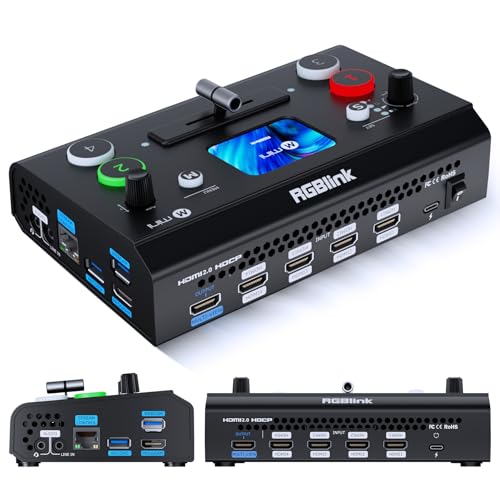
- Four HDMI inputs with dual 1080p outputs
- 2.1-inch touch screen and T-bar control
- UVC mode and USB recording support
Best For: Entry-level creators and compact multi-camera setups
Best Portable All-in-One Kit

- Includes a 14-inch monitor and mounting plates
- Four HDMI/SDI inputs with two HDMI outputs
- Supports AC, DC, and USB power-bank operation
Best For: Mobile streaming and live event production
Best 4K HDMI Pick

- 4K60FPS input with 4K loop-through
- Three-platform streaming support
- PTZ and professional audio controls
Best For: Multi-camera productions needing advanced audio and PTZ features
Best Compact Option
Mixer Plus Compact Video Switcher

- Four HDMI inputs in a portable design
- Built-in 4-inch multiview screen
- Transitions, keying, PIP, and PTZ control
Best For: Mobile and small-team multi-camera productions
Best Hybrid Production Hub

- Four HDMI and four SDI inputs
- NDI|HX3 and multiple IP protocols
- Dual recording with advanced PTZ control
Best For: Advanced HDMI, SDI, and network-based live productions
Best All-Arounder – Blackmagic ATEM Mini Pro
The Blackmagic Design ATEM Mini Pro is a capable video switcher for streamers who need four HDMI camera inputs, built-in streaming, multiview monitoring, and onboard audio control in a compact unit. It is suited to multicamera broadcasts, presentations, education, and esports streams.
Best For: Streamers building a four-camera HDMI production with integrated audio mixing and direct network streaming.
Pros:
- Four HDMI inputs with a four-camera multiview
- Built-in streaming, recording, and 6-input, 2-channel audio mixer
- Supports multiple transitions, upstream keys, and a downstream keyer
- USB-C webcam output works with streaming software
Cons:
- Video inputs are HDMI only
- Its feature set may be more than needed for a simple one-camera stream
For creators who want a compact switcher that combines camera control, audio mixing, multiview, and streaming features, the ATEM Mini Pro is a flexible choice. Its four-input design also leaves room to expand a multicamera setup.
Best for Audio-First Shows – RØDE RØDECaster Video S
The RØDE RØDECaster Video S combines video switching and a podcast-focused audio interface, making it an appealing video switcher for streamers who also rely on high-quality microphone or instrument input. It supports three HDMI sources, one USB video source, custom scenes, direct streaming, and recording.
Best For: Podcasters, interviewers, and live creators who want video switching and studio-grade audio controls in one device.
Pros:
- Switches up to four video sources, including three HDMI and one USB
- Two Neutrik combo inputs with Revolution Preamps
- Supports scenes, media playback, overlays, chroma keying, and transitions
- Can stream over Wi-Fi or Ethernet and record to external USB storage
Cons:
- Its audio-focused features may be unnecessary for video-only workflows
- Video inputs are limited to three HDMI sources plus one USB source
The RØDECaster Video S stands out when audio quality and hands-on show control matter as much as camera switching. Automatic chroma keying, Inspect Mode, and audio-based auto-switching add useful production flexibility for solo operators and podcast teams.
Best Standalone Production Hub – Magewell Director One
The Magewell Director One is an all-in-one video switcher for streamers who want switching, encoding, recording, monitoring, and streaming without a separate computer or HDMI switcher. Its 7-inch AMOLED touchscreen and support for HDMI, USB, IP sources, media, and mobile inputs make it suitable for both fixed and mobile productions.
Best For: Advanced creators and field teams needing standalone production, multistreaming, recording, and IP-source support.
Pros:
- Combines switching, encoding, recording, monitoring, and streaming
- Supports two HDMI, two USB-A, and up to three simultaneous IP sources
- 7-inch AMOLED touchscreen provides direct scene control and previewing
- Offers H.264/H.265 encoding up to 1080p60 and SD or internal recording
Cons:
- Its advanced production feature set may be excessive for basic streaming
- Integrated 4G connectivity requires a separate service
Director One is a strong fit for productions that need more than basic camera switching. Scene tools such as graphics, webpages, chroma key, timers, scoreboards, and overlays provide considerable flexibility, while Ethernet, Wi-Fi, and optional 4G support mobile workflows.
Best Budget Multicam Option – FEELWORLD LIVEPRO L1 V1
The FEELWORLD LIVEPRO L1 V1 is a compact video switcher for streamers who want four HDMI inputs, real-time switching, and USB 3.0 webcam-style output at a straightforward scale. Its preview display, transition controls, and LAN-based remote operation support small multicamera productions.
Best For: Solo streamers and small teams switching up to four 1080p HDMI sources through a computer-based streaming setup.
Pros:
- Four HDMI inputs and 1080p support
- USB 3.0 output appears as a webcam to streaming software
- Compact design can be mounted on a tripod
- Provides multiview monitoring and selectable transition effects
Cons:
- Requires a computer for USB-based streaming
- Offers fewer integrated production functions than larger all-in-one switchers
- Audio and video capabilities are more focused on basic switching
The LIVEPRO L1 V1 makes sense for creators who already stream through a computer and need a simple way to add multiple HDMI angles. Its small footprint and remote XPOSE operation can help a single operator manage a modest live production.
Best Direct-Streaming Control – GoStream Deck Pro
If you want a video switcher for streamers that can handle several sources without depending entirely on a computer, the Osee GoStream Deck Pro offers a practical mix of hardware control, recording, and network streaming. It accepts four HDMI sources plus a USB camera, making it suitable for multi-camera broadcasts, presentations, and live events.
Best For: Streamers, churches, schools, and production teams that want direct Ethernet streaming and tactile switching controls.
Pros:
- Supports four HDMI inputs plus an additional USB camera input.
- Can record MP4 video to an SD card while streaming through USB.
- Built-in encoder supports streaming to up to three platforms over Ethernet.
- Eight physical macro buttons provide quick access to switching, overlays, and transitions.
Cons:
- Its feature set may be more than needed for simple, single-camera streams.
- Network streaming requires an Ethernet connection and setup.
The GoStream Deck Pro stands out when hands-on control and a computer-independent workflow matter. Its multi-source layouts, local recording, and IP control make it a flexible choice for more organized live productions.
Best Compact 4K Option – RGBlink Mini V3
For creators seeking a compact video switcher for streamers, the RGBlink Mini V3 combines four HDMI inputs with a touch screen and professional T-bar control. It can serve as a multi-camera switcher, dual-output production tool, or UVC webcam interface, while some advanced functions depend on optional TAO Cloud activation.
Best For: Entry-level creators and mobile productions that need a compact 4K-capable switcher with flexible output options.
Pros:
- Provides four HDMI inputs, dual 1080p HDMI outputs, and a 2.1-inch touch screen.
- Supports UVC webcam mode for compatible streaming setups.
- Offers picture-in-picture layouts, chroma key, logo overlays, and 15 transition effects when available through the applicable features.
- Records to USB drives up to 2TB.
Cons:
- Recording and selected advanced features require optional TAO Cloud licensing.
- Stable operation is recommended with a 35W-or-higher USB-C power adapter.
- Activation requires firmware updating, Ethernet setup, and account binding.
The Mini V3 is a versatile choice for compact multi-camera work, especially if you value a built-in screen and physical T-bar. Review the licensing requirements first if recording, PTZ control, or creative overlays are central to your workflow.
Best Portable All-in-One Kit – GoStream Duet Kit
The GoStream Duet Kit is a video switcher for streamers who want a more complete mobile production setup. Along with the switcher, it includes a 14-inch monitor, mounting plates, and multiple power options, while its HDMI/SDI inputs and USB connections support flexible field production.
Best For: Mobile streamers and event crews that need an integrated monitor, multi-format inputs, and adaptable power.
Pros:
- Includes a GoStream Duet switcher, 14-inch 1080p monitor, silent fan, and three cheese plates.
- Accepts four HDMI/SDI inputs and provides two HDMI outputs for program and monitoring.
- Includes two USB ports for a USB camera and streaming software such as OBS, vMix, or Zoom.
- Supports AC, DC, or USB power-bank operation and can provide USB 5V power to additional devices.
Cons:
- At about 5kg according to the kit description, it is less lightweight than a standalone switcher.
- The integrated kit may be more equipment than home streamers need.
- Its listed item weight is 12 pounds, so transport planning is important.
This kit makes the most sense when portability means having a ready-to-use production station rather than minimizing weight. The built-in display, mounting options, HDMI/SDI compatibility, and flexible power choices are useful for live work away from a fixed studio.
Best 4K HDMI Pick – FoMaKo KC602
For streamers who want a video switcher for streamers that can handle high-resolution sources, the FoMaKo KC602 combines four HDMI inputs, 4K60FPS input, 1080p60FPS output, and a built-in 5.5-inch display. Its direct streaming, recording, PTZ control, and audio-mixing features make it suited to more involved live productions.
Best For: Multi-camera streamers, churches, studios, and users who need PTZ control, professional audio inputs, and 4K loop-through.
Pros:
- Accepts 4K60FPS input and provides 4K loop-through with 1080p60FPS output.
- Supports RTMP/RTMPS, USB UVC streaming, and simultaneous streaming to up to three platforms.
- Includes PTZ control for up to four cameras, nine presets, XLR input, phantom power, EQ, and monitoring.
- Built-in 5.5-inch display, T-bar, buttons, and knobs support hands-on operation.
Cons:
- Its extensive audio, networking, PTZ, and recording features may be more than a beginner needs.
- Output is limited to 1080p60FPS even though the unit accepts 4K60FPS input.
The KC602 is a feature-rich choice when your setup extends beyond simple HDMI switching. It is particularly compelling for creators who want integrated audio control, PTZ presets, recording, and multi-platform streaming in one device.
Best Compact Option – Mixer Plus Compact Video Switcher
The Mixer Plus is a practical video switcher for streamers who value portability and built-in monitoring. It provides four HDMI inputs, a 4-inch multiview screen, zero-latency switching, and production tools for online classes, events, YouTube, OBS, and Zoom setups.
Best For: Mobile creators and small production teams that need four-camera switching, multiview monitoring, and built-in effects in a compact unit.
Pros:
- Compact design includes a built-in 4-inch display for real-time multiview monitoring.
- Offers four HDMI inputs, zero-latency switching, 30 transition effects, and four scene presets.
- Includes chroma key, luma key, PIP, DSK, logo overlay, and VISCA-over-IP PTZ control.
- Customizable AUX HDMI output can route inputs, program, preview, clean feeds, patterns, or multiview.
Cons:
- The supplied notes do not specify 4K support or integrated streaming and recording functions.
- Its one-year manufacturer warranty is shorter than some specialized alternatives may offer.
Choose Mixer Plus when a smaller footprint and straightforward visual monitoring matter more than advanced resolution or broadcast connectivity. Its effects and flexible AUX output give compact productions useful creative and routing options.
Best Hybrid Production Hub – Tenveo PC500
The Tenveo PC500 is a video switcher for streamers running more demanding productions across HDMI, SDI, USB, and network sources. It combines 4K60FPS-capable inputs, 1080p60FPS output, PTZ and NDI|HX3 support, recording, and multiple streaming protocols for events, studios, conferences, and live broadcasts.
Best For: Professional or advanced streamers who need HDMI/SDI flexibility, network workflows, PTZ camera control, and recording backups.
Pros:
- Provides four HDMI and four SDI inputs, with two HDMI inputs supporting 4K60FPS.
- Supports UVC, SRT, RTMP, RTSP, and NDI|HX3 streaming, including up to two platforms simultaneously.
- Controls up to four PTZ cameras with presets, camera settings, AI tracking triggers, and cruise tracks.
- Supports dual recording to SD card, USB disk, or HDD while recording and streaming at separate bitrates.
Cons:
- The broad HDMI, SDI, NDI, and network feature set may require more setup knowledge than a basic switcher.
- 1080p60FPS is the stated maximum output, despite 4K60FPS input support.
The PC500 stands out for productions that need to bridge consumer HDMI gear with SDI and IP-based sources. Its recording redundancy, web-browser control, and PTZ workflow make it a strong fit for larger or more critical streams.
How We Picked the Best Video Switcher for Streamers
We compared these 10 models by looking at the features that matter during real-world live production: input type and count, supported video formats, switching controls, multiview monitoring, audio capabilities, USB output, encoding, recording, and portability. We also considered whether each unit is best suited to a simple webcam setup, a multicamera stream, a podcast, a class, an event, or a more advanced production environment.
Because workflows vary, the list includes both straightforward HDMI switchers and all-in-one systems with built-in screens, recording, streaming, and broader connectivity. Confirm the manufacturer’s current specifications before buying, particularly for 4K input, frame-rate support, audio routing, and output resolution.
Quick Comparison
- Simple HDMI streaming: The ATEM Mini Pro and compact four-input models are practical starting points for creators who want fast source switching and USB-based streaming.
- Podcast and talk-show production: The RØDECaster Video S emphasizes integrated audio and video control for conversational formats.
- Built-in production tools: Magewell, Osee, and similar all-in-one systems add touchscreen control, recording, encoding, or broader workflow support.
- Mixed HDMI and SDI setups: The FEELWORLD, Osee GoStream Duet, and Tenveo options are worth considering when cameras or other sources use SDI.
- High-resolution workflows: Look for stated 4K input and 1080p60 output support if you want detailed sources while keeping the live program broadly compatible.
Key Buying Factors for a Video Switcher for Streamers
Inputs and Camera Compatibility
Count your current sources, then add at least one spare input for a future camera, laptop, console, or presentation feed. HDMI is common in consumer and mirrorless cameras, while SDI is better suited to longer cable runs and production cameras. Mixed-input support can reduce the need for converters.
Resolution, Frame Rate, and Output
Do not assume that a switcher accepting 4K inputs also produces a 4K stream. Check the exact input, preview, program, USB, and streaming specifications. For smooth motion, verify support for the frame rate you plan to use, especially 60 fps.
Streaming, Recording, and Monitoring
Built-in encoding can simplify streaming directly to a platform, while USB output is useful when a computer handles production or broadcasting. Recording is valuable for backups and editing. A multiview display or touchscreen can make source checks much easier than relying on a separate monitor.
Audio and Operation
For interviews, podcasts, and live presentations, audio control may matter as much as video switching. Look for suitable microphone inputs, mixing, monitoring, and synchronization features. Physical buttons are often faster under pressure; touchscreen or software control can provide deeper configuration.
Who Should Buy Which Video Switcher for Streamers?
Choose a compact HDMI model if you are starting with two to four cameras, a laptop, or a console and want a relatively simple setup. Choose an audio-focused system for podcasts, interviews, and talk shows where microphone management is central. Choose an all-in-one switcher if you want streaming, recording, monitoring, and switching in one portable device. Choose HDMI-and-SDI equipment for event, venue, or studio workflows that use longer cable runs or professional cameras.
Before checkout, map your complete signal chain: camera outputs, audio sources, monitor, computer, network connection, and desired stream resolution. A slightly more capable Video Switcher for Streamers is often a better value than a cheaper unit that requires adapters or replacement as soon as your production grows.