The best compact mechanical keyboards save desk space without forcing you to give up responsive switches, useful navigation keys, or modern connectivity. The right layout depends on whether you prioritize competitive gaming, comfortable typing, portability, or customization.
We compared 10 compact models ranging from 60% and 65% boards to roomier 75% and 96% layouts, including wireless, hot-swappable, RGB, and Hall Effect options. Use the guide below to narrow the field by layout, features, and budget.
Best 10 Compact Mechanical Keyboards Picks for 2026
Best Wireless Customizer

- Tri-mode Bluetooth, 2.4GHz, and USB-C connectivity
- Hot-swappable 3-pin and 5-pin switch support
- 75% layout with knob, RGB, and 4000mAh battery
Best For: Wireless users who want a customizable 75% keyboard
Best Budget Space Saver

- Compact 68-key wired layout with arrow keys
- Detachable Type-C cable and 26-key anti-ghosting
- Mechanical-style feel with LED backlighting
Best For: Budget users wanting a small wired gaming keyboard
Best Creamy Wireless Typing
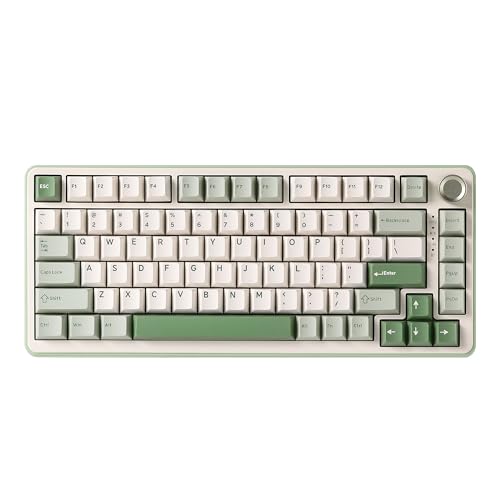
- Gasket mount and five-layer padding for a softer typing feel
- Tri-mode connectivity with a 4000mAh battery
- Hot-swappable sockets, RGB, and multimedia knob
Best For: Wireless typists and gamers seeking a tunable 75% board
Best for Rapid-Trigger FPS Gaming

- Hall Effect magnetic switches with 0.02mm rapid trigger
- Up to 8000Hz polling for fast wired response
- 60% layout with web-based customization tools
Best For: Windows FPS players seeking adjustable, low-latency input
Durable Wired Pick
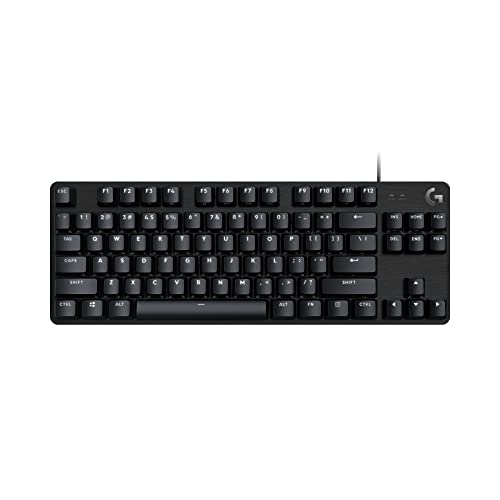
- Tenkeyless design with tactile mechanical switches
- Durable PBT keycaps and aluminum top case
- White backlighting with anti-ghosting input
Best For: Gamers wanting a sturdy, compact wired keyboard
Wireless Value Pick

- Tri-mode USB-C, Bluetooth, and 2.4GHz connectivity
- Gasket mount with five-layer noise dampening
- RGB lighting, control knob, and hot-swappable sockets
Best For: Multi-device users who value wireless flexibility
Competitive Gaming Pick

- Hall Effect switches with adjustable actuation
- 8,000Hz polling and claimed 0.3ms latency
- 68-key wired layout with RGB and hot-swap support
Best For: Windows gamers seeking precise, fast input
Best Compact Gaming Pick

- 81-key 75% layout saves desk space
- Tri-mode wireless and USB-C connectivity
- Hot-swappable switches with RGB and knob
Best For: Gamers wanting a customizable compact wireless keyboard
Best for Quiet, Cushioned Typing

- 85-key layout retains function and arrow keys
- Gasket mount targets a mellow, cushioned sound
- Tri-mode connectivity and hot-swap support
Best For: Writers and hybrid workers who prefer softer typing
Best Compact Board with Number Pad

- 99-key 96% layout retains the number area
- Tri-mode connections for up to five devices
- 8000mAh battery and hot-swappable switches
Best For: Work and gaming setups that need a compact number pad
Best Wireless Customizer – AULA F75 Pro
The AULA F75 Pro is a strong option for shoppers comparing compact mechanical keyboards that retain arrow keys, wireless flexibility, and customization potential. Its 75% layout, hot-swappable sockets, knob, and tri-mode connectivity suit both gaming and everyday work.
Best For: Users who want a wireless 75% keyboard with extensive customization, RGB controls, and a dedicated media knob.
Pros:
- Bluetooth 5.0, 2.4GHz wireless, and USB-C wired modes support multiple devices.
- Hot-swappable sockets accept 3-pin or 5-pin switches without soldering.
- Includes a 4000mAh battery, pre-lubricated stabilizers, and five-layer sound-dampening filling.
- Its 81-key layout keeps arrow keys while saving desk space.
Cons:
- The 75% format omits a dedicated number pad.
- Some advanced lighting and macro customization requires the driver.
With a substantial battery, three connection modes, and a flexible hot-swap design, the F75 Pro is a well-rounded pick for compact mechanical keyboard buyers who want a feature-rich setup rather than a basic board.
Best Budget Space Saver – GEODMAER GM68
The GEODMAER GM68 is a compact wired alternative for shoppers seeking the footprint of compact mechanical keyboards with a lower-cost membrane design. Its 68-key layout includes separate arrow keys, backlighting, media controls, and a detachable USB-C cable.
Best For: Budget-conscious gamers and office users who prioritize a small wired keyboard and mechanical-style feel.
Pros:
- 65% layout saves desktop space while retaining separate arrow keys.
- Detachable Type-C connection provides a stable wired link with low input latency.
- Offers 11 media buttons, LED backlighting, and 26-key anti-ghosting.
- Keycaps are designed for long-term use with a stated 10-million-keystroke lifespan.
Cons:
- It uses a membrane design rather than true mechanical switches.
- Wired connectivity does not provide Bluetooth or wireless flexibility.
- The plastic enclosure may feel less substantial than enthusiast mechanical boards.
The GM68 makes the most sense when compact size, straightforward wired performance, and a mechanical-like typing feel matter more than switch customization or wireless operation.
Best Creamy Wireless Typing – YUNZII B75 PRO
The YUNZII B75 PRO combines a space-saving 75% layout with the flexibility expected from enthusiast-oriented compact mechanical keyboards. Its gasket mount, five-layer padding, hot-swap sockets, tri-mode connectivity, and multifunction knob make it suitable for both gaming and productivity.
Best For: Typists and gamers who want a polished wireless keyboard with a softer, quieter-feeling build and room to change switches.
Pros:
- Supports Bluetooth, 2.4GHz wireless, and wired USB-C connections.
- Gasket construction, five-layer padding, and pre-lubricated components target a creamy typing sound.
- Full-key hot-swap sockets support both 3-pin and 5-pin switches.
- Includes a 4000mAh battery, RGB lighting, programmable keys, and a control knob.
Cons:
- The 75% layout does not include a dedicated number pad.
- Software-based remapping and RGB customization is specified for Windows.
The B75 PRO is a particularly versatile choice for buyers who want compact dimensions without giving up arrow keys, wireless modes, or the ability to tune the board’s switches and sound later.
Best for Rapid-Trigger FPS Gaming – AULA WIN60 HE
The AULA WIN60 HE targets competitive players who need fast, adjustable input in a very small footprint. Among compact mechanical keyboards, its 60% layout stands out for Hall Effect magnetic switches, rapid-trigger functionality, and an 8000Hz polling rate.
Best For: Windows PC players focused on FPS games such as Valorant and CS2 who value adjustable actuation and rapid response.
Pros:
- Hall Effect magnetic switches provide adjustable actuation and a stated 0.02mm rapid-trigger step distance.
- Up to 8000Hz polling supports a high-speed wired gaming setup.
- Compact 61-key 60% design leaves more room for mouse movement.
- Web-based driver supports remapping, macros, and RGB customization without a software download.
Cons:
- USB-C wired operation does not offer wireless connectivity.
- The 60% layout omits dedicated arrow and function-key rows.
- It is not compatible with PlayStation 4, PlayStation 5, or Xbox according to the supplied details.
The WIN60 HE is specialized rather than all-purpose: its magnetic switches and rapid-trigger controls are compelling for competitive FPS play, while the compact layout may require more function-layer use for general productivity.
Durable Wired Pick – Logitech G413 TKL SE
The Logitech G413 TKL SE is a practical choice for shoppers seeking compact mechanical keyboards with a straightforward wired setup. Its tenkeyless layout, tactile switches, PBT keycaps, and white backlighting suit gaming and everyday desktop use.
Best For: Gamers who want a durable, compact wired keyboard with tactile feedback and essential media controls.
Pros:
- Tenkeyless design saves desk space while retaining a familiar QWERTY layout.
- PBT keycaps resist heat and wear for long-term durability.
- Tactile switches, anti-ghosting, and six-key rollover support reliable gaming input.
- Brushed aluminum-magnesium construction provides a robust feel with minimal flex.
Cons:
- Wired connectivity limits placement flexibility.
- White LED lighting offers single-color illumination rather than RGB effects.
Choose this model if durability and dependable wired performance matter more than wireless connectivity or extensive lighting customization. It is also compatible with Windows and macOS.
Wireless Value Pick – Redragon K673 PRO
The Redragon K673 PRO stands out among compact mechanical keyboards for its 81-key layout, tri-mode connectivity, and cushioned gasket-mounted typing feel. It is designed for users who want one keyboard that can move between a PC, laptop, and tablet.
Best For: Multi-device users who want wireless flexibility, RGB lighting, and a quieter, softer typing experience.
Pros:
- USB-C, Bluetooth, and 2.4GHz modes support flexible device switching.
- Gasket mounting and five-layer noise dampening provide a cushioned typing feel.
- Hot-swappable sockets accept most three-pin or five-pin switches.
- A control knob handles backlight brightness and media playback.
Cons:
- Its 81-key layout may not suit shoppers seeking the smallest possible board.
- The listed operating-system compatibility is limited to Windows.
This is a well-rounded option for buyers prioritizing connectivity and customization. Its battery-powered design, RGB lighting, programmable software, and included puller and spare switches add versatility to the compact format.
Competitive Gaming Pick – AULA WIN68 HE
The AULA WIN68 HE targets competitive players shopping for compact mechanical keyboards with highly adjustable input. Its 68-key layout retains arrow keys and basic function access while adding Hall Effect magnetic switches, adjustable actuation, and an 8,000Hz polling rate.
Best For: Windows gamers who want precise actuation control, fast response, and a space-saving wired layout.
Pros:
- Hall Effect switches offer adjustable actuation from 0.02mm to 3.44mm.
- 8,000Hz polling and claimed 0.3ms latency are designed for responsive gaming.
- 68-key format retains arrow keys while saving desktop space.
- RGB lighting, hot-swappable support, and programmable software add customization.
Cons:
- The web driver is compatible with Windows only and does not support Mac.
- Wired USB-C connectivity does not provide wireless flexibility.
- The feature set may be more advanced than needed for basic typing.
For competitive gaming, this model’s adjustable magnetic switches and rapid polling are its main advantages. Buyers should be comfortable using Windows software and a wired connection to access its deeper customization features.
Best Compact Gaming Pick – AULA F75
The AULA F75 is a practical choice for shoppers seeking compact mechanical keyboards with a gaming-friendly 75% layout. Its 81 keys retain arrow keys, while tri-mode connectivity, hot-swappable switches, and a control knob add flexibility for both gaming and everyday use.
Best For: Gamers and multitaskers who want a compact wireless keyboard with customizable switches and lighting.
Pros:
- Tri-mode connectivity supports Bluetooth 5.0, 2.4GHz wireless, and USB-C wired use.
- Hot-swappable PCB accepts 3-pin and 5-pin switches without soldering.
- 4000mAh battery, RGB lighting, macro support, and a multifunction knob add useful convenience.
Cons:
- The 75% layout omits a dedicated number pad.
- Some programmable and lighting features require the Windows driver.
With pre-lubed switches, layered sound dampening, and a gasket-style structure, the F75 is positioned as a feature-rich compact board that balances desk space with a more cushioned typing feel.
Best for Quiet, Cushioned Typing – Kisnt KN85
The Kisnt KN85 is among the compact mechanical keyboards designed to preserve the essential function-row and arrow keys while reducing desktop footprint. Its 85-key layout, gasket mount, pre-lubed linear switches, and tri-mode connection options suit both work and gaming setups.
Best For: Students, writers, hybrid workers, and gamers who prefer a softer, mellow typing sound.
Pros:
- Compact 75% layout keeps F1-F12, arrows, and shortcuts while freeing desk space.
- Bluetooth 5.0, 2.4GHz, and USB-C support multi-device use.
- Hot-swappable 3-pin and 5-pin compatibility allows solder-free switch changes.
Cons:
- There is no dedicated number pad.
- Remapping and macro tools are limited to Windows in wired or 2.4GHz mode.
- The manufacturer recommends a wrist rest for extended use.
The KN85 emphasizes a cushioned, quieter-feeling typing experience through its gasket mount and internal dampening. Its 4000mAh battery and three connection modes also make it versatile for mobile and desktop workflows.
Best Compact Board with Number Pad – AULA F99
The AULA F99 is a strong option for shoppers who want compact mechanical keyboards without giving up a number area. Its 96% 99-key layout keeps the essentials for work and gaming, while tri-mode connectivity, hot-swappable switches, and an 8000mAh battery broaden its appeal.
Best For: Users who need frequent number-pad access but still want to save space compared with a full-size keyboard.
Pros:
- 96% layout retains a dedicated number area while remaining more compact than full-size designs.
- Supports Bluetooth 5.0, 2.4GHz wireless, and USB-C wired connections.
- Hot-swappable switches, PBT keycaps, RGB effects, and macro customization support personalization.
- 8000mAh battery is built for extended wireless use.
Cons:
- Its 99-key layout is less compact than a 75% keyboard.
- Macro and advanced lighting customization use the supplied driver.
The F99 is the most practical fit here for spreadsheet work, data entry, and gaming setups that still require a number pad. Its dampened gasket structure and pre-lubed linear switches add a smoother, more controlled feel.
How We Picked These Compact Mechanical Keyboards
We selected keyboards across the most useful compact layouts, including 60%, 65%, 75%, TKL, and 96% designs. Our comparison emphasizes practical differences: available keys, connection modes, switch type, customization, gaming features, build comfort, and desk footprint. We also included both conventional mechanical boards and Hall Effect models with adjustable actuation or rapid-trigger functions, since those features can matter for competitive gaming.
Specifications and features can vary by seller or version, so confirm the exact switch, color, connection, and included accessories before ordering.
Quick Comparison
| Layout | Best For | Main Advantage |
|---|---|---|
| 60% | Minimalist setups and competitive gaming | Smallest footprint |
| 65% | Gaming with dedicated arrow keys | Compact without losing basic navigation |
| 75% | Work and gaming | Function row and navigation cluster in a small design |
| TKL | Traditional desktop use | Familiar layout without a number pad |
| 96% | Number-heavy work | Near-full-size functionality in less space |
Key Buying Factors for Compact Mechanical Keyboards
Choose the Right Layout
A 60% board removes the function row and dedicated arrows, while 65% models usually retain arrow keys. A 75% layout is often the best compromise for mixed use because it preserves a function row and navigation keys. TKL models feel familiar but take more room, and 96% keyboards suit spreadsheets or frequent number entry.
Consider Switches and Customization
Mechanical switches provide distinct feel and sound, while hot-swappable sockets let you replace switches without soldering. Linear switches are smooth and commonly favored for gaming; tactile switches provide a noticeable bump for typing. Pre-lubed switches may sound smoother, but acoustics still depend on the case, plate, keycaps, and desk surface.
Check Gaming Features
Anti-ghosting and rollover help register simultaneous inputs. Hall Effect keyboards add adjustable actuation and rapid-trigger behavior, which can benefit fast-paced games, but they may be more specialized than a conventional mechanical keyboard. High polling rates are useful mainly when the rest of the system and game support low-latency input.
Review Connectivity and Controls
Tri-mode keyboards typically support Bluetooth, 2.4GHz wireless, and USB-C wired use. Wired models avoid battery management and are often the simplest choice for competitive play. A rotary knob can make volume or lighting adjustments faster, while RGB lighting is primarily a personalization feature rather than a performance upgrade.
Who Should Buy Which Compact Mechanical Keyboards?
Choose a 60% model if maximum desk space and unrestricted mouse movement matter most. Choose a 65% keyboard if you want a small board but rely on dedicated arrow keys. Choose a 75% model for the strongest all-around balance between compactness, productivity, and gaming.
Choose TKL if you prefer a familiar layout and do not need a number pad. Choose a 96% keyboard for office work, finance, or other tasks involving frequent numeric entry. For competitive gaming, consider a Hall Effect model with adjustable actuation; for flexible home setups, prioritize tri-mode wireless and hot-swappable switches.