Adding more case fans can improve airflow, but connecting them neatly and powering them safely becomes harder as a build grows. The best PC fan controllers with SATA power simplify that job by drawing power directly from the power supply while consolidating multiple fan connections.
This roundup compares 10-port hubs, compact multi-fan splitters, ARGB-compatible controllers, and models with manual speed knobs. Pay close attention to fan type, connector count, lighting support, control method, and total power capacity before choosing one for your system.
Best 10 PC Fan Controllers with Sata Power Picks for 2026
Compact 10-Fan Expansion
Thermalright 10-Port PWM Fan Hub
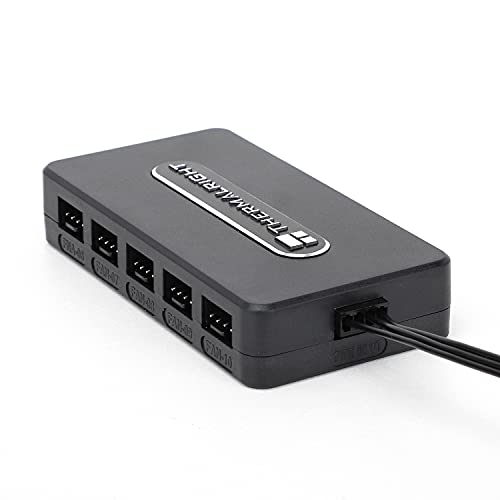
- Supports up to 10 four-pin fans
- Direct SATA power for stable output
- Adhesive mounting and organized cabling
Best For: Expanding PWM fan connections in space-limited PC cases
Budget PWM Splitter Hub
FainWan 10-Way SATA Fan Adapter

- Supports 10 four-pin fans
- Uses SATA power with motherboard PWM signaling
- Adhesive-backed compact PCB design
Best For: Affordable fan-header expansion and centralized cable management
ARGB and PWM Expansion
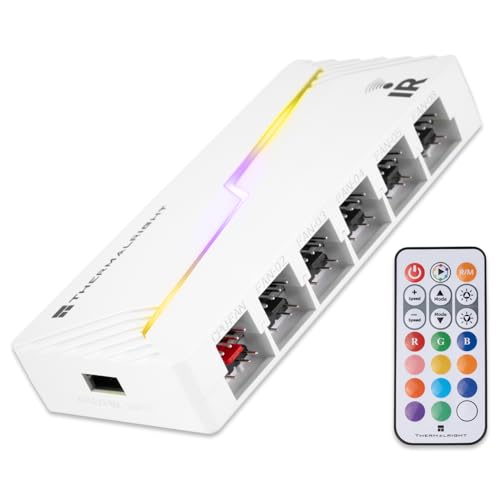
- Supports up to 12 ARGB and PWM groups
- Direct SATA-powered output
- Works with 5V three-pin ARGB, not 12V four-pin RGB
Best For: White ARGB builds needing combined lighting and fan expansion
Best Single-Knob PWM Pick

- Controls up to four 4-pin fans
- 0–100 knob adjustment
- 60W, 5A maximum output
Best For: Simple manual control of multiple 4-pin PWM fans
Best High-Capacity ARGB Hub

- Supports eight ARGB fan groups
- SATA-powered direct output
- Works with 5V 3-pin ARGB devices
Best For: Expanding compatible ARGB fan and lighting connections
Best Multi-Channel Manual Control

- Four independent adjustment knobs
- Eight-channel fan hub design
- PCI-position installation with SATA power
Best For: Hands-on control of multiple PC cooling fans
Best with Extra Features
9-Port Magnetic PWM Fan Controller

- Supports up to 9 PWM fans
- SATA-powered with 5V 3-pin ARGB support
- Magnetic mounting for cleaner cable management
Best For: Large ARGB-equipped PC builds
Best Adjustable Power Hub

- Controls up to 6 4-pin PWM fans
- SATA and DC 5525 input options
- Rotary adjustment with 60W total output
Best For: Manual control of compatible PWM fans
Best Dual-Input Controller

- Supports 6 standard 4-pin PWM fans
- Includes SATA cable with dual-input design
- 60W output and stepless knob adjustment
Best For: Medium cooling setups with flexible power needs
Compact 10-Fan Expansion – Thermalright 10-Port PWM Fan Hub
If you need pc fan controllers with sata power, this Thermalright hub offers a compact way to connect up to 10 four-pin fans. Its direct SATA input is designed to maintain stable output under high load, while the adhesive backing and centralized connections simplify installation and cable management.
Best For: Builders expanding a motherboard’s available fan connections for a large group of PWM fans.
Pros:
- Supports up to 10 four-pin fans.
- Direct SATA power helps reduce motherboard power demands.
- Compact body with built-in double-sided adhesive for case mounting.
- Reads fan speed through the fan connected to the red interface.
Cons:
- SATA cable must be purchased separately.
- Only one connected fan’s speed is recognized.
This is a straightforward, space-conscious fan hub for expanding PWM capacity. It is a particularly practical choice when tidy wiring and stable SATA-powered output matter more than onboard speed controls.
Budget PWM Splitter Hub – FainWan 10-Way SATA Fan Adapter
For shoppers comparing pc fan controllers with sata power, the FainWan 10-way hub provides a simple centralized connection for up to 10 four-pin fans. It uses motherboard PWM signaling for temperature control while drawing power directly from the computer’s power supply, helping reduce load on the motherboard.
Best For: Budget-conscious PC builders who want adhesive-mounted fan expansion and centralized cable routing.
Pros:
- Connects up to 10 four-pin fans.
- Separates motherboard PWM control from fan power delivery.
- Adhesive backing makes case installation straightforward.
- Compact design takes up little space.
Cons:
- The maximum current is listed as 1 milliamp, so system compatibility should be checked carefully.
- It is a splitter and hub rather than a standalone speed-control panel.
The FainWan focuses on basic expansion and neat installation rather than extra controls. Its SATA-powered design can be useful when a motherboard lacks enough fan headers, provided the listed electrical specifications suit the build.
Established 10-Port Hub – Thermaltake Commander FP SATA PWM Hub
The Thermaltake Commander FP is a practical option among pc fan controllers with sata power, supporting up to 10 independent four-pin PWM fans. It draws power directly from the SATA-equipped PSU connection and includes cable ties, Velcro tabs, and a PWM signal cable for a cleaner installation.
Best For: Desktop builders seeking a 10-port PWM hub with included mounting and cable-management accessories.
Pros:
- Supports up to 10 four-pin PWM fans.
- Direct SATA input can power up to nine PWM fans simultaneously.
- Includes reusable cable ties, Velcro tabs, and a PWM signal cable.
- Blue LED indicates power.
Cons:
- The product listing does not describe independent speed controls.
- It is intended for desktop use rather than a portable setup.
With its generous port count and included placement accessories, the Commander FP is well suited to larger desktop builds. The direct PSU connection and PWM signal cable provide a tidy way to expand cooling without relying on multiple motherboard headers.
ARGB and PWM Expansion – Thermalright X12 IR White Hub
If your build needs both lighting and fan expansion, this Thermalright X12 IR hub combines 3-pin 5V ARGB connections with four-pin PWM fan ports and direct SATA power. It supports up to 12 groups of connected devices, but it is an expansion hub rather than a standalone speed controller.
Best For: ARGB desktop builds that need additional 5V lighting and PWM fan connections in a white hub.
Pros:
- Supports up to 12 groups of ARGB and PWM devices.
- Direct SATA output is designed for stable high-load operation.
- Helps organize fan power and lighting connections.
- Synchronizes 3-pin 5V ARGB lighting and PWM fan signals through the motherboard.
Cons:
- SATA cable is not included.
- Does not independently control fan speed.
- 12V four-pin RGB devices are not supported.
The X12 IR is the most versatile option here for mixed ARGB-and-PWM expansion, especially when matching a white-themed system. Confirm that your lighting hardware uses 5V three-pin ARGB before buying, and remember that motherboard synchronization—not onboard control—is its operating model.
Best Single-Knob PWM Pick – 4-Fan SATA PWM Controller
If you need pc fan controllers with sata power for several 4-pin case fans, this compact PWM controller offers straightforward manual adjustment. Its single knob provides 0–100 speed control, while the SATA connection and 60W maximum output suit desktop builds with multiple or higher-power fans.
Best For: Builders who want simple, centralized control for up to four 4-pin PWM fans.
Pros:
- Supports four small 4-pin fan connections.
- Provides full-range knob adjustment from 0 to 100.
- Offers up to 60W and 5A total output.
- Includes 3M adhesive and extension wires for flexible placement.
Cons:
- Uses manual knob control rather than automatic motherboard-based adjustment.
- Limited to four fan connections.
This is a practical choice when you want an uncomplicated SATA-powered controller with physical control and a small internal footprint. Check that your fans use compatible 4-pin connectors before buying.
Best High-Capacity ARGB Hub – Thermalright 8-Port Fan Hub
For builds needing pc fan controllers with sata power and expanded ARGB connectivity, this Thermalright hub supports eight groups of compatible fans and lighting devices. It uses SATA power for stable output and supports PWM fan regulation, but it is intended primarily as an interface expansion hub rather than a standalone speed or lighting controller.
Best For: Systems with multiple 5V 3-pin ARGB fans or light bars that need cleaner cable management.
Pros:
- Supports up to eight groups of ARGB fans.
- Provides eight 4-pin PC fan ports.
- Uses SATA power for direct power delivery.
- Offers adhesive and magnetic installation options.
Cons:
- Does not itself control fan speed or adjust lighting.
- Does not support 12V 4-pin RGB devices.
- Only the fan connected to the red interface has its speed recognized.
This hub is best viewed as a connection and synchronization accessory. Confirm that your lighting equipment uses 5V 3-pin ARGB connectors, and follow the marked insertion direction to avoid equipment damage.
Best Multi-Channel Manual Control – SinLoon 8-Channel Fan Hub
This SinLoon unit stands out among pc fan controllers with sata power for users who want separate physical adjustments. Four knobs provide independent control across an eight-channel fan hub, allowing you to lower speed for less noise or increase it when components are working harder.
Best For: PC builders who want hands-on, independent fan adjustments from a PCI-mounted controller.
Pros:
- Provides four independent speed-control knobs.
- Supports an eight-channel fan hub configuration.
- Accepts 4-pin fans, with 3-pin compatibility noted.
- PCI-position installation helps save internal space.
Cons:
- Requires manual adjustment rather than automatic temperature-based control.
- Uses a 12V fan-control setup, so connector and voltage compatibility should be checked.
Choose this model when independent physical control matters more than software integration. Its PCI-position mounting and SATA power supply make it a useful option for water-cooling systems and case-fan setups that need several adjustable channels.
Best with Extra Features – 9-Port Magnetic PWM Fan Controller
If you need pc fan controllers with sata power for a larger desktop build, this ShakingTank hub supports up to nine standard 4-pin PWM fans while also handling 5V 3-pin ARGB lighting. SATA power helps provide stable power without overloading the motherboard, and the magnetic backing makes installation and repositioning straightforward.
Best For: Large PC cases using multiple 4-pin PWM fans and synchronized 5V 3-pin ARGB devices.
Pros:
- Supports up to nine PWM fans and synchronized ARGB lighting.
- SATA power helps reduce voltage loss and motherboard load.
- Magnetic mounting and a compact metal enclosure simplify installation.
Cons:
- 12V 4-pin motherboard connection is required for PWM control.
- Lighting support is for 5V 3-pin ARGB devices, not 12V 4-pin RGB.
This is a strong choice when fan count, ARGB expansion, and tidy case placement matter most. Confirm your motherboard and lighting connectors before buying.
Best Adjustable Power Hub – 6-Fan SATA PWM Controller
This six-port model is a practical option among pc fan controllers with sata power when you want direct, physical speed adjustment. It accepts SATA 12V or DC 5.5×2.5mm input, supports up to six 4-pin PWM fans, and provides a rotary control with a 1%–99% adjustable PWM duty cycle.
Best For: Users who want manual speed control for up to six 4-pin PWM fans.
Pros:
- Supports six standard 4-pin PWM fans.
- Offers SATA and DC 5525 power-input options.
- 60W total output and a convenient speed-control knob.
Cons:
- Not compatible with 3-pin or 2-pin fans.
- Fans are not included.
- Power output is limited to 5A total, with 2A per port.
Choose this controller for simple, hands-on regulation rather than software-based control. Its connector restrictions make checking your fan type especially important.
Best Dual-Input Controller – 6-Port PWM Fan Speed Hub
For builders comparing pc fan controllers with sata power, this six-port hub combines SATA and DC 5525 12V inputs with a simple rotary speed control. It supports up to six 4-pin PWM fans, provides up to 60W total output, and includes a SATA power cable for centralized case-fan management.
Best For: PC, mini PC, router, and server-cooling setups using multiple 12V 4-pin PWM fans.
Pros:
- Controls up to six standard 4-pin PWM fans.
- Includes a SATA power cable and supports dual power inputs.
- Provides 1%–99% stepless adjustment and overload protection.
Cons:
- Not compatible with 2-pin or 3-pin fans.
- Fans and a DC power adapter must be purchased separately.
- Maximum combined output is 5A at 12V.
This is a flexible choice if you value included SATA cabling and broad installation options. Its manual knob keeps operation straightforward, while the six-port limit suits medium-sized cooling setups.
How We Picked These PC Fan Controllers with Sata Power
We focused on controllers that use a SATA power connection, since it provides a practical way to supply several fans without placing the entire load on a single motherboard fan header. We also compared port counts, PWM support, ARGB compatibility, speed-control options, mounting features, cable arrangements, and stated power limits.
The selection includes straightforward PWM hubs for users who want motherboard-based control, as well as knob-equipped controllers for manual adjustment. Because specifications and included accessories can vary, confirm the listing details and connector requirements before purchasing.
Quick Comparison
| Controller type | Best for | What to check |
|---|---|---|
| 8- to 10-port PWM hub | Multiple case fans and simple cable management | Header signal behavior and SATA cable length |
| ARGB/PWM hub | Builds using addressable lighting | 5V 3-pin ARGB compatibility |
| Manual knob controller | Hands-on speed adjustment | Mounting method, wattage, and fan connector type |
| Six-port dual-power controller | Smaller builds needing flexible installation | SATA or DC input requirements and total load |
Key Buying Factors
Fan Connectors and Control
Most options here use 4-pin PWM fan connectors, but a 3-pin DC fan may behave differently. A hub generally mirrors one motherboard header’s control signal across its connected fans; it does not necessarily provide independent software control for every port. If individual fan curves matter, look for a controller designed with separate channels.
Port Count and Power Capacity
Count every fan you plan to connect, including radiator, rear, front, and bottom fans. Leave spare ports for future upgrades. SATA power reduces the electrical burden on the motherboard header, but each fan still consumes power. Compare the combined fan draw with the controller’s stated limit, particularly when using high-performance fans.
ARGB Compatibility
ARGB lighting normally uses a 5V 3-pin connector, which is different from a 12V 4-pin RGB connector. Do not connect them interchangeably. An ARGB/PWM hub is useful only if your fans and motherboard or lighting controller use compatible standards.
Installation and Noise
Magnetic backs, adhesive pads, and compact boards make installation easier behind a motherboard tray or inside a case. Manual knobs can be useful for quick changes, while motherboard PWM control is usually more convenient for automatic temperature-based curves.
Who Should Buy Which PC Fan Controllers with Sata Power?
- Choose a 10-port PWM hub if you want to connect many standard 4-pin fans and control them through the motherboard.
- Choose an ARGB/PWM hub if your system combines addressable lighting with several PWM fans.
- Choose a knob controller if direct, hardware-based speed adjustment matters more than software automation.
- Choose a six-port model for a compact case or a modest fan layout where extra capacity is unnecessary.
Before ordering, verify the fan connector style, lighting voltage, available SATA lead, mounting space, and total wattage. Those checks will help you select a controller that fits both your hardware and your preferred way of managing airflow.