PC fan controllers with physical knobs offer a straightforward way to adjust cooling without opening software or navigating BIOS menus. They are especially useful for builders who want quick, hands-on control over case, CPU, or auxiliary fans.
This roundup compares 10 PWM controller and hub options, focusing on fan support, power delivery, adjustment range, installation, and practical compatibility.
Best 10 PC Fan Controllers with Physical Knobs Picks for 2026
Best High-Power Pick
6-Fan PWM Controller with Speed Knob

- Controls up to six 4-pin PWM fans
- 60W total output capacity
- SATA or DC 5525 power input
Best For: Multi-fan 4-pin PWM setups needing higher power
Best USB-Powered Option
Type-C PWM Controller and 5-Way Hub

- Includes USB-C cable and five-way hub
- 0%–100% PWM adjustment
- Boosts 5V input to 12V output
Best For: USB-C-powered multi-fan DIY cooling
Best Simple Knob Control

- Controls four fans with one knob
- 0–100 stepless speed range
- 60W maximum output
Best For: Compact shared control for 4-pin case fans
Best Independent Control

- Four independent speed-control knobs
- Eight-channel hub design
- Supports 3-pin and 4-pin fans
Best For: Manual control of multiple fan groups
Best High-Capacity Hub

- Controls up to six 4-pin PWM fans
- 60W total output with 5A combined limit
- SATA or 12V DC power input
Best For: Multi-fan PC cases and custom cooling rigs
Best Compact Module
Adjustable PWM Speed Regulator

- Ultra-compact 20×26mm PCB
- Dual knobs control speed and minimum RPM
- 5–12V compatibility with four-wire fans
Best For: DIY builds and tight cooling enclosures
Best Flexible Power Setup

- Supports six 4-pin PWM fans
- SATA and 12V DC input options
- 1%–99% stepless PWM adjustment
Best For: Multi-fan cases and DIY cooling systems
Best Dual-Hub Value
KOOBOOK 4-Pin PWM Fan Hub with Knob

- Two SATA-powered hubs included
- Controls up to four 4-pin fans per hub
- 0–100 knob adjustment with 60W output
Best For: Multi-zone PC, NAS, server, and water-cooling setups
Best Flexible Power Input
6-Fan PWM Controller with Knob
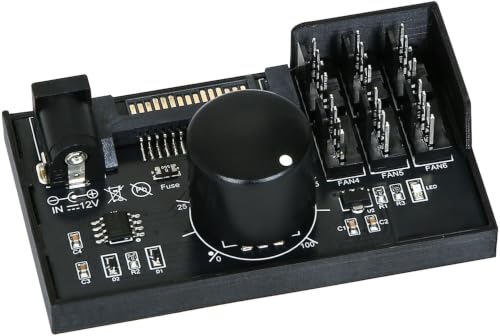
- Supports up to six 4-pin PWM fans
- Accepts SATA or 12V DC input
- 1%–99% stepless control and 60W output
Best For: DIY desktop builds needing six-fan control
Best High-Power Pick – 6-Fan PWM Controller with Speed Knob
For shoppers seeking PC fan controllers with physical knobs, this 12V PWM model offers straightforward manual speed adjustment for up to six 4-pin PWM fans. It accepts either SATA or DC 5.5×2.5mm power and supports up to 60W total output.
Best For: Builders who need one physical knob to manage several 4-pin PWM fans with a higher total power capacity.
Pros:
- Supports up to six 4-pin PWM fans.
- Offers up to 60W or 5A total output.
- Accepts SATA or DC 5525 12V input.
- Provides a 1%–99% adjustable PWM duty cycle.
Cons:
- Not compatible with 3-pin or 2-pin fans.
- Fans are not included.
- Only one controller is included.
This is a practical choice when power capacity and flexible installation matter more than extras. Confirm that your fans use 4-pin PWM connectors before buying.
Best USB-Powered Option – Type-C PWM Controller and 5-Way Hub
This compact option brings physical-knob fan control to USB-C-powered setups. It includes a five-way 4-pin PWM hub and boosts 5V input to 12V output, making it suitable for smaller systems, DIY cooling, and compatible USB-powered applications.
Best For: Users who want a USB-C-powered controller and hub for multiple 4-pin PWM fans or small cooling projects.
Pros:
- Includes a Type-C cable and five-way fan hub.
- Supports 0%–100% PWM duty-cycle adjustment.
- Works with a 5V power source through its USB-C input.
- Can also suit routers, small hosts, and other DIY cooling applications.
Cons:
- Not compatible with 3-pin or 2-pin fans.
- Output is limited by the connected charger’s 5V capability.
- Its listed output is 15–18W or 1.2–1.5A.
The included hub makes this an easy all-in-one choice for lower-power fan projects. Use a charger with enough output for the combined fan load.
Best Simple Knob Control – SATA 4-Fan PWM Adapter
For a simple approach to PC fan controllers with physical knobs, this SATA-powered adapter controls four 4-pin fans simultaneously with one external knob. Its 0–100 range provides stepless adjustment, while the magnetic design helps with flexible placement inside a case.
Best For: Users who want compact, single-knob control for up to four 4-pin PC chassis fans.
Pros:
- Controls four fans at the same time.
- Provides 0–100 full-range, stepless speed adjustment.
- Offers up to 60W maximum output.
- Uses SATA power and has a magnetic installation design.
Cons:
- Not compatible with 3-pin or 2-pin fans.
- Requires a SATA power connection.
- It uses one shared knob rather than independent fan controls.
This model keeps manual adjustment uncomplicated and adds useful mounting flexibility. It is a good fit when all connected fans can be managed together.
Best Independent Control – 4-Knob 8-Channel Fan Hub
This SinLoon hub is designed for users who want more hands-on control than a single shared dial provides. It offers four independent knobs across an 8-channel 12V fan hub and installs in a PCI position to help conserve case space.
Best For: PC builders who want independent manual adjustment for multiple cooling zones or fan groups.
Pros:
- Provides four independent speed-control knobs.
- Offers an 8-channel fan-hub layout.
- Can connect 3-pin fans as well as 4-pin fans.
- PCI-position installation helps save space.
Cons:
- Uses a 4-pin power-supply interface.
- There is no display.
- The supplied notes do not specify a maximum output rating.
With four separate dials, this is the most flexible option here for manual zone-style adjustment. Choose it if independent control is more important than a stated high-power rating.
Best High-Capacity Hub – Six-Fan PWM Controller
This six-port hub is a practical choice among pc fan controllers with physical knobs when you want one manual control point for multiple 4-pin PWM fans. Its rotary adjustment covers a 1%–99% PWM duty-cycle range, while SATA or 12V DC power supports flexible installation.
Best For: PC cases, server racks, and custom cooling rigs using up to six 4-pin PWM fans.
Pros:
- Controls up to six 4-pin PWM fans simultaneously.
- Supports up to 60W total output, with a 5A combined limit.
- Offers SATA and 5.5×2.5mm 12V DC power options.
Cons:
- Works only with 4-pin fans, not 3-pin or 2-pin models.
- Package includes the controller only; cables and accessories are not included.
Choose this model when fan quantity and power capacity matter more than a compact bare-board design. Confirm your fans are 4-pin PWM models and stay within the stated current limits.
Best Compact Module – Adjustable PWM Speed Regulator
This compact board is a useful option among pc fan controllers with physical knobs for DIY builds and tight enclosures. Its rotary switch handles on/off and speed adjustment, while a second potentiometer sets minimum RPM for more customized control.
Best For: Compact PC, gaming-system, and electronics-enclosure cooling projects using compatible 5–12V four-wire fans.
Pros:
- Compact 20×26mm PCB weighs about 11g.
- Provides 0–97% duty-cycle adjustment with dual potentiometers.
- Includes an LED indicator and reverse-polarity protection.
Cons:
- Designed for four-wire adjustable fans and may not suit 2-pin or 3-pin setups.
- Its bare PCB format may require more installation planning than a finished hub.
This is the most space-conscious choice of the three, especially if you want separate control over speed and minimum RPM. It suits hands-on builders who can accommodate a small PCB rather than a larger enclosed controller.
Best Flexible Power Setup – Six-Fan PWM Speed Hub
This six-fan hub gives pc fan controllers with physical knobs a straightforward manual speed adjustment for multi-fan systems. It supports 1%–99% PWM control and accepts either SATA power or a 12V DC input, although the required DC adapter is not included.
Best For: Multi-fan PC cases, mini PCs, router cooling, and DIY setups using standard 4-pin PWM fans.
Pros:
- Supports up to six standard 4-pin PWM fans.
- Provides up to 60W total output and 2A per port.
- Offers stepless 1%–99% PWM adjustment through the knob.
Cons:
- Not compatible with 2-pin or 3-pin fans.
- Power adapter, fans, and cables must be purchased separately.
Consider this model if you want a six-fan controller with flexible power-input options and a broad manual adjustment range. As with any high-output hub, keep the combined fan load at or below 5A.
Best Dual-Hub Value – KOOBOOK 4-Pin PWM Fan Hub with Knob
For shoppers comparing PC fan controllers with physical knobs, the KOOBOOK set provides two SATA-powered hubs with straightforward manual adjustment. Each hub supports up to four 4-pin PWM fans and offers a 0–100 speed range for flexible cooling control.
Best For: PC, NAS, server, and water-cooling setups that need two compact controllers for 4-pin fans.
Pros:
- Includes two fan controllers for multi-system or multi-zone setups.
- Controls up to four 4-pin PWM fans per hub.
- Offers full-range knob adjustment and up to 60W output.
- SATA power and magnetic mounting help simplify installation.
Cons:
- Supports 4-pin fans only; 2-pin and 3-pin models are excluded.
- Its SATA-powered design may be less flexible for users seeking external DC power.
With two hubs and a generous 60W rating, this is a practical choice when you want physical control across several 4-pin fans. Confirm fan compatibility before buying.
Best Flexible Power Input – 6-Fan PWM Controller with Knob
This controller suits builders looking for PC fan controllers with physical knobs and support for larger fan arrays. It handles up to six standard 4-pin PWM fans, with SATA or 5.5×2.5mm DC 12V input and stepless 1%–99% adjustment.
Best For: DIY desktops and cooling projects that need six-fan capacity and a choice of internal SATA or DC power.
Pros:
- Supports up to six 12V 4-pin PWM fans.
- Provides SATA and DC 12V power-input options.
- Offers real-time stepless 1%–99% speed adjustment.
- Rated for 60W total output, with a 2A limit per port.
Cons:
- Not compatible with 2-pin or 3-pin fans.
- The DC power adapter is not included.
- Fans and additional cables are sold separately.
The six-port layout and dual-input design make this a versatile option for custom builds, especially where a motherboard header cannot support every fan. Stay within the stated total and per-port current limits.
Best Compact Six-Fan Hub – 4-Pin PWM Controller with Knob
For compact builds, this hub combines six-fan support with the convenience of a physical knob. It works with 12V 4-pin PWM fans, accepts SATA or DC input, and provides 1%–99% stepless control for balancing airflow and noise.
Best For: PC cases, routers, and mini-PC cooling projects using multiple 12V 4-pin fans.
Pros:
- Supports up to six 4-pin PWM fans.
- Offers SATA and 5.5×2.5mm DC 12V input flexibility.
- Provides 1%–99% knob-based speed control.
- Compact 2.7 × 1.6 × 0.7-inch form factor.
Cons:
- Does not support 2-pin or 3-pin fans.
- Total output is limited to 60W, with 2A maximum per port.
- Only the controller is included; connected fans and power accessories are not listed as included.
Its small size and six-port capacity make it a useful fit where space is limited but centralized manual control is still important. Check both connector type and power requirements before installation.
How We Picked the Best PC Fan Controllers with Physical Knobs
We focused on the features that matter most in a manual fan-control setup: four-pin PWM compatibility, the number of supported fans, rated power capacity, input options, knob placement, and installation flexibility. We also considered whether a controller is best suited to a single fan, a compact group of fans, or a larger multi-fan build.
Because product listings can use similar names for different hardware, verify the included cables, connector layout, and electrical ratings before buying. A hub may distribute one control signal to several fans rather than provide independent speed control for every channel.
Quick Comparison
| Best For | Look For |
|---|---|
| Basic one-knob control | Simple four-pin PWM input and a conveniently mounted dial |
| Several case fans | Six-fan support, SATA power, and a clearly stated wattage limit |
| More adjustment points | Multi-channel or four-knob designs such as an eight-channel controller |
| Flexible installation | PCI brackets, adhesive mounting, or accessible external wiring |
| Replacement or expansion | Two-pack hubs or spare fan headers |
Key Buying Factors for PC Fan Controllers with Physical Knobs
Fan and Connector Compatibility
Most entries in this roundup are designed for four-pin PWM fans. Confirm that your fans use four-pin connectors if you want true PWM adjustment. Three-pin DC fans may connect physically but can behave differently or require voltage-based control.
Power Capacity
Check the controller’s total wattage and current rating, not just its fan count. Six supported fans do not automatically mean six high-power fans are safe to run together. SATA-powered models generally provide more practical headroom than motherboard-header-only accessories, but you should still total the rated current of your fans.
Control Layout and Installation
A physical knob is only useful if you can reach it. A PCI-bracket design works well for a desktop tower, while a compact hub may be easier to mount inside the case or route toward the front panel. Measure cable lengths and leave space around the dial before final installation.
Signal Behavior and Monitoring
Many hubs mirror one PWM control signal across connected fans, so they are best for groups that should run at a similar speed. If you need independent CPU, intake, exhaust, and radiator control, look for separate channels and confirm whether the controller supports motherboard speed reporting.
Who Should Buy Which PC Fan Controllers with Physical Knobs?
Choose a simple single-knob controller if you want quick manual adjustment for one fan group and minimal installation work. A six-fan SATA-powered hub is a better fit for a conventional gaming or workstation case with several matching fans. Builders who want separate manual adjustments should consider a multi-knob, multi-channel model, provided its installation and power requirements suit the case.
For frequent hardware changes, a dual-power-input or spare-hub option can add flexibility. Whichever model you choose, keep fan loads within the stated limit, connect power securely, and test the lowest setting to ensure every fan continues spinning reliably.