Long hours at a screen can make display comfort just as important as resolution or refresh rate. The best computer monitors with eye care technology combine flicker-free operation, reduced blue light, glare-conscious panels, and adjustable brightness with a sharp, responsive picture.
We compared 10 affordable 24- and 27-inch monitors for home offices, study spaces, everyday browsing, and casual gaming. This guide highlights the features that matter most when choosing a comfortable, versatile display.
Best 10 Computer Monitor with Eye Care Technology Picks for 2026
Balanced Eye-Care Pick
BenQ GW2490 24-inch IPS Monitor

- 100Hz IPS display with 99% sRGB coverage
- Low Blue Light Plus and flicker-free viewing
- HDMI, DisplayPort, speakers, and VESA support
Best For: Home offices, study, and everyday desktop use
High-Refresh Office Choice
ViewSonic VA2456A-MHD 24-inch Monitor

- 120Hz Full HD IPS display
- Flicker-Free and Blue Light Filter features
- DisplayPort-out supports daisy chaining
Best For: Office work, study, and multi-monitor setups
Large-Screen Comfort Value
Philips 271V8LB 27-inch Monitor

- 27-inch Full HD VA panel with 3000:1 contrast
- EasyRead, Blue Light Filter, and Flicker-Free features
- 100Hz refresh rate with FreeSync
Best For: Document work, media, and spacious home-office setups
USB-C Productivity Upgrade
BenQ GW2790TC 27-inch IPS Monitor

- 144Hz Full HD IPS display with 2ms response
- USB-C one-cable video, data, and power delivery
- Low Blue Light, Flicker-Free, and Visual Optimizer features
Best For: Laptop users, home offices, and business workstations
Best Compact Eye-Care Pick
ASUS VA249QG 24-Inch 120Hz Monitor

- 24-inch Full HD IPS panel with 99% sRGB
- Flicker-Free and Low Blue Light eye-care features
- 120Hz refresh rate with Adaptive-Sync and 1ms MPRT
Best For: Compact home-office, study, and casual gaming setups
Best Value Office Choice
Philips 241V8LB 24-Inch 100Hz Monitor
- VA panel delivers a 3000:1 contrast ratio
- EasyRead, Flicker-Free, and Blue Light features
- 100Hz refresh rate with VESA mounting support
Best For: Document work, home offices, and contrast-focused viewing
Best Large-Screen Eye-Care Pick
ASUS VA279QG 27-Inch 120Hz Monitor

- 27-inch Full HD IPS display with 99% sRGB
- Flicker-Free and Low Blue Light viewing features
- 120Hz, 1ms MPRT, and Adaptive-Sync for smooth motion
Best For: Larger home-office, multitasking, streaming, and casual gaming setups
Best Smooth-Viewing Pick
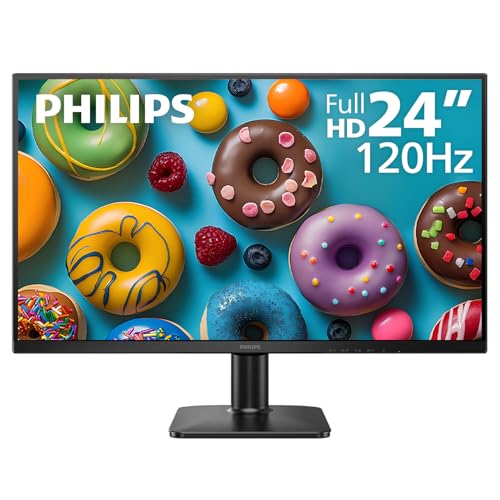
- 120Hz IPS Full HD display
- LowBlue Mode and flicker-free viewing
- HDMI and VGA connectivity
Best For: Office work, streaming, and casual gaming
Best Certified Eye-Care Pick

- TUV-certified eye-care features
- ePaper Mode for extended reading
- 100Hz IPS display with 99% sRGB
Best For: Reading, office productivity, and long screen sessions
Best Budget-Friendly Flexible Setup

- Flicker-free and Low Blue features
- Tilt stand and VESA compatibility
- HDMI and VGA ports with cable included
Best For: Home offices, basic entertainment, and flexible mounting
Balanced Eye-Care Pick – BenQ GW2490 24-inch IPS Monitor
The BenQ GW2490 is a practical computer monitor with eye care technology for work, study, and everyday entertainment. Its 24-inch Full HD IPS panel combines 100Hz motion, 99% sRGB coverage, flicker-free viewing, and Low Blue Light Plus features.
Best For: Home offices, general productivity, and users who want comfortable viewing with flexible connectivity.
Pros:
- Eye-Care Tech, Low Blue Light Plus, ePaper mode, and flicker-free technology support extended viewing.
- 100Hz refresh rate and FreeSync provide smoother scrolling and motion.
- IPS panel offers 178-degree viewing angles and 99% sRGB color coverage.
- Includes built-in speakers, DisplayPort, two HDMI connections, and VESA compatibility.
Cons:
- Full HD resolution gives less workspace than a higher-resolution monitor.
- 250-nit brightness is suited to typical indoor environments rather than especially bright rooms.
Choose the GW2490 if you want a well-rounded 24-inch display with strong eye-comfort features, smooth everyday performance, and useful connections without moving beyond Full HD.
High-Refresh Office Choice – ViewSonic VA2456A-MHD 24-inch Monitor
The ViewSonic VA2456A-MHD is a computer monitor with eye care technology aimed at comfortable office and study use. Its 24-inch 1080p IPS screen pairs a 120Hz refresh rate with Flicker-Free technology, a Blue Light Filter, and broad viewing angles.
Best For: Students, professionals, collaborative workspaces, and multi-monitor office setups.
Pros:
- 120Hz refresh rate makes scrolling and general motion feel smoother than standard 60Hz displays.
- SuperClear IPS technology provides consistent color and 178-degree viewing angles.
- Flicker-Free technology and a Blue Light Filter help support longer work sessions.
- DisplayPort-out supports daisy chaining, while HDMI, DisplayPort, and VGA provide connection flexibility.
Cons:
- It remains a 1920×1080 display, so it offers less desktop space than higher-resolution options.
- The supplied information does not list built-in speakers or USB-C connectivity.
This ViewSonic is a strong fit for users who prioritize smooth office interaction and flexible workspace expansion, especially when its daisy-chain capability can simplify a multi-monitor desk.
Large-Screen Comfort Value – Philips 271V8LB 27-inch Monitor
The Philips 271V8LB offers a larger 27-inch screen for users seeking a computer monitor with eye care technology at a Full HD resolution. Its VA panel emphasizes contrast, while EasyRead mode, a Blue Light Filter, Flicker-Free features, and a wide viewing angle support office and media use.
Best For: Document viewing, home offices, entertainment, and users who prefer a spacious screen.
Pros:
- 27-inch Full HD screen provides a larger viewing area for documents and media.
- VA panel delivers a 3000:1 contrast ratio with deeper blacks and brighter whites.
- EasyRead mode is designed to provide a more paper-like reading experience.
- 100Hz refresh rate, FreeSync, and 178-degree viewing angles add everyday versatility.
Cons:
- At 27 inches, Full HD may appear less sharp than a higher-resolution display at the same size.
- Connectivity is limited to HDMI and VGA in the supplied specifications.
- The glossy finish may be less suitable for rooms with significant reflections.
The 271V8LB makes sense when screen size and contrast matter more than advanced connectivity. Its reading and eye-care modes are particularly useful for document-heavy routines.
USB-C Productivity Upgrade – BenQ GW2790TC 27-inch IPS Monitor
The BenQ GW2790TC is a computer monitor with eye care technology designed for extended productivity. It combines a 27-inch Full HD IPS panel with 144Hz performance, Low Blue Light, Flicker-Free viewing, Visual Optimizer settings, and USB-C connectivity for a streamlined desk.
Best For: Laptop-based home offices, business deployments, multitasking, and users who want a high-refresh work display.
Pros:
- USB-C provides a one-cable connection for video, data, and power delivery according to the supplied notes.
- 144Hz refresh rate and a 2ms response time support smooth scrolling and responsive use.
- IPS technology, Low Blue Light, Flicker-Free viewing, and Visual Optimizer features target long work sessions.
- Height and tilt adjustment, pivot support, and a slim bezel improve desk flexibility.
Cons:
- The display is limited to Full HD resolution despite its 27-inch size.
- The supplied specifications list USB-C connectivity but do not detail additional HDMI or DisplayPort inputs.
- Its business-focused features may be more than necessary for basic browsing and document work.
Consider the GW2790TC when USB-C simplicity and ergonomic adjustment are priorities. It is especially compelling for laptop users who want eye-care features and fluid performance in one productivity-oriented monitor.
Best Compact Eye-Care Pick – ASUS VA249QG 24-Inch 120Hz Monitor
The ASUS VA249QG is a practical computer monitor with eye care technology for work, study, streaming, and casual gaming. Its 24-inch Full HD IPS panel combines 120Hz motion, broad viewing angles, and flicker-free and low-blue-light features for comfortable everyday use.
Best For: Home offices, dorm rooms, dual-monitor setups, and casual gaming where compact size and flexible connectivity matter.
Pros:
- 24-inch 1080p IPS display with 99% sRGB coverage and 178-degree viewing angles
- ASUS Eye Care technology includes TV-certified Flicker-Free and Low Blue Light features
- 120Hz refresh rate, 1ms MPRT, and Adaptive-Sync help reduce choppy motion, blur, and tearing
- HDMI, DisplayPort, VGA, built-in speakers, and VESA mounting support varied setups
Cons:
- Full HD resolution offers less workspace than higher-resolution monitors
- At 24 inches, it provides less screen area than a 27-inch alternative
This ASUS model is a well-rounded choice when eye-comfort features, smooth motion, and connectivity are more important than extra resolution or screen size. The three-year warranty with Advanced Replacement and Repair adds useful ownership support.
Best Value Office Choice – Philips 241V8LB 24-Inch 100Hz Monitor
The Philips 241V8LB is a straightforward computer monitor with eye care technology for office work, documents, entertainment, and general desktop use. Its VA panel emphasizes contrast, while Flicker-Free technology and EasyRead mode support more comfortable viewing during longer reading sessions.
Best For: Office workers, document-heavy tasks, home desktops, and multi-monitor arrangements that benefit from strong contrast and a slim-bezel design.
Pros:
- 23.8-inch Full HD display with a 3000:1 contrast ratio and 16.7 million colors
- Flicker-Free technology, Blue Light filtering, and EasyRead mode support extended viewing
- 100Hz refresh rate and Adaptive-Sync provide smoother scrolling and video playback
- Three-sided near-bezel-free design, VESA mounting, HDMI, and VGA support
Cons:
- VA response time is listed at 4ms, slower than the 1ms ASUS models
- Connectivity is limited to HDMI and VGA
- The glossy finish may not suit every lighting environment
The Philips is a sensible office-focused option for shoppers who prioritize contrast, reading comfort, and a clean multi-monitor design. It is less gaming-oriented than the ASUS alternatives but includes the essential eye-care and productivity features.
Best Large-Screen Eye-Care Pick – ASUS VA279QG 27-Inch 120Hz Monitor
The ASUS VA279QG offers a larger workspace in a computer monitor with eye care technology, pairing a 27-inch Full HD IPS display with 120Hz motion and ASUS Flicker-Free and Low Blue Light features. It is designed for work, study, streaming, multitasking, and casual gaming.
Best For: Users who want a larger screen for productivity and entertainment while retaining smooth motion, broad connectivity, and eye-comfort features.
Pros:
- 27-inch Full HD IPS display with 178-degree viewing angles and 99% sRGB coverage
- ASUS Eye Care technology combines TV-certified Low Blue Light and Flicker-Free features
- 120Hz refresh rate, 1ms MPRT, and Adaptive-Sync support smoother gameplay and video
- HDMI, DisplayPort, VGA, built-in speakers, VESA mounting, and a phone slot add flexibility
Cons:
- 27-inch screen uses Full HD resolution rather than a higher-resolution format
- Larger footprint requires more desk space than the 24-inch models
The VA279QG is the strongest fit for shoppers who prefer a spacious display without giving up eye-care features or gaming-friendly motion. Its 27-inch size is useful for multitasking, while the connection options make it adaptable to older and newer devices.
Best Smooth-Viewing Pick – Philips 24E2N2100
The Philips 24E2N2100 is a practical computer monitor with eye care technology for everyday office work, streaming, and casual gaming. Its 24-inch Full HD IPS panel, 120Hz refresh rate, LowBlue Mode, and flicker-free technology combine clear visuals with added comfort for extended sessions.
Best For: Office users and casual gamers who want smoother motion and basic eye-comfort features.
Pros:
- 120Hz refresh rate supports smoother motion than standard 60Hz displays.
- IPS panel delivers Full HD resolution and 178-degree viewing angles.
- LowBlue Mode and flicker-free technology help reduce eye fatigue.
- Three-sided narrow bezels work well in multi-monitor setups.
Cons:
- Only one HDMI port is listed.
- Its 1920×1080 resolution is suited to standard Full HD use rather than higher-resolution work.
- Connectivity is limited to HDMI and VGA.
Choose this Philips when a responsive 120Hz experience matters alongside straightforward eye-care features. FreeSync support and a 4ms response time add flexibility for casual gaming, while the included VGA input helps accommodate older devices.
Best Certified Eye-Care Pick – BenQ GW2491
The BenQ GW2491 is a strong computer monitor with eye care technology for readers, office workers, and anyone spending long periods in front of a screen. It pairs a 23.8-inch Full HD IPS display with TUV certification, Flicker-Free technology, Low Blue Light, Eyesafe 2.0, and a dedicated ePaper Mode.
Best For: Long reading sessions and productivity users prioritizing certified eye-comfort features.
Pros:
- TUV-certified eye-care design includes Flicker-Free and Low Blue Light features.
- ePaper Mode is designed to support more comfortable extended reading.
- IPS panel offers 99% sRGB coverage and wide-angle image consistency.
- 100Hz refresh rate provides smoother everyday movement.
Cons:
- It has a 1920×1080 Full HD resolution rather than a higher-resolution panel.
- Only one HDMI port is listed.
- The monitor’s 100Hz refresh rate is below the 120Hz rate of the Philips option.
The GW2491 stands out when eye comfort and reading-focused features are more important than maximum refresh rate. DisplayPort and HDMI support make it adaptable for laptops, desktops, and gaming consoles, while the slim-bezel design keeps the viewing area visually uncluttered.
Best Budget-Friendly Flexible Setup – SANSUI ES-24X5AL
The SANSUI ES-24X5AL is a straightforward computer monitor with eye care technology for home, office, entertainment, and light gaming use. Its 23.8-inch Full HD display includes flicker-free and Low Blue features, while the adjustable stand, VESA compatibility, and HDMI/VGA ports make placement and connection simple.
Best For: Home and office users seeking an affordable, flexible monitor with basic eye-care functions.
Pros:
- Flicker-free and Low Blue features support more comfortable viewing.
- 178-degree viewing angles and a matte screen finish suit shared workspaces.
- Tilt adjustment and 75x75mm VESA compatibility provide mounting flexibility.
- Includes HDMI and VGA inputs, plus an HDMI cable.
Cons:
- Refresh rate is limited to 75Hz.
- No speakers or headphone jack are included.
- Warranty coverage is listed as 12 months, with separate 30-day replacement and lifetime technical-support terms.
This SANSUI model is a sensible choice for basic productivity and entertainment where mounting flexibility and simple eye-care settings matter. FreeSync and a listed 1ms response time add gaming-oriented features, but its 75Hz refresh rate is more modest than the other monitors in this roundup.
How We Picked the Best Computer Monitor with Eye Care Technology
We focused on monitors that explicitly include comfort-oriented features such as flicker-free backlighting, low-blue-light modes, adaptive brightness, or eye-care certifications. We also considered panel type, resolution, refresh rate, connectivity, ergonomics, mounting support, and overall suitability for common desk setups.
Every model here uses a practical Full HD resolution, making it appropriate for everyday productivity without demanding an expensive graphics card. The list includes IPS and VA displays in 24- and 27-inch sizes, with refresh rates ranging from 100Hz to 144Hz.
Quick Comparison
| Best For | Recommended Type | Features to Prioritize |
|---|---|---|
| Office work and study | 24-inch IPS | Flicker-free mode, low blue light, adjustable brightness |
| More screen space | 27-inch Full HD | Viewing distance, IPS or VA contrast, VESA support |
| Casual gaming | 100Hz–144Hz model | High refresh rate, adaptive sync, DisplayPort or HDMI |
| Flexible laptop setup | USB-C-equipped monitor | Single-cable video, charging, and data support |
Key Buying Factors for a Computer Monitor with Eye Care Technology
Eye-Comfort Features
Look for flicker-free operation and a low-blue-light setting that can be enabled without making the image excessively yellow. Adaptive brightness can help in changing room conditions, while a matte coating may reduce distracting reflections. These features support comfort, but regular breaks and sensible screen placement still matter.
Panel, Size, and Resolution
IPS panels generally offer wider viewing angles and consistent colors, while VA panels often provide deeper contrast. A 24-inch 1080p monitor produces a relatively sharp, manageable desktop image. A 27-inch 1080p display offers larger text and workspace, but it looks best when positioned far enough away to avoid visible pixel structure.
Refresh Rate and Connectivity
A 100Hz or 120Hz refresh rate makes scrolling and cursor movement feel smoother than standard 60Hz. A 144Hz model is more appealing for gaming. Check that the monitor has the inputs your computer needs, including HDMI, DisplayPort, or USB-C, and confirm whether speakers, audio output, or a hub are important to your setup.
Ergonomics and Mounting
Tilt adjustment is useful, while height adjustment is better for achieving a comfortable eye level. VESA compatibility lets you use a monitor arm or wall mount. If the stand is basic, budget for an external mount when planning a long-workday workstation.
Who Should Buy Which Computer Monitor with Eye Care Technology?
Choose a 24-inch IPS model if you want a compact, balanced screen for writing, browsing, remote work, or school. Select a 27-inch monitor if larger text and a more spacious workspace matter more than desk depth. For smoother gaming and scrolling, prioritize the 120Hz or 144Hz options. If you regularly connect a laptop, the BenQ USB-C model is the most convenient choice, provided its USB-C capabilities match your computer. For a simple, low-cost secondary display, a basic HDMI/VGA model can be sufficient.