The right business monitor can make everyday work more comfortable, organized, and productive. Screen size, panel quality, refresh rate, connectivity, and ergonomic adjustment all matter when you spend hours reading documents, managing spreadsheets, or joining video calls.
Our roundup includes practical options for home offices, shared workstations, multitasking, and budget-conscious setups. Use the guide below to narrow the choices based on your workspace, workload, and preferred features.
Best 10 Computer Monitor for Business Use Picks for 2026
Best for Video Conferencing

- Built-in webcam, mic array, and speakers
- 27-inch 1080p IPS display
- Flexible ergonomic stand and connectivity
Best For: Remote work and frequent video meetings
Best for Smooth Office Scrolling

- 100Hz refresh rate for smoother motion
- IPS panel with wide viewing angles
- Height adjustment and pivot support
Best For: Everyday office work and multitasking
Best for Ergonomic Comfort

- Height, tilt, swivel, and pivot adjustments
- 100Hz refresh rate with 99% sRGB
- Built-in dual 5W speakers
Best For: Comfort-focused office work
Best Large-Screen Value
Samsung S32B304N 32-Inch Monitor

- Spacious 32-inch Full HD display
- Three-sided borderless design
- Eye Saver Mode and Flicker Free technology
Best For: General office work on a large screen
Best All-Around Office Pick
HP Series 3 27-inch FHD Monitor

- 27-inch IPS Full HD display with 100Hz refresh rate
- HDMI, DisplayPort, and VGA connectivity
- Built-in speakers and Eyesafe-certified eye comfort
Best For: Larger-screen office setups and dual-monitor workstations
Best Contrast for Documents
Philips 24-inch FHD VA Monitor

- VA panel delivers a 3000:1 contrast ratio
- EasyRead mode supports lengthy document work
- Three-sided frameless design suits multi-monitor setups
Best For: Document-heavy office work in compact spaces
Best Budget Multimedia Option
Sceptre 24-inch Prime FHD Monitor

- 24-inch Full HD screen with 99% sRGB coverage
- Two HDMI ports, VGA, and built-in speakers
- Blue Light Shift and tilt adjustment for everyday use
Best For: Budget home offices and mixed work-and-media setups
Value Office Pick
Acer KB220Q H2bi 21.5-inch Monitor

- 21.5-inch Full HD display for compact workspaces
- 100Hz refresh rate with 1ms response time
- ZeroFrame design and HDMI/VGA connectivity
Best For: Everyday office work and compact multi-monitor setups
Ergonomic Workstation Choice
Dell P2419H 24-inch IPS Monitor
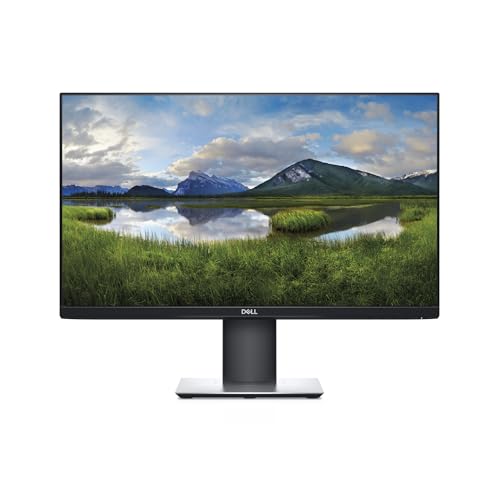
- 24-inch Full HD IPS panel with 178-degree viewing
- Height, pivot, swivel, and tilt adjustments
- ComfortView plus HDMI, DisplayPort, VGA, and USB
Best For: Long office sessions and adjustable professional workstations
High-Refresh Business Pick
Dell SE2426H 24-inch IPS Monitor

- 23.8-inch Full HD IPS display with 144Hz refresh
- 1ms MPRT, FreeSync, and two HDMI ports
- TÜV 3-star eye comfort and thin bezels
Best For: Workstations that also handle streaming and smooth motion
Best for Video Conferencing – ASUS BE279QSK 27-Inch Monitor
The ASUS BE279QSK is a practical computer monitor for business use when video meetings are part of your daily workflow. Its built-in webcam, microphone array, stereo speakers, adjustable stand, and broad port selection help reduce desktop clutter while supporting comfortable, productive work.
Best For: Remote workers, video conferencing, online learning, and business users who want an all-in-one monitor setup.
Pros:
- Integrated Full HD adjustable webcam, microphone array, and stereo speakers
- 27-inch 1080p IPS display with 178-degree viewing angles
- Highly adjustable stand with tilt, swivel, pivot, and 150mm height adjustment
- Includes HDMI, DisplayPort, VGA, USB, audio, and headphone connectivity
Cons:
- 60Hz refresh rate is less fluid than newer 100Hz business monitors
- 1080p resolution offers less workspace than a higher-resolution display of the same size
Choose this ASUS if built-in conferencing hardware is more valuable to you than a faster refresh rate. Its 3-year warranty with Advanced Replacement and Repair service is also useful for business environments.
Best for Smooth Office Scrolling – Samsung S40GD 27-Inch Monitor
The Samsung S40GD is a versatile computer monitor for business use, combining a borderless 27-inch IPS display with a 100Hz refresh rate. It suits office work, browsing, video, and occasional gaming while offering height adjustment and pivot positioning for a more adaptable desk setup.
Best For: Business users who want smooth scrolling, consistent viewing angles, and a modern borderless design.
Pros:
- 100Hz refresh rate supports smoother scrolling and motion
- IPS panel maintains color clarity across wide viewing angles
- Height adjustment and pivot support flexible positioning
- Flicker reduction, reduced blue light, and a USB hub support longer work sessions
Cons:
- Full HD resolution provides limited workspace for complex multitasking
- No integrated webcam or speakers is listed in the supplied specifications
The S40GD is a strong middle-ground option for offices that value a smoother feel than a standard 60Hz monitor. Its slim border bezels also make it suitable for multi-monitor arrangements.
Best for Ergonomic Comfort – Dell S2725HS 27-Inch Monitor
The Dell S2725HS is a well-rounded computer monitor for business use, with a fully adjustable stand, 100Hz refresh rate, built-in speakers, and 99% sRGB coverage. Its ComfortView Plus technology is designed to reduce blue light emissions without sacrificing color accuracy during extended work sessions.
Best For: Office users who prioritize ergonomic positioning, comfortable viewing, and integrated audio.
Pros:
- Stand supports height, tilt, swivel, and pivot adjustments
- 100Hz refresh rate and 1500:1 contrast ratio support smooth, clear visuals
- 99% sRGB coverage and TÜV Rheinland Eye Comfort 4-star rating
- Integrated dual 5W speakers and two HDMI ports
Cons:
- Only a 1-year warranty is listed
- Connectivity is centered on HDMI, with no DisplayPort listed in the supplied specifications
- 1080p resolution may feel limiting for dense side-by-side workflows
This Dell is a sensible choice for a conventional office desk where comfort and adjustability matter. The built-in speakers add convenience for calls, videos, and casual media without requiring separate desktop speakers.
Best Large-Screen Value – Samsung S32B304N 32-Inch Monitor
The Samsung S32B304N provides a large 32-inch screen for computer monitor for business use shoppers who want more physical display area without moving beyond Full HD resolution. Its three-sided borderless design, 75Hz refresh rate, and eye-care features make it suitable for general office work and multimedia.
Best For: Users who prefer a spacious single-screen workspace for documents, presentations, and general desktop tasks.
Pros:
- Large 32-inch display with a 4000:1 contrast ratio
- Three-sided borderless design works well in multi-monitor setups
- 75Hz refresh rate and AMD FreeSync support smoother visuals
- Flicker Free technology and Eye Saver Mode support extended use
Cons:
- 1920×1080 resolution is relatively low for a 32-inch screen
- Only one HDMI port is listed
- No height, swivel, or pivot adjustment is listed
This Samsung makes the most sense when screen size is the priority and your work does not require especially high pixel density. It offers a simple, spacious display with a 3-year manufacturer warranty and B2B support.
Best All-Around Office Pick – HP Series 3 27-inch FHD Monitor
If you want a practical computer monitor for business use, the HP Series 3 combines a roomy 27-inch Full HD screen with an IPS panel, useful connectivity, and built-in speakers. Its 100Hz refresh rate and ergonomic features also suit busy everyday workflows.
Best For: Office users who want a larger screen, wide viewing angles, and flexible connections for a desktop or laptop.
Pros:
- 27-inch 1920 x 1080 IPS display with 178-degree viewing angles
- HDMI, DisplayPort, and VGA inputs support varied office setups
- 100Hz refresh rate, built-in speakers, and Eyesafe-certified low-blue-light technology
- Four-way adjustability through the HP Display Center ergonomic setup guide
Cons:
- Full HD resolution is less detailed than a QHD monitor at this screen size
- Includes only one HDMI port
This is a well-rounded choice for general office work, especially if you value screen space, modern digital and legacy inputs, and eye-comfort features. The three-sided micro-edge design also works well in a dual-monitor arrangement.
Best Contrast for Documents – Philips 24-inch FHD VA Monitor
The Philips 241V8LB is a compact computer monitor for business use with a 23.8-inch Full HD VA panel. Its high 3000:1 contrast ratio, EasyRead mode, and flicker-free design make it a sensible fit for documents, spreadsheets, and everyday desktop tasks.
Best For: Office workers who prioritize strong contrast, comfortable document reading, and a space-efficient display.
Pros:
- Full HD resolution with a VA panel and 3000:1 contrast ratio
- 178-degree viewing angles help maintain consistent colors off-center
- EasyRead mode is designed for lengthy documents
- Three-sided frameless design supports multi-monitor setups
Cons:
- Connectivity is limited to HDMI and VGA
- Its glossy finish may be less suitable for brightly lit offices
Choose this Philips model when readable documents and deep blacks matter more than extensive connectivity. Its 23.8-inch size is easy to accommodate, while the VESA mounting support adds flexibility for desk or arm installations.
Best Budget Multimedia Option – Sceptre 24-inch Prime FHD Monitor
For budget-conscious buyers, the Sceptre E248W-19203R is a straightforward computer monitor for business use with a 24-inch Full HD display, built-in speakers, and two HDMI ports. Its blue-light setting and compact design add practical value for mixed work and entertainment.
Best For: Home offices and general business tasks where low cost, built-in audio, and flexible HDMI connectivity are priorities.
Pros:
- 24-inch 1920 x 1080 display with a wide 178-degree viewing angle
- Two HDMI ports plus VGA provide convenient device compatibility
- Built-in speakers, headphone jack, and audio input save desk space
- 99% sRGB color coverage and Blue Light Shift support everyday multimedia use
Cons:
- Listed specifications show a 60Hz refresh rate and 8ms response time
- Only tilt adjustment is specified
- One-year limited warranty is shorter than some competing options
This Sceptre is a practical entry-level pick for routine office work, video, and occasional gaming. It offers more audio and HDMI convenience than many basic monitors, though users seeking more ergonomic adjustment or faster listed performance may prefer the HP or Philips options.
Value Office Pick – Acer KB220Q H2bi 21.5-inch Monitor
If you need a straightforward computer monitor for business use, the Acer KB220Q H2bi delivers a compact 21.5-inch Full HD workspace with clear text, a matte finish, and a 100Hz refresh rate. Its near-bezel-less design also works well in side-by-side monitor setups.
Best For: Everyday office work, compact desks, and budget-conscious multi-monitor setups.
Pros:
- Full HD 1920×1080 resolution provides clear text and detailed images.
- 100Hz refresh rate and 1ms response time support smooth motion.
- HDMI and VGA connectivity, plus tilt adjustment, suit basic desktop setups.
- ZeroFrame design helps create a more continuous multi-monitor view.
Cons:
- The 21.5-inch screen is smaller than the 24-inch alternatives here.
- Its stand offers tilt adjustment only, without height, swivel, or pivot movement.
- Connectivity is limited to one HDMI port and VGA.
The Acer is a practical choice when desk space and cost matter most. It covers core office needs while adding a faster refresh rate than many traditional business monitors.
Ergonomic Workstation Choice – Dell P2419H 24-inch IPS Monitor
The Dell P2419H is a flexible computer monitor for business use, pairing a 24-inch Full HD IPS panel with wide viewing angles and an adjustable stand. Its ComfortView and flicker-free features are especially useful for extended desk sessions.
Best For: Office professionals who prioritize ergonomics, eye comfort, and versatile connectivity.
Pros:
- IPS technology delivers consistent color across a 178-degree viewing angle.
- Height, pivot, swivel, and tilt adjustments support a more comfortable setup.
- ComfortView, flicker-free operation, and an anti-glare screen help with prolonged viewing.
- Includes HDMI, DisplayPort, VGA, and multiple USB ports.
Cons:
- The 60Hz refresh rate is less fluid than the faster Acer and Dell SE2426H.
- The listed 8ms response specification is not aimed at fast-action use.
- The design is less compact than the 21.5-inch Acer.
For conventional office productivity, the P2419H offers the most complete ergonomic package in this group. Its broad adjustment range and extensive ports make it easy to integrate into a professional workstation.
High-Refresh Business Pick – Dell SE2426H 24-inch IPS Monitor
For buyers who want a computer monitor for business use that also handles smooth motion, the Dell SE2426H combines a 23.8-inch Full HD IPS display with a 144Hz refresh rate and 1ms MPRT. Its thin bezels and wide viewing angle keep the workspace clean and easy to share.
Best For: Mixed work, streaming, and motion-focused desktop use.
Pros:
- 144Hz refresh rate and 1ms MPRT provide notably fluid motion.
- IPS technology supports consistent color from wide viewing angles.
- TÜV Rheinland 3-star eye-comfort certification helps reduce harmful blue light.
- Two HDMI ports and thin bezels support flexible, streamlined setups.
Cons:
- The stand provides tilt adjustment only.
- It lacks DisplayPort, VGA, and USB connectivity.
- The one-year advanced exchange warranty is shorter than the Acer and Dell P2419H coverage listed.
The SE2426H is the strongest fit when smooth scrolling, video, or occasional gaming matters alongside office work. Choose it over the P2419H if refresh rate is more important than ergonomic stand adjustments and broader port selection.
How We Picked the Best Computer Monitor for Business Use
We focused on features that matter during typical office work rather than gaming-only specifications. The selection covers dependable 24- to 32-inch displays, with attention to resolution, panel type, refresh rate, viewing comfort, connectivity, built-in audio, webcam availability, and mounting support. We also included options across different budgets so buyers can choose between basic productivity and more polished long-term setups.
Full HD remains suitable for email, documents, web applications, and general administration on smaller screens. Larger monitors benefit from a higher resolution when available, but screen size should be matched to viewing distance and desk space.
Quick Comparison
| Best For | Recommended Type | Why It Matters |
|---|---|---|
| Video meetings | ASUS BE279QSK | Integrated webcam and business-friendly connectivity |
| General office work | Samsung S40GD or HP Series 3 | 27-inch IPS viewing area with comfortable everyday performance |
| Large spreadsheets | Samsung 32-inch monitor | More screen space for multitasking |
| Small desks | Philips 241V8LB or Dell P2419H | Compact 24-inch formats for standard workstations |
| Budget setups | Acer KB220Q H2bi or Sceptre E248W-19203R | Affordable Full HD productivity displays |
| Smoother motion | Dell SE2426H | Higher refresh rate and IPS technology |
Key Buying Factors for a Computer Monitor for Business Use
Screen Size and Resolution
A 24-inch Full HD monitor is a practical choice for focused desk work and limited spaces. A 27-inch screen provides more comfortable room for side-by-side windows, while a 32-inch display suits spreadsheets, dashboards, and multitasking. At larger sizes, consider whether Full HD provides enough sharpness for your viewing distance.
Panel Quality and Comfort
IPS panels generally offer consistent colors and wide viewing angles, which helps in collaborative offices or dual-monitor arrangements. VA panels can provide stronger contrast. Look for flicker reduction, low-blue-light modes, matte anti-glare coatings, and eye-comfort certifications if you work long hours.
Ergonomics and Connectivity
Height, tilt, swivel, and VESA compatibility can make a major difference in daily comfort. Check that the monitor includes the inputs your computer supports, such as HDMI or DisplayPort. Built-in speakers and a webcam can reduce desk clutter, but dedicated peripherals may still deliver better audio and video quality.
Refresh Rate and Extra Features
60Hz is adequate for most office tasks, while 100Hz or higher can make scrolling and window movement feel smoother. A fast refresh rate is useful for mixed work and entertainment, but it should not outweigh better ergonomics, image clarity, or reliable connectivity.
Who Should Buy Which Computer Monitor for Business Use?
Choose the ASUS model if video conferencing is central to your work and you want an integrated webcam. Pick a 27-inch IPS option from Samsung, HP, or Dell for a balanced primary office display. The Samsung 32-inch model is better for users who prioritize workspace and frequently compare documents or applications.
For compact desks or multi-monitor arrays, consider a 24-inch Philips or Dell display. Buyers seeking the lowest-cost functional setup should look at Acer or Sceptre. If smooth scrolling and general-purpose versatility matter more than the lowest price, the Dell SE2426H offers a stronger refresh-rate specification in a compact format.