USB duplicators with erase functions can streamline everything from IT deployment and media production to drive recycling and data sanitization. The right model depends on how many target drives you need to process, which interfaces you use, and how thoroughly you must erase existing data.
This roundup compares 10 standalone and docking-style options, ranging from compact 1:1 and 1:2 units to high-capacity systems designed for copying dozens of USB drives at once.
Best 10 USB Duplicators with Erase Functions Picks for 2026
Best Overall Docking Station
StarTech.com USB Duplicator and SATA Cloner

- Copies or erases two USB drives standalone
- Includes DoD 3-pass and quick-erase modes
- Docks 2.5- and 3.5-inch SATA drives
Best For: IT teams needing USB sanitizing and SATA drive access
Best Compact USB Eraser
Vinpower 1-to-3 Standalone Duplicator

- Copies three USB drives without a PC
- Provides Smart Copy and Raw Copy modes
- Uses DoD 5220.22-M data wiping
Best For: Compact USB duplication and secure drive retirement
Best High-Capacity Sanitizer
Acumen Disc 1-to-7 USB Duplicator

- Copies up to seven Type-A drives at once
- Includes quick, full, DoD 3-pass, and 7-pass erasure
- Adds copy-and-compare verification
Best For: Batch duplication and sanitizing of Type-A flash drives
Best for Nine Drives
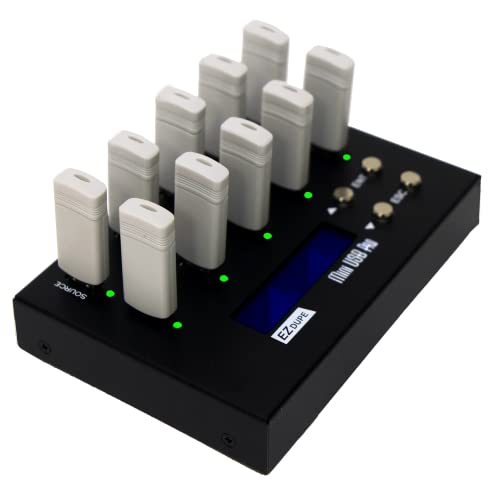
- Copies up to nine USB drives simultaneously
- Offers quick and whole-media copy modes
- Supports two erase functions and 2TB external drives
Best For: High-volume USB duplication with occasional hard-drive support
Best Standalone Choice
Vinpower USBDBL 15-Target Duplicator

- 15-target standalone USB duplication
- Asynchronous, Smart Copy, and Raw modes
- Secure erase with optional flash adapters
Best For: High-volume USB copying and drive sanitization
Best Erase-Mode Variety

- Four erase modes, including DoD options
- Supports flash drives, HDDs, and SSDs
- Four copy modes with one-touch controls
Best For: Flexible USB and external-drive duplication
Best High-Capacity Station

- Duplicates up to 39 USB targets
- Three erase modes and asynchronous copying
- Up to 2 GB/minute copy speed
Best For: Large-scale USB duplication and sanitization
Best Multi-Bay SATA Workstation
4-Bay HDD Duplicator and Eraser

- 1:3 standalone SATA cloning
- Secure Erase with NIST alignment
- USB/eSATA docking functionality
Best For: IT teams processing multiple SATA drives
Best High-Volume USB Production Unit
1:47 USB Duplicator and Eraser

- Copies to up to 47 USB targets
- Asynchronous standalone operation
- Smart, Raw, and Secure Erase modes
Best For: Bulk USB duplication and sanitization
Best One-to-One Sanitizer
SATA and USB Duplicator/Eraser

- Four copy and five erase modes
- Copies between SATA and USB
- Copy-and-Compare verification
Best For: Technicians sanitizing individual mixed-interface drives
Best Overall Docking Station – StarTech.com USB Duplicator and SATA Cloner
For buyers seeking USB duplicators with erase functions plus drive-docking flexibility, the StarTech.com USBDUP12 combines standalone USB copying with a dual-bay SATA HDD/SSD dock. It supports several copy and erase modes, including a DoD 3-pass overwrite, without requiring a PC for USB duplication.
Best For: IT teams that need USB sanitizing alongside SATA drive cloning and external storage access.
Pros:
- Copies or erases two USB drives without a computer.
- Offers sector-by-sector, file/system, quick-erase, and DoD 3-pass modes.
- Supports 2.5- and 3.5-inch SATA HDDs and SSDs over USB 3.2 Gen 2.
- LCD provides drive information, speeds, and error scans.
Cons:
- Its broader docking-station design may be more than needed for USB-only duplication.
- DoD erasure is specified as a 3-pass mode, rather than the 7-pass option found on some larger duplicators.
This is a versatile choice when a USB eraser and a SATA docking station are useful in the same workspace. Asynchronous copying also helps maintain a steady workflow when replacing finished drives.
Best Compact USB Eraser – Vinpower 1-to-3 Standalone Duplicator
The Vinpower Flash Memory USB Duplicator is a compact option for organizations needing USB duplicators with erase functions in a standalone format. It supports Smart Copy for accessible files, Raw Copy for bit-by-bit duplication, and DoD 5220.22-M data wiping.
Best For: Small offices and professional teams that regularly duplicate or securely retire USB flash drives.
Pros:
- Duplicates up to three USB drives without a PC.
- Smart Copy and Raw Copy cover file-based and complete cloning tasks.
- DoD 5220.22-M erasure supports secure drive reuse, recycling, or disposal.
- Read Error Skip can bypass damaged sectors during duplication.
Cons:
- Its three-port capacity is lower than larger multi-drive duplicators.
- The supplied notes focus on USB flash media rather than SATA drive docking.
Choose this model for portability and straightforward USB-focused work. Read Error Skip adds useful flexibility when the source drive is aging or contains partially damaged media.
Best High-Capacity Sanitizer – Acumen Disc 1-to-7 USB Duplicator
The Acumen Disc AD07-USB is built for higher-volume workflows, making it a strong candidate among USB duplicators with erase functions. It can copy up to seven Type-A flash drives at once and provides quick, full, DoD 3-pass, and DoD 7-pass erase options.
Best For: Businesses, deployment teams, and service desks that need to duplicate or sanitize several Type-A USB drives simultaneously.
Pros:
- Supports simultaneous copying to up to seven USB drives.
- Offers four erase modes, including DoD 3-pass and 7-pass options.
- Copy-and-compare helps verify successful duplication.
- Supports synchronous and asynchronous operation plus file or whole-media copying.
Cons:
- It supports standard USB Type-A media; USB-C drives require a separate adapter.
- Hardware-encrypted or protected USB devices are not supported.
- The listed transfer rate is up to 35 MB/s, below some newer USB 3.2-based equipment.
With seven slots and extensive erase choices, this is the most suitable option here for batch Type-A media handling. Confirm drive compliance before purchase, especially if your workflow uses encrypted or USB-C flash drives.
Best for Nine Drives – EZ Dupe MiniUSB Pro 1-to-9
The EZ Dupe MiniUSB Pro is designed for large batches, copying up to nine USB flash drives simultaneously. Its quick and whole-media copy modes, along with two erase functions, make it a practical choice among USB duplicators with erase functions for routine distribution and sanitizing tasks.
Best For: Users who prioritize maximum simultaneous USB capacity and occasional external USB hard-drive support.
Pros:
- Copies up to nine USB flash or thumb drives at the same time.
- Supports quick copying of essential files and sector-by-sector whole-media copying.
- Includes two erase functions for data-sanitizing workflows.
- Works with external USB-powered hard drives up to 2TB when they have their own power source.
Cons:
- The supplied notes do not specify DoD-branded erase standards.
- External hard drives require their own power source.
- Its listed read speed is about 35 MB/s, so it is aimed at capacity rather than newer high-speed USB performance.
This model stands out when nine simultaneous destinations matter more than advanced erase-standard details. Its support for external USB hard drives also broadens its usefulness beyond flash-drive duplication.
Best Standalone Choice – Vinpower USBDBL 15-Target Duplicator
For buyers comparing usb duplicators with erase functions, the Vinpower USBDBL stands out as a standalone 15-target system that needs no computer. Its asynchronous duplication, Smart Copy, Raw Mode, and secure erase tools make it suited to repeatable copying and drive sanitization.
Best For: Businesses and labs that need high-volume USB duplication with independent copying and secure erasure.
Pros:
- Copies to 15 USB drives asynchronously without requiring a PC.
- Offers Smart Copy for accessible files and Raw Mode for bit-by-bit duplication.
- Securely erases USB drives, with support for added flash-media adapters.
Cons:
- Its 11-pound standalone design is less convenient for occasional or portable use.
- Additional interface adapter modules are needed for formats such as SD or CompactFlash.
The USBDBL is a strong fit when throughput, independent target operation, and data removal matter more than compactness. Its one-year warranty adds basic coverage for a professional-oriented setup.
Best Erase-Mode Variety – EZ Dupe USB Cyclone 1-to-15
The EZ Dupe USB Cyclone is a practical option among usb duplicators with erase functions, combining 1-to-15 copying with support for USB flash drives and external HDDs or SSDs. It also provides four erase modes, including Quick, Full, DoD 3-pass, and DoD 7-pass options.
Best For: Users who need flexible copying and multiple data-erasure standards across USB drives and external storage.
Pros:
- Supports USB 1.0 through 3.1 devices and external USB hard drives.
- Includes four erase modes, from Quick and Full to DoD 3-pass and 7-pass.
- Provides four copy modes and independent bandwidth for each channel.
Cons:
- Its listed transfer speed is up to 45 MB/s, so performance depends on the connected USB devices.
- The seven-pound unit is less compact than a simple single-drive copier.
With one-touch copy, compare, erase, and format functions, the Cyclone is easy to operate without software or a computer. Its broad device and capacity support makes it versatile for mixed-storage workflows.
Best High-Capacity Station – EZ Dupe Xtreme 1-to-39
For large production runs, the EZ Dupe Xtreme is a high-capacity choice among usb duplicators with erase functions. This standalone 1-to-39 system supports USB flash drives and external hard drives, with synchronous and asynchronous copying plus three erase modes.
Best For: Organizations that need to duplicate or sanitize many USB devices in a single workflow.
Pros:
- Handles up to 39 target drives without a computer.
- Supports synchronous and asynchronous copying, including sources larger than system memory.
- Offers three erase modes and copy speeds up to 2 GB per minute.
Cons:
- At 25 pounds, it is intended for a dedicated workspace rather than portability.
- The supplied notes do not specify the exact erase-mode standards.
The Xtreme prioritizes scale and workflow speed, making it a better match for regular batch operations than occasional home use. A three-year warranty and lifetime support provide useful coverage for ongoing deployment.
Best Multi-Bay SATA Workstation – 4-Bay HDD Duplicator and Eraser
For IT teams that need to clone and sanitize several SATA drives, this four-bay StarTech.com unit is one of the more capable USB duplicators with erase functions. It works as a standalone 1:3 duplicator, an eraser, and a USB 3.0 or eSATA docking station for 2.5- and 3.5-inch SATA drives.
Best For: IT professionals handling multiple SATA HDDs or SSDs and needing standalone cloning, secure erasure, and drive access.
Pros:
- Four bays enable one source drive to be copied to up to three targets.
- Supports Quick Erase and Secure Erase aligned with NIST SP 800-88 Rev. 1 Purge.
- Works with 2.5- and 3.5-inch SATA drives, with included adapters for certain IDE drives.
- Can also function as a USB or eSATA docking station.
Cons:
- Target drives must be equal to or larger than the source for cloning.
- Its SATA-focused design is less suitable for USB flash-drive duplication.
This is a practical choice when capacity and drive versatility matter more than a compact footprint. The LCD menu, drive doors, eject buttons, and multiple connection options make it well suited to repeatable bench work.
Best High-Volume USB Production Unit – 1:47 USB Duplicator and Eraser
For large duplication runs, the Vinpower Digital USBDupeBoxES is a specialized option among USB duplicators with erase functions. Its standalone design can copy one USB master to as many as 47 targets, while asynchronous operation lets connected targets proceed independently.
Best For: Organizations producing or sanitizing USB flash drives and USB-connected external HDDs or SSDs in high volume.
Pros:
- Supports up to 47 USB target devices without requiring a PC.
- Asynchronous duplication allows targets to operate independently.
- Offers Smart Copy for accessible content and Raw Mode for bit-by-bit copying.
- Secure Erase is designed to remove USB-device content without leaving recoverable data.
Cons:
- Its 27-pound chassis is substantially less portable than smaller duplicators.
- The high-capacity design may be excessive for occasional one-to-one copying.
- Alternative flash formats require corresponding add-on interface modules.
This model is built for throughput rather than casual desktop use. The 600-watt power supply, PC-exportable job logs, and asynchronous workflow make it a strong fit for production, deployment, or bulk sanitization environments.
Best One-to-One Sanitizer – SATA and USB Duplicator/Eraser
This StarTech.com unit is a flexible one-to-one choice for buyers comparing USB duplicators with erase functions. It can copy between SATA drives and USB thumb drives, and it provides four duplication modes plus five erase modes from a standalone LCD-controlled interface.
Best For: Technicians who need detailed cloning and sanitization options for individual SATA HDDs, SSDs, or USB flash drives.
Pros:
- Supports cross-interface copying between SATA and USB devices.
- Includes Quick, Full, Secure, Cryptographic, and 3-Pass Overwrite erase modes.
- Offers System & File, All Partitions, Percentage, and sector-by-sector copy modes.
- Copy & Compare helps verify the cloned drive against the source.
Cons:
- Its 1:1 design does not support simultaneous multi-target duplication.
- Adapters for eSATA, mSATA, IDE, and M.2 SATA are sold separately.
Choose this model when erase-method selection and cross-interface support are more important than copying speed at scale. Its toolless drive handling and LCD menu keep routine cloning and wiping straightforward.
How We Picked the Best USB Duplicators with Erase Functions
We focused on the features that most affect real-world copying and sanitization work: target-drive count, support for USB flash drives and external hard drives, SATA compatibility, copying speed, standalone operation, erase modes, and ease of use. We also considered whether each unit suits occasional duplication, recurring business workflows, or high-volume production.
Models with LCD controls and standalone operation earned particular attention because they can reduce dependence on a computer. We also looked for products that clearly support multiple drive types, since a USB-only duplicator may not be the best choice for users who regularly handle HDDs or SSDs.
Quick Comparison
| Best For | What to Prioritize | Typical Capacity |
|---|---|---|
| Occasional copying | Simple controls, compact design, 1:1 or 1:2 operation | One or two targets |
| Small offices and technicians | Standalone use, multiple erase modes, USB and SATA support | Three to nine targets |
| Production and deployment | High target count, sustained speed, status monitoring | 15 to 47 targets |
| Drive recycling | Dedicated erase or sanitizer functions and verification | Varies by interface |
Key Buying Factors for USB Duplicators with Erase Functions
Target Count and Throughput
Choose capacity based on your normal workload, not your occasional maximum. A 1:1 or 1:2 unit is easier to store and may be sufficient for a technician, while a 1:15, 1:39, or 1:47 system can reduce labor dramatically for large batches. Check whether the advertised speed applies to simultaneous copies and whether the source drive can sustain that rate.
Drive and Interface Compatibility
Confirm support for the media you actually use. Some products focus on USB flash drives, while others also accommodate external USB hard drives, SATA HDDs, or SATA SSDs. USB 2.0 support may be adequate for older media, but USB 3.x and compatible source drives can significantly reduce transfer times.
Erase Modes and Verification
Erase functions vary widely. Look for clearly specified overwrite methods, quick erase options, full erase modes, and any verification or comparison feature. If the duplicator is used for client, workplace, or regulated data, document which erase mode is appropriate and whether the process produces useful completion information.
Standalone Controls and Reliability
A standalone unit should offer readable status information, intuitive buttons, and clear error handling. For frequent use, consider cooling, power requirements, warranty coverage, and the physical spacing around ports. Larger systems need a stable workspace and may be less convenient to move.
Who Should Buy Which USB Duplicators with Erase Functions?
Choose a compact StarTech.com-style 1:1 or 1:2 solution for occasional cloning, basic sanitization, and mixed USB/SATA tasks. Small businesses, repair shops, and IT departments will generally benefit from a 1:3 to 1:9 standalone duplicator with dedicated erase modes. If you regularly prepare large batches of identical media, step up to a 15-, 39-, or 47-target system to improve throughput and reduce hands-on time. For organizations focused primarily on retiring or repurposing drives, prioritize verified sanitization features over maximum copy count.