A good gaming desk does more than hold a monitor and keyboard. The right size, layout, storage, cable management, and power features can make a gaming or work-from-home setup feel considerably cleaner without pushing the budget too high.
We selected 10 gaming desks under $200 that cover a range of room sizes and setup needs, from compact carbon-fiber desktops to large L-shaped and storage-heavy designs. Use the guide below to compare the most important differences before buying.
Best 10 Gaming Desks Under 200 Picks for 2026
Best Compact L-Shape Pick
AODK Reversible LED Gaming Desk

- Reversible 53-inch L-shaped layout
- Three outlets and two USB ports
- Shelves, CPU stand, hook, and storage bag
Best For: Compact corner gaming and home-office setups
Best Large Workstation
SEDETA 75-Inch LED Gaming Desk

- Wide workstation for two computers
- Hutch, display cabinets, and shelves
- Four outlets plus two USB ports
Best For: Large gaming rooms and multi-device workstations
Best Organized Small-Space Desk
DUMOS 52-Inch Reversible Gaming Desk

- Three drawers plus shelf and side hook
- Reversible layout with RGB lighting
- Three outlets and two USB ports
Best For: Compact setups needing enclosed accessory storage
Best Stable Reversible Desk
ODK 53-Inch L-Shaped Gaming Desk

- Reversible L-shaped configuration
- Three outlets and two USB ports
- Steel frame with adjustable foot pads
Best For: Corner setups prioritizing stability and cable organization
Feature-Packed Pick
Casaottima 48-Inch Gaming Desk
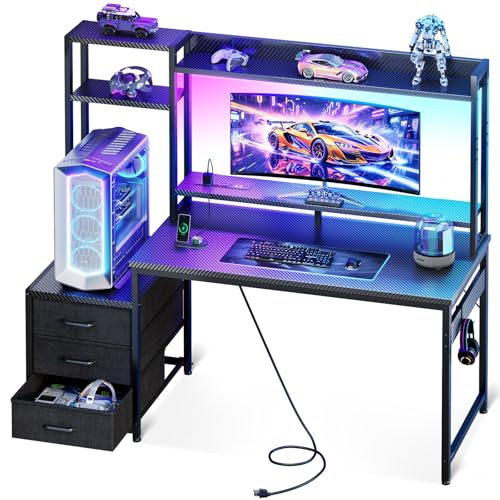
- Hutch, shelves, drawers, and monitor stand
- RGB lighting with USB charging ports
- Reversible storage for compact rooms
Best For: Gamers and students needing integrated storage and lighting
Sturdy Minimalist Pick
HLDIRECT 47-Inch A-Shaped Gaming Desk

- 47-by-23.6-inch carbon-fiber surface
- Steel frame rated for up to 200 pounds
- Includes cup holder, hook, and cable grommets
Best For: Gamers wanting a stable, spacious minimalist desk
Organized Lighting Pick
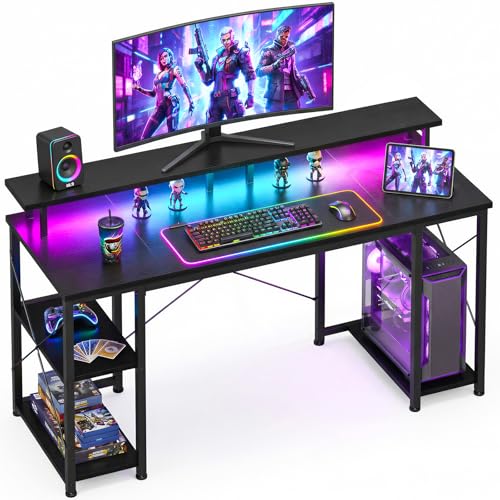
- LED lighting with colors, modes, and memory
- Reversible shelves plus dedicated CPU stand
- Reinforced frame for gaming, study, or work
Best For: Compact setups needing storage and customizable LEDs
Storage-Packed RGB Station

- RGB lighting with 22 effects and built-in charging
- Five reversible fabric drawers
- Monitor stand with steel-frame support
Best For: Organized gaming and home-office setups
Wide Carbon-Fiber Workstation
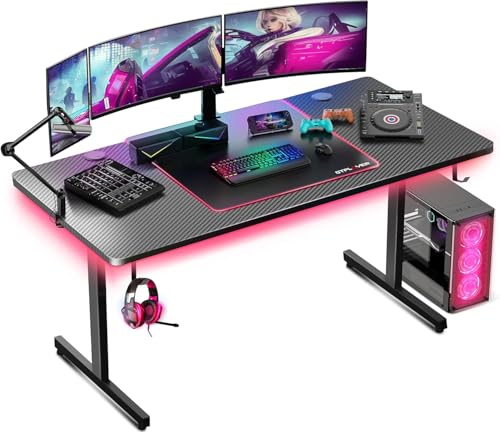
- Spacious 55.11-inch desktop
- Built-in mouse pad and headphone hook
- Adjustable LED lighting and metal frame
Best For: Multi-monitor gaming and flexible work setups
Compact Dual-Monitor Setup

- Three AC outlets and two USB ports
- Monitor stand supports two computers
- Five shelves with configurable storage
Best For: Small rooms and space-conscious dual-monitor setups
Best Compact L-Shape Pick – AODK Reversible LED Gaming Desk
Among gaming desks under 200, this AODK model stands out for combining a reversible L-shaped layout with built-in charging, lighting, and storage. Its 53-inch workspace is designed for corner placement and can be configured to suit your room.
Best For: Gamers and home-office users who need a compact, flexible corner desk with organized storage.
Pros:
- Reversible L-shaped design lets you position the hutch on either side.
- Includes three power outlets, two USB ports, and a cable-friendly power cord.
- LED strip offers 10 colors, eight brightness levels, 10 dynamic modes, and memory.
- Two shelves, a CPU stand, headphone hook, and storage bag add practical organization.
Cons:
- The 18.9-inch depth may feel limited for especially large setups.
- Assembly is required.
This is a well-equipped choice when space efficiency matters more than having an exceptionally deep desktop. Its reversible configuration and included accessories make it particularly adaptable for bedrooms, offices, and gaming corners.
Best Large Workstation – SEDETA 75-Inch LED Gaming Desk
For shoppers comparing gaming desks under 200, the SEDETA offers an unusually broad 74.8-inch workstation with extensive display and storage features. The setup is built to support gaming, studying, or a multi-monitor work area.
Best For: Users who want a wide gaming workstation with substantial shelving and display storage.
Pros:
- Large desktop can accommodate two computers and measures about 47.2 inches by 21.6 inches in the stated workspace description.
- Three hutch compartments, two acrylic display cabinets, and two large shelves provide ample storage.
- Four power sockets and two USB ports support multiple connected devices.
- Monitor stand is designed to place screens at a more comfortable viewing height.
Cons:
- At 74.8 inches wide, it requires considerable room.
- The extensive hutch and storage layout may be more than minimalist setups need.
- Assembly is required.
This SEDETA is best viewed as a complete gaming and productivity station rather than a simple desk. Its size and storage capacity are valuable for multi-device users, but buyers should measure carefully before choosing it.
Best Organized Small-Space Desk – DUMOS 52-Inch Reversible Gaming Desk
Among gaming desks under 200, the DUMOS 52-inch model is a practical option for gamers who want drawers without giving up integrated power access. Its reversible setup, monitor shelf, and compact L-shaped design help keep smaller spaces organized.
Best For: Small-space gamers who need drawers, a monitor riser, and flexible left- or right-side placement.
Pros:
- Reversible design supports left- or right-side configurations.
- Three fabric drawers, an open shelf, and a side hook organize accessories and equipment.
- Includes three AC outlets and two USB ports for a centralized charging area.
- RGB lighting supports app or key control, music and microphone sync, timers, and dynamic modes.
Cons:
- The supplied dimensions list appears inconsistent, so buyers should verify the current listing measurements.
- Its 52-inch size may not suit very large multi-monitor setups.
- Assembly is required.
The DUMOS focuses on everyday organization: drawers handle smaller accessories while the shelf accommodates a PC tower or console. Adjustable feet and a reinforced metal frame add useful stability features for a compact gaming station.
Best Stable Reversible Desk – ODK 53-Inch L-Shaped Gaming Desk
This ODK model is a strong contender among gaming desks under 200 for shoppers who want an L-shaped workstation with storage, integrated power, and a sturdy frame. Its reversible side modules make it easier to adapt to different room layouts.
Best For: Gamers and home-office users seeking a reversible corner desk with dual shelves and built-in charging.
Pros:
- Reversible layout supports left- or right-side placement of the storage modules.
- Provides three AC outlets, two USB ports, and cable-management channels.
- Includes two shelves, a CPU stand, accessory hook, and tool bag.
- X-shaped steel frame and adjustable foot pads are designed to improve stability.
Cons:
- Assembly is required.
- The L-shaped configuration may be less suitable for users who prefer a simple rectangular desk.
- LED controls offer preset colors and modes rather than the broader color range described for some app-controlled desks.
The ODK balances practical storage with a stable, adaptable frame. It is especially appealing for corner spaces where reversible placement, power access, and a dedicated CPU area can reduce clutter.
Feature-Packed Pick – Casaottima 48-Inch Gaming Desk
For shoppers comparing gaming desks under 200, the Casaottima 48-inch model offers a compact all-in-one setup with a hutch, shelves, drawers, LED lighting, and USB charging. Its reversible storage design can work well in bedrooms, dorms, and other smaller spaces.
Best For: Gamers and students who want built-in storage, lighting, and charging in one desk.
Pros:
- Includes a hutch, display shelves, headset hook, monitor stand, and three fabric drawers.
- Built-in RGB lighting offers multiple colors, brightness levels, and dynamic effects.
- USB ports provide convenient phone and tablet charging at the desk.
- Reversible shelf configuration supports different room layouts.
Cons:
- The 18.9-inch depth provides a relatively compact work surface.
- Engineered-wood construction and fabric drawers may not suit shoppers seeking premium materials.
- Assembly is recommended for two people.
The Casaottima stands out when organization and atmosphere matter as much as gaming space. It is a practical choice for compact setups, though users with large peripherals may prefer a deeper desktop.
Sturdy Minimalist Pick – HLDIRECT 47-Inch A-Shaped Gaming Desk
Among gaming desks under 200, the HLDIRECT 47-inch desk focuses on a spacious, uncluttered surface and a stable A-shaped frame. Its curved carbon-fiber desktop is designed for gaming or work, with useful accessories for headphones, drinks, and cable routing.
Best For: Gamers who prioritize desktop space, stability, and a minimalist appearance.
Pros:
- The 47-by-23.6-inch surface accommodates monitors and supports monitor-arm installation.
- A 1.1 mm steel triangle frame and dual-frame design are rated for up to 200 pounds.
- Curved edges and rounded corners support a more comfortable sitting position.
- Includes a cup holder, headphone hook, and double-sided cable grommets.
Cons:
- It does not include built-in shelves, drawers, or LED lighting.
- The fixed 29-inch height offers less adjustability than an adjustable desk.
- Storage accessories are limited to the included cup holder and headphone hook.
The HLDIRECT is a strong fit for a clean, equipment-focused workstation. Its large surface and high stated load capacity make it appealing for multi-device setups, while the lack of built-in storage favors users who prefer open legroom.
Organized Lighting Pick – ODK 48-Inch Gaming Desk
The ODK 48-inch desk is a practical contender among gaming desks under 200, combining customizable LED lighting with reversible shelves and a dedicated CPU stand. Its compact footprint is aimed at bedrooms, apartments, dorms, and home offices.
Best For: Gamers and remote workers who need compact storage and customizable lighting.
Pros:
- LED system offers 10 static colors, eight brightness levels, 10 dynamic modes, and memory functionality.
- Reversible shelves and a dedicated CPU stand organize accessories and computer equipment.
- Reinforced steel framing, thick engineered wood, and an X-shaped crossbar support stability.
- Compact 48-inch design suits smaller rooms while serving gaming, study, and work needs.
Cons:
- The 19.6-inch depth may feel restrictive for especially large setups.
- Its 0.75-inch tabletop is thinner than some heavier-duty desk surfaces.
- The storage-focused design may offer less open legroom than a simple tabletop desk.
The ODK balances organization and gaming ambiance without requiring a large room. Choose it if reversible shelving and lighting are priorities; users who want maximum desktop depth may prefer the HLDIRECT.
Storage-Packed RGB Station – 47-Inch Gaming Desk
If you want gaming desks under 200 with built-in organization, the Korfile 47-inch model combines RGB lighting, charging access, a monitor stand, and five drawers in one compact workstation. Its reversible drawer layout can adapt to different room arrangements.
Best For: Gamers and remote workers who need storage, charging ports, and an elevated monitor position.
Pros:
- Includes three AC outlets, two USB ports, and RGB lighting with 22 effects.
- Five fabric drawers offer four installation configurations.
- Full-coverage monitor stand helps raise the screen for a more comfortable viewing position.
- Powder-coated steel frame, crossbar support, and adjustable legs provide stability.
Cons:
- The 18.5-inch depth provides less front-to-back space than larger desks.
- Fabric drawers may be less rigid than hard-sided drawer units.
- Assembly is required.
This is a practical all-in-one choice when organization and integrated power matter as much as gaming style. Confirm the 47-inch width and drawer configuration will fit your room before buying.
Wide Carbon-Fiber Workstation – 55-Inch Gaming Desk
Among gaming desks under 200, the GTPLAYER 55-inch desk stands out for its wide work surface and straightforward gaming extras. It pairs a carbon-fiber-style top with a built-in mouse pad, LED lighting, and a headphone hook for a clean, ready-to-use setup.
Best For: Players who want a spacious desk for gaming, studying, or home-office work.
Pros:
- The 55.11-inch-wide surface provides room for gaming gear and work materials.
- Built-in mouse pad supports consistent mouse movement without a separate accessory.
- Integrated LED lights add adjustable ambient color.
- Includes a headphone hook and lists a 300-pound maximum weight recommendation.
Cons:
- Assembly tools are not included.
- It does not list built-in AC outlets or USB charging ports.
- Its larger footprint requires more room than compact desks.
Choose this model if surface area is your priority and you already have a separate charging solution. The included mouse pad and headphone hook help keep commonly used accessories within reach.
Compact Dual-Monitor Setup – 40-Inch Gaming Desk
For shoppers comparing gaming desks under 200 in smaller rooms, the Korfile 40-inch desk offers a compact footprint with substantial storage. Its carbon-fiber-textured top includes RGB lighting, power access, a monitor stand, and configurable shelves for a flexible setup.
Best For: Dorm rooms, bedrooms, and compact gaming spaces that need storage and dual-monitor support.
Pros:
- Three AC outlets and two USB ports support simultaneous device charging.
- Full desktop monitor stand can accommodate two computers.
- Five shelves and configurable tower-compartment shelving add storage.
- Double Z-shaped legs and adjustable pads improve stability on uneven floors.
Cons:
- The 39.3-inch width limits room for larger gaming peripherals.
- The compact 18.9-inch depth may feel tight with multiple devices.
- Assembly is required.
This desk makes efficient use of limited space by combining vertical storage with a monitor riser. It is a strong fit for compact setups, provided the narrower desktop suits your equipment.
How We Picked the Best Gaming Desks Under 200
We focused on desks that combine practical workspace with features useful for gaming, such as built-in LED lighting, power outlets, shelves, drawers, hutches, reversible layouts, and included mouse-pad surfaces. We also considered desktop dimensions, shape, storage capacity, and how easily each design could fit a bedroom, office, or dedicated gaming room.
Because specifications and prices can change, confirm the current dimensions, outlet configuration, weight capacity, color, and assembly requirements before ordering. A low price is only a good value when the desk fits your equipment and available space.
Quick Comparison
| Desk type | Best for | What to prioritize |
|---|---|---|
| L-shaped | Corner setups and multiple screens | Reversible orientation, corner dimensions, and legroom |
| Large straight desk | Wide monitors and full-size accessories | Desktop depth, stability, and cable routing |
| Storage-focused desk | Smaller rooms or cluttered setups | Drawer capacity, shelf placement, and clearance |
| Compact desk | Bedrooms, apartments, and simple setups | Monitor footprint, usable depth, and portability |
| LED gaming desk | Players who want ambient lighting | Lighting controls, power access, and cable management |
Key Buying Factors for Gaming Desks Under 200
Measure the Full Footprint
Do not rely only on the advertised width. Measure the desk’s depth, return panels, shelves, drawers, and space needed to pull out a chair. L-shaped models can use corners efficiently, but they may be difficult to reposition once assembled.
Match the Desktop to Your Equipment
Measure your monitor stands, speakers, laptop, console, and any desk-mounted monitor arms. A wide surface is helpful, but depth matters just as much for comfortable viewing distance. Check whether shelves or hutches restrict monitor height.
Evaluate Storage and Legroom
Drawers and shelves help keep controllers, games, and office supplies organized, while open shelving offers quicker access. Make sure storage does not interfere with your knees, tower placement, or preferred sitting position.
Check Power and Cable Features
Built-in outlets and USB ports can simplify charging, but they do not replace a surge protector. Plan where the main power cable will run and verify that the desk’s outlet module is positioned conveniently for your setup.
Consider Stability and Assembly
Gaming desks in this price range commonly use engineered wood and metal supports. Look for a reinforced frame, levelers, clear instructions, and a desktop that will not flex under your monitor and accessories. Allow enough time for careful assembly and retighten fasteners after the desk settles.
Who Should Buy Which Gaming Desks Under 200?
Choose an L-shaped desk if you want separate zones for gaming, streaming, studying, or work. A large straight desk is better for ultrawide monitors, multiple displays, or a broad mouse area. Pick a storage-heavy model if you need drawers, shelves, or a hutch to reduce clutter. A compact desk makes more sense for a small bedroom or basic single-monitor setup. If atmosphere matters most, an LED-equipped desk adds customizable lighting, while desks with built-in outlets are especially useful for charging peripherals and keeping cables within reach.