A capture card with passthrough lets you send gameplay to a display while recording or streaming a separate video feed to your computer. That makes it easier to play at high refresh rates without forcing your audience to watch a delayed image.
We selected 10 options ranging from affordable USB 3.0 devices to advanced HDMI 2.1 hardware. The right choice depends on your console, target resolution, refresh rate, streaming software, and budget.
Best 10 Capture Card with Passthrough Picks for 2026
Best Value Aluminum Pick
ByteWave 1080p Capture with 4K Passthrough

- 1080p60 capture with 4K30 passthrough
- Aluminum shell and braided USB 3.0 cable
- Plug-and-play support for consoles, PC, Mac, and OBS
Best For: Everyday 1080p streaming with a 4K secondary-display signal
Premium High-Frame-Rate Pick

- 4K60 capture with HDR10 support
- 1440p120 and 1080p240 passthrough
- Near-zero latency and analog audio input
Best For: High-refresh console gameplay and 4K recording
Balanced 2K Option
UGREEN 4K Loop-Out Capture Card

- 2K30 recording and 1080p60 capture
- 4K30 HDMI input and loop-out
- USB-A/USB-C connectivity with broad OS support
Best For: Flexible 2K streaming and low-latency 4K30 monitoring
High-Frame-Rate Feature Pick

- 4K60 capture and 4K passthrough
- 1080p120 support with high-refresh compatibility
- 3.5mm audio input and microphone output
Best For: Feature-rich gaming streams with high-refresh video and external audio
Best Budget HDMI Pass-Through

- Captures up to 1080p at 60FPS
- HDMI loop-out for low-delay gameplay
- Plug-and-play with microphone input
Best For: Budget streamers and casual console capture
Best High-Refresh HDMI 2.1

- Captures up to 4K144 on supported Windows PCs
- Passes through 4K144 HDR/VRR
- Includes party chat and 5.1 audio support
Best For: High-refresh PC and console gaming setups
Best Simple 4K Pass-Through
Redragon VC321 1080p60 Capture
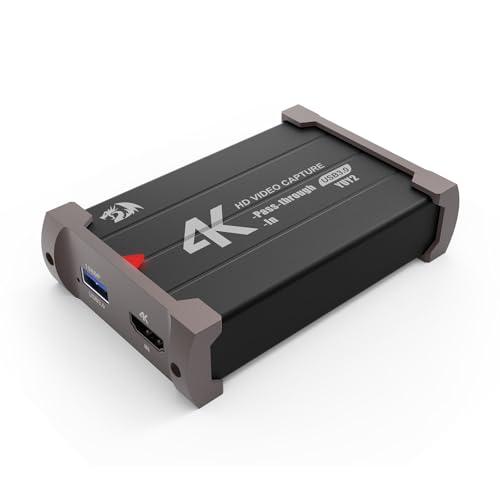
- Captures 1080p60 from 4K30 input
- Zero-latency HDMI pass-through
- Driver-free Windows and Mac setup
Best For: Simple console and camera streaming
Acer USB 3.0 Capture Card

- 4K HDMI input and loop-out
- 1080p capture at up to 60Hz
- USB-A/USB-C and 3.5mm mic-in
Best For: Gamers and creators needing simple 1080p capture with 4K passthrough
XIIXMASK HDMI Capture Card
4K Passthrough with 2K Capture

- 4K60 HDMI input and loop-out
- 2K30 or 1080p60 USB capture
- USB-A/USB-C and mic-in support
Best For: High-frame-rate gaming and streaming setups
Dcyfol USB 3.0 Capture Card
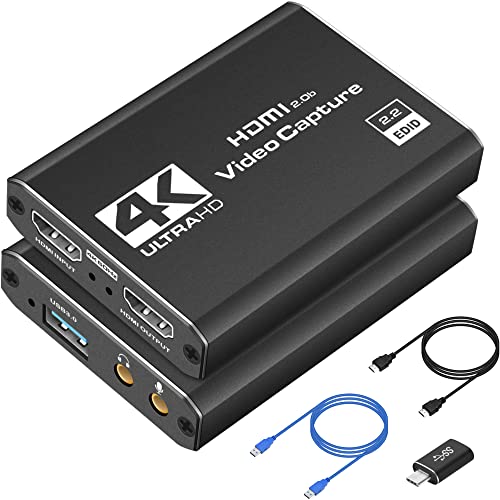
- 4K HDMI loop-out and preview
- 1080p60 video recording
- Plug-and-play with major streaming apps
Best For: Portable, straightforward console streaming and recording
Best Value Aluminum Pick – ByteWave 1080p Capture with 4K Passthrough
The ByteWave is a practical capture card with passthrough for gamers and streamers who want 1080p60 recording while sending a 4K30 signal to a second display. Its USB 3.0 connection, plug-and-play setup, and broad platform support make it a flexible option for everyday streaming.
Best For: Gamers, streamers, teachers, and creators who need 1080p60 capture with 4K30 display passthrough.
Pros:
- Captures up to 1080p60 and supports 4K30 passthrough.
- Aluminum shell and braided USB 3.0 cable are designed for extended use.
- Supports microphone input, Windows and Mac, and software including OBS, Twitch, and YouTube.
Cons:
- Capture resolution tops out at 1080p rather than 4K.
- Requires a USB 3.0 port for USB 3.0 operation.
Choose this model when dependable 1080p streaming matters more than 4K recording. Its low-latency operation, compact design, and stated extended support coverage add practical value for console and PC setups.
Premium High-Frame-Rate Pick – Elgato 4K S Capture Card
The Elgato 4K S is a high-performance capture card with passthrough for users who want 4K60 recording and high-refresh gameplay. It also supports 1440p120 or 1080p240 passthrough, making it well suited to modern consoles and fast-paced games.
Best For: Console gamers and creators who prioritize 4K capture, HDR10, and high-refresh passthrough.
Pros:
- Captures video at up to 4K60.
- Supports 1440p120 and 1080p240 passthrough for high-frame-rate play.
- Includes HDR10 support, near-zero latency, and a 3.5mm analog audio input.
Cons:
- Listed operating-system requirements are relatively specific: Windows 11 or macOS 13 and later.
- Requires a compatible USB 3.0 Type-C port and capable computer hardware.
The 4K S is the strongest fit here for creators who need both detailed recording and smooth high-refresh passthrough. Its higher system requirements are worth considering before purchase, especially for older computers.
Balanced 2K Option – UGREEN 4K Loop-Out Capture Card
UGREEN offers a versatile capture card with passthrough for recording up to 2K30 while accepting and looping out a 4K30 signal. Dual USB-A and USB-C connectivity, plug-and-play operation, and support for several operating systems make it useful across mixed setups.
Best For: Streamers who want 2K recording, 4K30 loop-out, and flexible USB connectivity.
Pros:
- Records up to 2K30 and captures 1080p60.
- Supports 4K30 input and HDMI loop-out for low-latency monitoring.
- Works with Windows, macOS, Linux, and Android, with USB-A and USB-C options.
Cons:
- Does not support 4K capture.
- PS4 and PS5 require HDCP to be turned off.
- Not compatible with Fire TV Stick.
This is a sensible middle ground for users who want more than 1080p recording without paying for a 4K capture workflow. Check your source-device settings and USB requirements before buying.
High-Frame-Rate Feature Pick – USB 4K60 HDMI Capture Card
This XIIXMASK model is a capture card with passthrough aimed at demanding streaming and gaming setups. It combines 4K60 capture and passthrough with 1080p120 support, multiple video formats, and USB-A/USB-C connectivity.
Best For: Streamers who need 4K60 capture, 1080p120 recording, and flexible audio connections.
Pros:
- Supports up to 4K60 capture and 4K passthrough.
- Handles 1080p120 and lists support for 240Hz or 144Hz high-refresh input.
- Includes 3.5mm audio input and microphone output, plus USB-A/C connectivity.
Cons:
- Requires USB 3.0 and a compatible operating system.
- Its 0.22 kg weight is higher than the listed weight of some compact alternatives.
With its high frame-rate support and dedicated audio connections, this is a compelling choice for gaming creators who want room to refine their setup. Verify that your computer and display can support the desired resolution and refresh rate.
Best Budget HDMI Pass-Through – 1080p 60FPS Capture Card
This affordable capture card with passthrough is designed for straightforward console, camera, and PC streaming. It captures up to 1080p at 60FPS, accepts 4K30/60Hz input, and uses HDMI loop-out for low-delay gameplay monitoring.
Best For: Budget-conscious streamers who need plug-and-play 1080p capture, HDMI loop-out, and microphone commentary support.
Pros:
- Captures up to 1080p at 60FPS and supports 4K30/60Hz input.
- HDMI loop-out is intended for low-delay gameplay.
- Plug-and-play USB 3.0 setup works with Windows and Mac OS.
- Includes a 3.5mm microphone input for commentary.
Cons:
- Does not support 4K120Hz or 4K144Hz input.
- Output is limited to up to 2K30Hz.
- The microphone input accepts only a 3.5mm TRS standard headset.
This model covers the essentials for casual streaming and recording without external power or drivers. Its 1080p capture limit and lower output ceiling make it less suitable for high-refresh gaming setups.
Best High-Refresh HDMI 2.1 – 4K144 Live Gamer Ultra 2.1
For demanding gaming setups, this capture card with passthrough combines HDMI 2.1 connectivity with high-refresh support. It can capture up to 4K144 on supported Windows PCs while passing through up to 4K144 HDR/VRR, 1440p240, or 1080p360 to compatible displays.
Best For: High-refresh PC and current-generation console users who want HDR, VRR, party chat, and advanced audio support.
Pros:
- Supports up to 4K144 MJPEG capture on compatible Windows PCs.
- Passes through 4K144 HDR/VRR, 1440p240, and 1080p360 on compatible displays.
- USB 3.2 Gen 2 Type-C connects to Windows, Mac, or iPad.
- Supports party chat, 5.1-channel audio, and HDR workflows.
Cons:
- macOS capture is limited to up to 4K60.
- Displays using DSC may limit 4K passthrough to 4K120.
- Advanced features require compatible hardware and supported Windows workflows.
The GC553G2 is the strongest choice here for high-refresh passthrough and feature-rich gaming audio. It costs more complexity-wise than basic USB capture cards, but it is better matched to HDMI 2.1 gaming systems.
Best Simple 4K Pass-Through – Redragon VC321 1080p60 Capture
The Redragon VC321 is a practical capture card with passthrough for creators who want 1080p60 recording from a 4K30 input source. Its zero-latency HDMI pass-through, USB 3.0 connection, and driver-free setup make it suitable for uncomplicated streaming and recording.
Best For: Console and camera users seeking simple 1080p60 capture with 4K30 HDMI pass-through on Windows or Mac.
Pros:
- Captures up to 1080p at 60FPS from 4K30 input.
- Provides zero-latency HDMI pass-through for real-time gameplay.
- Plug-and-play design requires no extra drivers or power source.
- Captures audio and video simultaneously and supports Windows and macOS.
Cons:
- Capture resolution is limited to 1080p.
- 4K input support is limited to 30FPS.
- The supplied notes do not indicate support for HDR, VRR, or high-refresh passthrough.
This is a sensible middle ground for standard console streaming: more capable than basic capture hardware while remaining simple to install. Choose another model if you need 4K recording or HDMI 2.1 high-refresh features.
Acer USB 3.0 Capture Card – 4K Loop-Out with Mic-In
If you need a capture card with passthrough for console gaming, streaming, or recording, this Acer model combines 4K HDMI input and loop-out with 1080p video output at up to 60Hz. Its USB-A and USB-C connectivity, mic input, and plug-and-play setup make it practical for creators using OBS, VLC, or similar software.
Best For: Gamers and content creators who want low-latency 1080p capture, 4K loop-out, and direct microphone connectivity.
Pros:
- Supports 4K input and HDMI loop-out with 1080p at 60Hz output.
- Includes a 3.5mm mic-in for commentary and voice recording.
- Works without extra drivers or external power and supports USB-A and USB-C.
- Compatible with Windows, Linux, consoles, cameras, and streaming software such as OBS and VLC.
Cons:
- Capture output is specified at 1080p or 720p rather than 4K.
- USB 3.0 is required for USB 3.0 operation.
This is a flexible choice when straightforward setup and commentary support matter more than 4K recording. The combination of 4K passthrough and 1080p60 capture suits most mainstream gaming and streaming workflows.
XIIXMASK HDMI Capture Card – 4K Passthrough with 2K Capture
This capture card with passthrough is designed for high-frame-rate gaming setups, supporting 4K 60Hz HDMI input and loop-out while sending up to 1080p60 or 2K30 video to a computer. Its aluminum-alloy housing, USB-A/USB-C connectivity, and mic input add useful flexibility for streaming, recording, and online meetings.
Best For: Users who want 4K60 passthrough, 2K30 or 1080p60 capture, and broad console and computer compatibility.
Pros:
- Supports 4K 60Hz HDMI input and loop-out.
- Captures up to 2K30 or 1080p60 through USB 3.0.
- Includes USB-A and USB-C connectivity plus a 3.5mm mic input.
- Compatible with Windows, macOS, Linux, Android, iPadOS 17+, consoles, cameras, OBS, VLC, and Zoom.
Cons:
- The mic input does not record party chats.
- OBS may need to be restarted after audio setup to restore sound output.
- The product notes list Windows as the minimum system requirement despite broader compatibility claims.
With its higher-resolution 2K capture option and 4K60 loop-out, this model is a strong fit for users who want to play at a higher source resolution while recording to a computer. Be prepared to review the audio setup in OBS before streaming.
Dcyfol USB 3.0 Capture Card – Compact 4K HDMI Loop-Out
For a compact capture card with passthrough, the Dcyfol ozc3 offers 4K HDMI loop-out and 1080p60 recording through USB 3.0. It is built for plug-and-play use with OBS, Streamlabs, and XSplit, making it a practical option for gaming, live broadcasts, and portable creator setups.
Best For: Travelers, gamers, and new streamers who want simple 1080p60 capture with 4K HDMI passthrough.
Pros:
- Provides 4K HDMI real-time preview and loop-out.
- Records 1080p video at up to 60FPS.
- Plug-and-play design works with OBS Studio, Streamlabs, and XSplit.
- Supports PS5, PS4, Xbox, Nintendo Switch, PCs, Macs, and cameras.
Cons:
- 4K is listed for HDMI preview or loop-out, while recording is specified at 1080p60.
- A USB 3.0 port is required.
- The supplied notes do not mention a microphone input.
This model emphasizes portability and an easy setup rather than advanced audio features. It makes sense for creators who want reliable 1080p60 recording, 4K passthrough, and compatibility with common streaming software.
How We Picked the Best Capture Card with Passthrough
We compared these models by looking at the features that matter most during real-world streaming and recording: passthrough resolution, capture resolution, supported refresh rates, connection type, latency, compatibility, and ease of setup. We also considered whether each device is better suited to casual console streaming, high-refresh PC gaming, or everyday video capture.
Specifications can vary by input, output, software, and operating system. Before buying, confirm that the capture card supports the exact console or graphics card setup you plan to use.
Quick Comparison
| Best For | Look For | Recommended Type |
|---|---|---|
| Casual console streaming | 1080p60 capture and 4K passthrough | USB 3.0 capture card |
| PS5, Xbox Series, or Switch 2 | HDMI passthrough and reliable console compatibility | Console-focused model |
| High-refresh gaming | HDMI 2.1, 144Hz or higher passthrough | Advanced HDMI 2.1 card |
| Budget recording | Plug-and-play USB connection | Basic 1080p60 model |
Key Buying Factors for a Capture Card with Passthrough
Passthrough Resolution and Refresh Rate
Passthrough is the signal sent directly to your monitor or television. A card may capture at 1080p60 while passing through 4K, but that does not mean it records 4K. Check both specifications separately. Competitive players should prioritize the refresh rate they actually use, especially at 120Hz, 144Hz, or higher.
Capture Quality
1080p at 60 frames per second remains a practical target for most livestreams. Higher-resolution capture can benefit edited videos, but it requires more storage, bandwidth, and computer performance. Look for clear color reproduction and stable frame pacing rather than resolution alone.
HDMI and USB Requirements
HDMI 2.1 is important for newer consoles and gaming PCs that use 4K at high refresh rates. USB 3.0 is generally preferred over USB 2.0 for dependable 1080p60 capture. Use compatible cables and connect the device directly to a suitable USB port when possible.
Latency, Audio, and Software
Passthrough should feel effectively immediate, while the captured preview may have some delay. For responsive play, use the monitor output instead of the preview window. Also check microphone, headset, party-chat, HDR, HDCP, and operating-system support before purchasing.
Who Should Buy Which Capture Card with Passthrough?
Choose an affordable USB 3.0 model if you mainly stream at 1080p60 and want 4K passthrough for a console display. A console-focused option is a good fit for users who want straightforward setup with PS5, Xbox Series consoles, or Switch 2. For 4K high-refresh PC or console gaming, step up to an HDMI 2.1 capture card with the necessary 144Hz-or-higher passthrough support.
If you only need occasional recording, prioritize price, compatibility, and simple software support. Full-time streamers should spend more on stable drivers, reliable thermal performance, strong audio handling, and the refresh-rate headroom needed for their primary display.