The best mechanical keyboard for gaming combines responsive switches, dependable anti-ghosting, comfortable key spacing, and features that suit the way you play. This roundup covers compact 60% and 75% layouts, versatile 98-key designs, and full-size keyboards with dedicated controls.
Whether you want wireless flexibility, hot-swappable switches, per-key RGB lighting, programmable macros, or a straightforward budget option, these picks make it easier to match your desk, games, and typing preferences.
Best 10 Mechanical Keyboard for Gaming Picks for 2026
Fast-Input Macro Specialist

- Fast, quiet linear Yellow switches
- Six dedicated macro keys
- Per-key Chroma RGB and media controls
Best For: PC gamers who want a full-size wired keyboard with rapid inputs and extensive customization
Custom Display Compact Pick

- Color multimedia display with GIF support
- Hot-swappable 3-pin and 5-pin PCB
- Gasket-mounted 82-key RGB design
Best For: Keyboard enthusiasts wanting a compact, customizable wired gaming board
Wireless Customization Choice

- Bluetooth, 2.4GHz, and USB-C connectivity
- 4000mAh battery and five-device support
- Hot-swappable 75% layout with control knob
Best For: Multi-device gamers seeking wireless flexibility and customizable mechanical hardware
High-Report-Rate Full-Function Pick

- 8 kHz report rate for responsive inputs
- 98% layout includes a numpad
- Hot-swappable switches and PBT keycaps
Best For: Gamers needing numpad functionality in a compact, customizable wired layout
Flexible RGB Pick
Redragon K668 Hot-Swap Gaming Keyboard

- Full-size 108-key layout with anti-ghosting
- Hot-swappable 3-pin and 5-pin switch support
- RGB lighting and four programmable hotkeys
Best For: Gamers wanting quiet switches and easy customization
Durable Tactile Choice
Logitech G413 SE Mechanical Gaming Keyboard

- Durable PBT keycaps and aluminum top case
- Tactile mechanical switches for defined feedback
- White backlighting with media and Windows-lock controls
Best For: Gamers prioritizing durability and a classic full-size layout
Feature-Rich Clicky Pick
SteelSeries Apex 5 Hybrid Gaming Keyboard
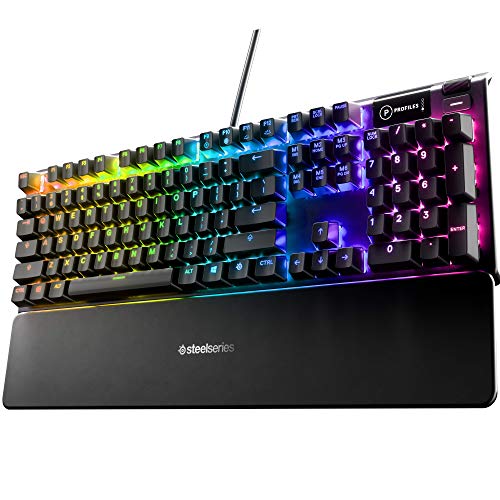
- Hybrid blue switches with tactile clicky feedback
- OLED display for games, GIFs, and Discord messages
- Per-key RGB, aluminum frame, and magnetic wrist rest
Best For: Gamers wanting extra features and a clicky typing feel
Best Customizable Full-Size Pick
Redragon K671 Mechanical Gaming Keyboard

- 104-key layout with full-key anti-ghosting
- Hot-swappable linear red switches
- 11 backlight modes and macro editing
Best For: Gamers wanting a programmable full-size keyboard with smooth switches
Best for Macros and Media Controls

- Five onboard macro keys
- Volume roller and dedicated media controls
- Hot-swappable clicky blue switches
Best For: MMO and MOBA players who rely on quick shortcuts
Best Compact Budget Pick

- Compact 68-key space-saving layout
- Smooth linear red switches
- About 16 adjustable blue LED modes
Best For: Small desks, portable setups, and straightforward plug-and-play gaming
Fast-Input Macro Specialist – Razer BlackWidow V4 X
The Razer BlackWidow V4 X is a strong mechanical keyboard for gaming if you want rapid linear inputs, dedicated macro controls, and a full-size layout. Its Yellow switches are designed for quick, quieter actuation, while the sound-dampening features help make intense sessions less distracting.
Best For: PC gamers who want fast linear switches, six dedicated macro keys, and extensive per-key RGB customization.
Pros:
- Linear Yellow switches use 1.2mm actuation and 45g force for fast inputs.
- Six dedicated macro keys provide convenient access to customized commands.
- Per-key Chroma RGB supports more than 16.8 million colors and dynamic game lighting.
- Doubleshot ABS keycaps, lubricated stabilizers, and foam help support durability and quieter acoustics.
Cons:
- Wired connectivity may not suit buyers seeking a wireless setup.
- The full-size 104-key design takes up more desk space than a compact layout.
- It is not water resistant.
The BlackWidow V4 X focuses on speed and convenience rather than portability. Choose it if dedicated macros, media controls, and Razer Chroma integration matter more than a smaller footprint.
Custom Display Compact Pick – Womier SK80 75%
The Womier SK80 is an eye-catching mechanical keyboard for gaming built around a compact 75% layout. Its color multimedia display adds visual customization, while the gasket-mounted structure, hot-swappable PCB, and pre-lubed linear switches give enthusiasts plenty of room to tailor the experience.
Best For: Gamers and keyboard hobbyists who want a compact wired board with a customizable display, RGB lighting, and hot-swappable switches.
Pros:
- Color display can show GIFs, connection details, lighting settings, volume, and more.
- Hot-swappable PCB supports both 3-pin and 5-pin switches without soldering.
- Gasket mount, EVA positioning plate, and bottom filling provide a softer, quieter feel.
- Offers 19 lighting effects, nine lighting colors, and software customization.
Cons:
- USB-C wired connectivity does not provide wireless flexibility.
- The 82-key layout omits the dedicated numpad found on full-size keyboards.
- It is not water resistant.
The SK80 stands out for its display and customization potential. It is a particularly appealing choice for buyers who enjoy modifying their keyboard and want a compact board that still retains dedicated arrow keys.
Wireless Customization Choice – AULA F75 Pro
The AULA F75 Pro is a versatile mechanical keyboard for gaming with Bluetooth 5.0, 2.4GHz wireless, and USB-C wired modes. Its compact 75% layout preserves arrow keys, while hot-swappable support, a control knob, pre-lubed switches, and layered sound dampening make it suitable for both gaming and everyday use.
Best For: Gamers who need multi-device wireless connectivity, a compact layout, and an enthusiast-friendly hot-swappable design.
Pros:
- Tri-mode connectivity supports Bluetooth 5.0, 2.4GHz wireless, and USB-C wired use.
- 4000mAh battery supports extended wireless use, and the keyboard can connect with up to five devices.
- Hot-swappable base accepts 3-pin and 5-pin switches without soldering.
- Multi-function knob controls lighting or media, while programmable keys and N-key rollover support gaming.
Cons:
- The 75% layout does not include a dedicated numpad.
- Some advanced lighting and macro customization requires the driver.
- The supplied notes do not specify a water-resistance rating.
The F75 Pro is a well-rounded option when wireless flexibility is a priority. Its connectivity choices and customization features make it more adaptable than a basic wired gaming keyboard, while the compact layout saves desk space.
High-Report-Rate Full-Function Pick – Logitech G316 X 98
The Logitech G316 X 98 is a practical mechanical keyboard for gaming when you want full-size functionality in a more compact footprint. Its 98% layout includes a numpad, while the 8 kHz report rate, hot-swappable linear switches, onboard controls, and G HUB support target fast and customizable play.
Best For: Gamers and productivity users who want a numpad, compact layout, hot-swappable switches, and advanced software controls.
Pros:
- An 8 kHz report rate is designed for quick signal transmission and responsive inputs.
- Hot-swappable switches and doubleshot PBT keycaps support customization and shine resistance.
- Gasket mounting with silicone and foam layers provides a quieter, refined typing feel.
- The 98% layout keeps a numpad while using less space than a traditional full-size board.
Cons:
- The supplied notes list USB connectivity but do not mention wireless modes.
- Some features, including the 8 kHz report rate and macros, rely on G HUB software.
- Buyers seeking a very compact keyboard may prefer a 75% layout instead.
The G316 X 98 is a compelling middle ground between a full-size office keyboard and a compact gaming board. It is best suited to users who need the numpad but still want more room for mouse movement and modern customization features.
Flexible RGB Pick – Redragon K668 Hot-Swap Gaming Keyboard
The Redragon K668 is a practical mechanical keyboard for gaming if you want a full-size layout, quiet linear switches, and easy customization. Its hot-swap sockets, programmable shortcut keys, and RGB lighting give you room to tailor the board without soldering.
Best For: Gamers who want a full-size, customizable keyboard with discreet switches and dedicated shortcuts.
Pros:
- Hot-swappable sockets support most 3-pin and 5-pin switches.
- Four dedicated hotkeys can handle mute, calculator, screen lock, or desktop functions.
- Full-size anti-ghosting design supports rapid multi-key inputs.
- RGB lighting includes up to 19 preset modes and music synchronization.
Cons:
- Wired connectivity may be less convenient than wireless options.
- Its full-size layout takes up more desk space than a compact keyboard.
The K668 stands out for its combination of accessible switch customization and gaming-oriented controls. It is a strong choice when you want a feature-rich board that can evolve with your preferences.
Durable Tactile Choice – Logitech G413 SE Mechanical Gaming Keyboard
The Logitech G413 SE is a straightforward mechanical keyboard for gaming built around tactile switches, durable PBT keycaps, and a sturdy aluminum top case. Its full-size layout and six-key rollover make it suited to players who prefer a conventional wired setup.
Best For: Gamers seeking a durable full-size keyboard with tactile feedback and restrained white backlighting.
Pros:
- Wear-resistant PBT keycaps are designed for long-term durability.
- Tactile mechanical switches provide defined key feedback.
- Aluminum-magnesium construction offers a robust body with minimal flex.
- FN controls cover media functions, lighting, and Windows lock.
Cons:
- Lighting is single-color white rather than RGB.
- Six-key rollover is less extensive than full-key anti-ghosting designs.
- The full-size format occupies more room than the available TKL alternative.
The G413 SE focuses on dependable construction and essential gaming features instead of extensive lighting customization. Choose it if durable keycaps and a solid aluminum frame matter more than RGB effects.
Feature-Rich Clicky Pick – SteelSeries Apex 5 Hybrid Gaming Keyboard
The SteelSeries Apex 5 is a distinctive mechanical keyboard for gaming that combines hybrid blue switches with per-key RGB lighting, an OLED smart display, and a magnetic wrist rest. It is designed for players who value visible feedback and extra on-screen information alongside a sturdy build.
Best For: Gamers who want clicky tactile feedback, per-key RGB effects, and an integrated OLED display.
Pros:
- Hybrid blue switches provide tactile, clicky feedback with a membrane layer.
- OLED display can show GIFs, game information, and Discord messages.
- Aircraft-grade aluminum alloy frame adds sturdiness.
- Per-key RGB lighting and a magnetic wrist rest add customization and comfort.
Cons:
- Clicky switches may be distracting in shared spaces.
- The feature-heavy design may be more than users seeking a simple keyboard need.
- The supplied specifications list an AZERTY layout, which may not suit every buyer.
The Apex 5 is a strong match for gaming setups where lighting, display features, and tactile feedback are priorities. Its hybrid switch design offers a different feel from conventional mechanical boards, while the aluminum frame supports a premium presentation.
Best Customizable Full-Size Pick – Redragon K671 Mechanical Gaming Keyboard
The Redragon K671 is a practical mechanical keyboard for gaming when you want a full-size layout, smooth linear red switches, and plenty of backlight customization. Its 104-key design includes full-key anti-ghosting, hot-swappable switches, macro editing, and convenient multimedia shortcuts.
Best For: Gamers who want a full-size, programmable keyboard with smooth red switches and adjustable lighting.
Pros:
- Hot-swappable linear red switches include spare switches for replacement.
- Full-key anti-ghosting supports simultaneous key presses.
- Offers 11 backlight modes, five brightness levels, and adjustable lighting speed.
- Macro editing and 12 multimedia shortcuts add flexibility.
Cons:
- The backlight color cannot be changed, according to the supplied notes.
- The full-size layout takes more desk space than a compact board.
The K671 is a well-rounded choice for players who prefer a traditional 104-key layout and want easy customization without giving up smooth, light key presses.
Best for Macros and Media Controls – Redragon K580 VATA
The Redragon K580 VATA is a mechanical keyboard for gaming built around fast access to macros and media controls. It combines five dedicated G keys, a volume roller, clicky Outemu Blue switches, hot-swappable switch sockets, and full anti-ghosting in a durable 104-key design.
Best For: MMO and MOBA players who use programmable shortcuts, dedicated media controls, and audible clicky feedback.
Pros:
- Five dedicated macro keys can record combos directly without software.
- Dedicated media controls and a volume roller provide quick adjustments.
- Hot-swappable sockets allow switches to be changed without soldering.
- Double-shot keycaps and a 50-million-keystroke rating support long-term use.
Cons:
- Clicky blue switches produce audible feedback, which may not suit quiet spaces.
- The 104-key layout is less compact than a space-saving gaming keyboard.
Choose the K580 if dedicated controls are more important than a minimalist footprint. Its onboard macros are especially useful for games that rely on repeated commands and shortcuts.
Best Compact Budget Pick – MageGee MK-Box 60% Keyboard
The MageGee MK-Box is a compact mechanical keyboard for gaming designed for smaller desks and portable setups. Its 68-key layout keeps separate arrow and function keys while using smooth linear red switches, full anti-ghosting, and adjustable blue LED backlighting.
Best For: Gamers and students who need a space-saving, portable keyboard with dedicated arrow keys and function access.
Pros:
- Compact 68-key layout saves desk space while retaining arrow and F1-F12 keys through its layout and functions.
- Linear red switches offer low-resistance, smooth key presses.
- Provides about 16 LED backlight modes with adjustable speed and brightness.
- Plug-and-play compatibility includes Windows, Linux, and Mac.
Cons:
- The backlighting is single-color blue rather than full RGB.
- Its compact layout may require function-layer shortcuts for some controls.
The MK-Box makes sense when desk space and portability come first. It delivers core mechanical features and anti-ghosting in a smaller footprint, though users wanting full-size controls or RGB color options should look elsewhere.
How We Picked the Best Mechanical Keyboard for Gaming
We compared these keyboards by focusing on the features that have the greatest effect on everyday play: switch response, rollover and anti-ghosting performance, layout efficiency, connection reliability, build quality, customization, and value. We also considered whether each model serves a distinct use case, such as competitive gaming, streaming, office work, or portable setups.
Because switch feel is personal, the list includes linear, tactile-style, hybrid, and hot-swappable options where available. Hot-swappable models offer more flexibility because you can replace compatible switches without soldering, while pre-lubed switches and stabilizers can provide a smoother out-of-box experience.
Quick Comparison
| What You Need | Look For | Best-Matched Type |
|---|---|---|
| Fast competitive play | Linear switches, low latency, anti-ghosting | Compact or tenkeyless gaming board |
| Gaming and productivity | Navigation keys, number pad, media controls | Full-size or 98% layout |
| Customization | Hot-swappable PCB, RGB, programmable controls | 75% custom-style keyboard |
| Limited desk space | 60% or 75% layout, detachable or compact cable | Portable compact keyboard |
| Simple budget upgrade | Mechanical switches, wired USB, durable keycaps | Entry-level wired model |
Key Buying Factors for a Mechanical Keyboard for Gaming
Switch Type and Sound
Linear switches usually have a smooth, uninterrupted press and are popular for rapid repeated inputs. Tactile switches provide a bump that can help confirm activation, while hybrid designs may balance mechanical feel with a softer or quieter response. Consider your room, microphone setup, and typing habits as well as gaming performance.
Layout and Desk Space
A full-size keyboard includes a number pad but occupies the most horizontal space. A 98% layout keeps most dedicated keys while reducing gaps, and 75% models retain useful navigation keys in a smaller footprint. A 60% board is easiest to position beside a low mouse sensitivity setup, but function-row and navigation commands require shortcuts.
Connectivity and Controls
Wired USB keyboards are generally simple and consistent for gaming. Wireless models offer a cleaner desk and more flexibility, but check battery life, charging, connection modes, and whether wireless performance meets your expectations. Dedicated media keys, a volume wheel, and programmable macro buttons are valuable for streaming and multitasking.
Build and Customization
Look for sturdy frames, stable keycaps, adjustable feet, and clear legends. RGB lighting is mainly cosmetic, though per-key lighting can improve visibility and game-specific profiles. Hot-swappable sockets, onboard memory, and software support matter most if you plan to tune switches, remap keys, or create multiple profiles.
Who Should Buy Which Mechanical Keyboard for Gaming?
Choose a Compact Board for Small Desks
Pick a 60% or 75% keyboard if you want maximum mouse room, travel-friendly dimensions, or a cleaner minimalist setup. Be prepared to use function-layer shortcuts for missing keys.
Choose a Full-Size or 98% Board for Versatility
Gamers who also work with spreadsheets, chat, or productivity software should consider a full-size or 98% layout. The number pad and dedicated controls reduce the need for shortcuts and make the keyboard more practical beyond gaming.
Choose a Hot-Swappable Model for Long-Term Flexibility
A hot-swappable keyboard is the strongest choice for enthusiasts who want to experiment with quieter, faster, or more tactile switches later. It can also extend the useful life of the board without requiring a complete replacement.
Choose a Wired Budget Model for Simplicity
If you want dependable plug-and-play performance at a lower cost, a wired mechanical keyboard with anti-ghosting and durable keycaps is often the best value. Spend extra on premium features only if you know you will use wireless connectivity, macros, advanced lighting, or switch customization.