Compact studio monitors make it easier to build a capable listening or production setup when desk space, budget, or room size is limited. The best models combine clear near-field sound with practical connections and enough control for everyday use.
We compared 10 compact pairs across sound-focused features, connectivity, power, size, and versatility to help you choose the right speakers for recording, editing, music, gaming, or casual listening.
Best 10 Compact Studio Monitors Picks for 2026
Best All-Around Value

- 50W stereo pair with 3.5-inch woofers
- Room-tuning controls for high and low frequencies
- TRS, RCA, aux, and headphone connections
Best For: Versatile desktop audio and entry-level production
Best for Wireless Flexibility
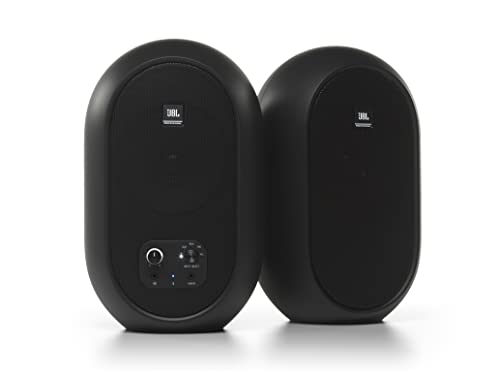
- Bluetooth 5.0 for wireless mix referencing
- 60W Class D amplification across the pair
- Coaxial driver with a wide sweet spot
Best For: Desktop monitoring with wired and wireless sources
Best for Traditional Monitoring

- Compact two-way pair with 3.5-inch woofers
- Room-control and high-trim adjustments
- XLR/TRS, RCA, and stereo mini inputs
Best For: Wired music production and studio recording
Best for Feature-Packed Desktops

- 3.5-inch Kevlar woofers and silk tweeters
- Multiple wired inputs plus front headphone output
- Includes cables, foam feet, and MPC Beats software
Best For: Desktop production, podcasting, and multimedia
Best Connected Pick

- Hi-Res 52Hz–40kHz response
- TRS, RCA, AUX, Bluetooth, and headphone output
- App-based EQ and three listening modes
Best For: Versatile home studio and desktop listening
Best Budget Desk Setup

- Pair of desk-friendly 3.5-inch monitors
- Tone and location controls
- Includes cables and isolation pads
Best For: Small studios and uncomplicated desktop monitoring
Best Premium Desktop Monitoring

- USB-C, balanced TRS, and headphone output
- D-ART tweeter with 3.5-inch aluminum woofer
- Angled stands and placement-focused DSP switches
Best For: Serious desktop production and critical listening
Best Bluetooth Pick

- Bluetooth and multiple wired inputs
- 3.5-inch Kevlar woofers
- Front headphone connection
Best For: Desktop users who want wireless playback and flexible connections
Best Balanced Desktop Option

- 50 watts of built-in amplification
- Acoustic tuning controls
- Balanced TRS, RCA, aux, and headphone connections
Best For: Small-room and desktop setups needing versatile stereo sound
Best Connectivity Value

- Bluetooth 5.3 and USB DAC
- Balanced TRS plus RCA and AUX
- Front headphone output
Best For: Compact setups requiring digital, wireless, and professional inputs
Best All-Around Value – PreSonus Eris 3.5
The PreSonus Eris 3.5 is a versatile choice among compact studio monitors, pairing a 3.5-inch woven-composite woofer with a 1-inch silk-dome tweeter. Its 50-watt stereo amplification, acoustic tuning controls, and broad input selection make it suitable for both creative work and everyday desktop listening.
Best For: Music production, gaming, movies, streaming, and general desktop audio.
Pros:
- Sold as a complete stereo pair with 50 watts of built-in amplification.
- High- and low-frequency controls help tailor the sound to your room.
- Balanced TRS, RCA, front aux, and headphone connections support varied setups.
Cons:
- The compact 3.5-inch woofer may not provide the deepest bass without a subwoofer.
- Wired operation requires a nearby power connection.
Choose the Eris 3.5 if you want compact studio monitors that balance monitoring features with convenient connections for a desktop or small room.
Best for Wireless Flexibility – JBL 104-BT
The JBL Professional 104-BT stands out among compact studio monitors with Bluetooth 5.0, coaxial drivers, and a 60-watt Class D amplifier. Its desktop-focused design and multiple input options make it a practical reference system when you want both wired and wireless playback.
Best For: Desktop monitoring, Bluetooth mix referencing, and setups using professional or consumer audio sources.
Pros:
- Coaxial 4.5-inch woofer and 0.75-inch tweeter provide a wide sweet spot.
- Bluetooth 5.0 works alongside balanced TRS, RCA, and aux inputs.
- Front headphone output automatically mutes the speakers for private listening.
- Master-monitor design helps minimize wiring and desk clutter.
Cons:
- The larger 4.5-inch design may require more desk space than smaller monitors.
- Bluetooth is useful for reference playback but does not replace a wired monitoring connection for critical work.
The 104-BT is a strong pick when wireless convenience matters, while its coaxial driver and professional inputs preserve a monitoring-oriented feature set.
Best for Traditional Monitoring – Yamaha HS3
The Yamaha HS3 is a compact, wired pair designed for studio monitoring in space-conscious rooms. It combines 3.5-inch woofers, 0.75-inch dome tweeters, room-control and high-trim adjustments, and professional XLR/TRS connectivity in a tabletop-friendly enclosure.
Best For: Music production and studio recording in compact desktop setups.
Pros:
- Two-way bass-reflex design uses 3.5-inch woofers and 0.75-inch tweeters.
- Room-control and high-trim controls help adapt the response to the listening space.
- Provides XLR/TRS combo, RCA, and stereo mini inputs.
- Includes speaker cable, stereo mini-to-RCA cable, and anti-slip pads.
Cons:
- Its 26-watt output is lower than some competing compact studio monitors.
- No wireless connectivity is included.
The HS3 suits buyers who prioritize a straightforward wired monitoring setup, useful adjustment controls, and familiar Yamaha studio design over wireless features.
Best for Feature-Packed Desktops – M-Audio BX3
The M-Audio BX3 is a practical pair of compact studio monitors for desktops, combining 3.5-inch Kevlar woofers, silk-dome tweeters, and a wired bi-amplified design. With flexible inputs, front headphone access, EQ controls, and included MPC Beats software, it covers production and multimedia needs in a small setup.
Best For: Recording, mixing, podcasting, gaming, streaming, and general desktop multimedia.
Pros:
- 3.5-inch Kevlar woofers and silk-dome tweeters support detailed stereo playback.
- Rear 1/4-inch, 1/8-inch, and RCA inputs accommodate varied equipment.
- Front headphone output supports late-night or private monitoring.
- Includes cables, foam feet, and Akai Professional MPC Beats software.
Cons:
- Wired-only connectivity does not provide Bluetooth convenience.
- The compact woofer may limit low-end depth compared with larger monitors.
The BX3 is a well-equipped option for users who want compact studio monitors with flexible connections and useful accessories for getting started quickly.
Best Connected Pick – Edifier MR3
The Edifier MR3 is a flexible choice for anyone looking for compact studio monitors that can handle monitoring, music creation, and everyday listening. Its 3.5-inch drivers, multiple wired inputs, Bluetooth, and customizable listening modes make it especially adaptable for desktop setups.
Best For: Home studios, video editing, guitar practice, and versatile desktop listening.
Pros:
- Hi-Res Audio certification with a stated 52Hz–40kHz flat response.
- Balanced TRS, RCA, AUX, Bluetooth, and headphone connectivity.
- Music, Monitor, and Custom modes with EQ adjustments through the Edifier ConneX app.
- MDF cabinets are designed to reduce distortion.
Cons:
- The 3.5-inch drivers may provide less low-end presence than larger monitors.
- Bluetooth and app features may be unnecessary for a strictly wired monitoring setup.
The MR3 stands out among compact studio monitors for connectivity and customization. It is a practical all-purpose option when you want studio-oriented sound alongside convenient wireless and everyday-use features.
Best Budget Desk Setup – Mackie CR3.5
The Mackie CR3.5 is a straightforward pair of compact studio monitors sized for desks and small studios. It focuses on practical controls, useful placement adjustments, and an included accessory kit that helps you get started without buying extra cables or isolation pads.
Best For: Small studios, desktop production, casual listening, and streaming.
Pros:
- Sold as a pair with 3.5-inch woofers and 1-inch tweeters.
- Tone Knob lets you adjust the voicing directly from the desk.
- Location Switch helps correct bass response when placed against a wall or in open space.
- Includes isolation pads and multiple connection cables.
Cons:
- Its feature set is less extensive than models with Bluetooth, USB-C, or app control.
- The compact 3.5-inch woofer may not suit listeners seeking especially deep bass.
The CR3.5 is a sensible pick if you want compact studio monitors with simple physical controls rather than a feature-heavy system. Its included accessories and placement switch make it particularly convenient for a small desk.
Best Premium Desktop Monitoring – ADAM Audio D3V
The ADAM Audio D3V brings a more advanced monitoring design to a compact desktop format. With USB-C connectivity, 3.5-inch aluminum woofers, passive radiators, D-ART tweeters, angled stands, and placement-focused DSP switches, it is built for serious desk-based listening and production.
Best For: Songwriters, producers, and music lovers who want a feature-rich desktop monitoring system.
Pros:
- USB-C connection supports direct use with computers and mobile devices.
- D-ART tweeters and aluminum woofers target precise high-frequency and full-range reproduction.
- Dual-sided passive radiators extend the stated response down to 45Hz.
- Includes angled monitor stands, headphone output, balanced TRS inputs, and mic-stand mounting points.
Cons:
- Its advanced feature set may be more than casual listeners need.
- Only the listed input options may be less convenient for setups centered on traditional RCA sources.
The D3V is the strongest choice here for a premium compact studio monitor experience. Its desktop stands, USB-C connectivity, placement controls, and ADAM tweeter design make it well suited to focused production work in a limited space.
Best Bluetooth Pick – M-Audio BX3BT
The M-Audio BX3BT is a practical choice when you want compact studio monitors with both wireless convenience and flexible wired connectivity. Its 3.5-inch Kevlar woofers, silk-dome tweeters, and MDF cabinets suit desktop music production, editing, streaming, and general multimedia.
Best For: Desktop users who want Bluetooth playback alongside traditional studio and computer connections.
Pros:
- Bluetooth supports wireless playback from smartphones, tablets, and laptops.
- 3.5-inch Kevlar woofers and silk-dome tweeters provide detailed stereo sound.
- Includes 1/4-inch, 1/8-inch, and RCA inputs, plus a front headphone connection.
- High- and low-frequency EQ controls allow basic room and taste adjustments.
Cons:
- Its 3.5-inch woofers are compact and may not deliver the low-end reach of larger monitors.
- The speakers require a wired power connection and inter-speaker cable.
The BX3BT stands out for combining desktop-friendly dimensions with Bluetooth and several hardwired inputs. It is a versatile fit for a compact workspace where music production and everyday listening share the same speakers.
Best Balanced Desktop Option – PreSonus Eris 3.5
The PreSonus Eris 3.5 is a strong all-around option for compact studio monitors, offering a complete stereo pair with 50 watts of built-in amplification. Its woven-composite woofers, silk-dome tweeters, and acoustic tuning controls make it suitable for home studios, gaming, movies, and everyday desktop listening.
Best For: Users seeking balanced near-field sound and straightforward connections in a small room or desktop setup.
Pros:
- 50 watts of built-in amplification provides clear, dynamic output.
- 3.5-inch woofers and 1-inch silk-dome tweeters cover an 80 Hz–20 kHz range.
- High- and low-frequency controls help tailor the response to the room.
- Balanced TRS, RCA, aux, and front headphone connections support varied sources.
Cons:
- The 3.5-inch design prioritizes desktop size over extended deep bass.
- These are corded speakers, not a fully wireless monitor system.
The Eris 3.5 offers a useful balance of compact size, power, tuning flexibility, and connectivity. It is especially appealing when one pair of monitors needs to handle both creative work and general entertainment.
Best Connectivity Value – Ortizan C7
The Ortizan C7 brings an extensive connection set to the compact studio monitors category, including Bluetooth 5.3, USB audio through a built-in 24-bit DAC, RCA, AUX, and balanced TRS. Its 3.5-inch carbon-fiber woofer and silk-dome tweeter are designed for desktop production, content creation, gaming, and general audio.
Best For: Compact workstations that need digital, wireless, consumer, and professional audio inputs in one pair.
Pros:
- Bluetooth 5.3 supports convenient wireless playback.
- Built-in 24-bit DAC accepts digital audio through USB.
- Balanced 6.35mm TRS, RCA, AUX, and front headphone connections offer broad compatibility.
- Professional tuning is intended to provide balanced reproduction across the frequency range.
Cons:
- The 3.5-inch woofer may offer less deep bass than larger studio monitors.
- The supplied details do not specify an amplifier power rating.
The C7 is most compelling for users who value input flexibility above all else. With USB, Bluetooth, consumer inputs, and balanced TRS available, it can anchor a varied compact setup without requiring multiple speaker systems.
How We Picked These Compact Studio Monitors
We selected models that are genuinely practical for desktop and small-room use, prioritizing powered designs that do not require a separate amplifier. Our comparisons considered woofer size, stated frequency range, input options, Bluetooth or USB connectivity, front-panel controls, stereo pairing, and the intended balance between accurate monitoring and general listening.
We also included a range of price and feature levels. Some speakers are better suited to entry-level music production, while others emphasize wireless convenience, multimedia use, or more advanced desktop connectivity. Manufacturer specifications can vary by model and revision, so verify the current listing before buying.
Quick Comparison
| Best For | What to Look For |
|---|---|
| Entry-level production | Wired inputs, balanced connectivity, and adjustable high or low frequencies |
| Desktop listening | Small footprint, front-panel volume control, and easy computer connection |
| Wireless versatility | Bluetooth support alongside wired inputs |
| More demanding monitoring | Wider response, higher output, and stronger stereo imaging |
Key Buying Factors for Compact Studio Monitors
Size and Listening Distance
Three- to four-inch woofers are a sensible match for a desk or small untreated room. Place the tweeters near ear height and form a roughly equal-sided triangle between your head and the speakers. Larger cabinets may produce more bass, but they can overwhelm a close listening position or take up valuable desk space.
Inputs and Connectivity
Choose balanced TRS inputs when your audio interface supports them, particularly if cables run near computers or power supplies. RCA and auxiliary inputs are convenient for consumer equipment. Bluetooth is useful for casual playback, but wired connections remain preferable when you need predictable latency and the most consistent signal.
Sound Controls and Output
High- and low-frequency adjustments help compensate for desk placement and room character. Check continuous power, maximum output, and low-frequency extension rather than relying on wattage alone. A subwoofer is rarely essential for basic editing, but bass-heavy production benefits from careful placement and a room that can handle additional low end.
Practical Details
Confirm whether the pair includes speaker cable, whether one speaker contains the amplifier, and how much clearance is needed around rear ports. USB-C can simplify computer connections on compatible models, while a headphone output or front volume control can make everyday desktop use easier.
Who Should Buy Which Compact Studio Monitors?
Choose an entry-level wired pair if you are learning production, podcast editing, or music playback and want the clearest path to an audio interface. Choose Bluetooth-equipped monitors if the speakers will also serve a phone, tablet, gaming setup, or shared office desk.
Choose the most accurate, better-equipped option if you expect to mix regularly and need more precise imaging, flexible connections, or higher headroom. Choose the smallest, simplest model when desk space is the main constraint. Whichever pair you buy, use symmetrical placement, avoid pushing the speakers against a wall, and allow time to learn how familiar reference tracks sound on your new system.