The best wired game controllers deliver responsive input without charging, pairing, or wireless interference. They are a practical choice for PC gaming, compatible consoles, cloud gaming, and retro setups.
Our selection includes versatile controllers for Windows and Steam, officially licensed Nintendo and Xbox options, and affordable retro-style gamepads. Use the guide below to match features, compatibility, and comfort to the way you play.
Best 10 Wired Game Controllers Picks for 2026
Versatile PC Pick

- Familiar console-style layout
- Broad support for new and older PC games
- Six-foot USB cable and optional button programming
Best For: PC gamers wanting straightforward, familiar controls
Feature-Rich Retro Choice

- Hall Effect sticks for precise, anti-drift control
- 1000Hz polling rate for low-latency input
- Mappable back buttons, rumble, and Turbo
Best For: Players wanting modern features with retro styling
Precision Windows Controller

- Hall Effect joysticks and triggers
- 1000Hz low-latency polling rate
- Remappable L4/R4 bumpers without software
Best For: Windows and Android players seeking precise customization
Simple Switch Essential
PowerA Nintendo Switch Wired Controller
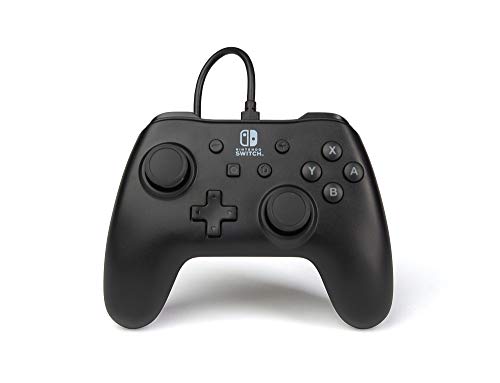
- Instant plug-and-play Switch connection
- Detachable 10-foot USB cable
- No battery or syncing required
Best For: Switch players wanting a simple, long-cable controller
Best Hall Effect Xbox Controller

- Hall Effect sticks and triggers
- Four rumble motors
- 3.5 mm headset jack
Best For: Xbox and Windows players wanting drift-resistant controls
Best Retro Two-Pack
Rii Classic Retro USB Controller

- Two controllers included
- SNES-style retro layout
- Works with PCs and Raspberry Pi
Best For: Emulator-based classic gaming and two-player sessions
Best Customizable Xbox Controller

- Two customizable back buttons
- Hall Effect sticks and triggers
- Removable USB and headset jack
Best For: Xbox and PC gamers wanting added control flexibility
360-Compatible Comfort

- Xbox 360 and Windows compatible
- 7.2-foot USB cable
- Dual vibration and ergonomic grip
Best For: Xbox 360 and Windows users wanting a comfortable wired gamepad
Multi-Platform Flexibility
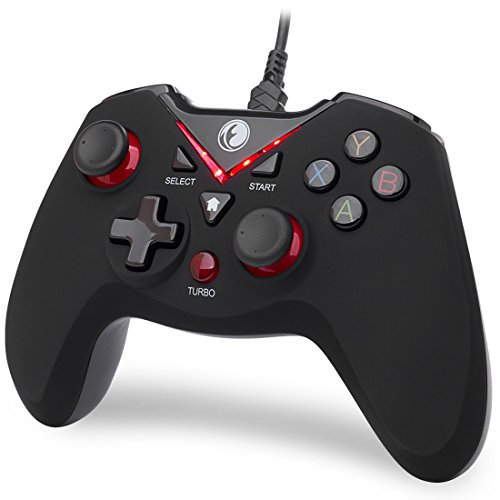
- Supports PC, Steam, PS3, and Android
- Multiple input modes
- Vibration and turbo functions
Best For: Multi-platform users with compatible PC, PS3, or Android devices
Simple PC and PS3 Value

- Supports PC, Steam, Linux, PS3, and Android
- Xinput and DirectInput modes
- Plug-and-play USB design
Best For: PC and PS3 players seeking a versatile wired gamepad
Versatile PC Pick – Logitech G F310
The Logitech G F310 is a practical choice among wired game controllers for PC players who want a familiar console-style layout and broad game support. Its USB connection and six-foot cable make setup straightforward, while optional Profiler software adds customization for games without native gamepad support.
Best For: PC gamers seeking a familiar, plug-and-play controller for both newer titles and older favorites.
Pros:
- Works with a broad range of popular and older games.
- Console-like layout with a responsive four-switch D-pad.
- Six-foot cable provides comfortable distance from the monitor.
- Profiler software supports programmable keyboard and mouse commands.
Cons:
- Profiler customization requires software installation.
- Supplied compatibility information focuses on older Windows versions.
The F310 prioritizes familiarity and easy setup over advanced modern features. It is a sensible wired option for casual and general PC gaming.
Feature-Rich Retro Choice – GameSir Tegenaria Lite
The GameSir Tegenaria Lite brings a retro 90s design to wired game controllers while adding modern performance features. Its wired connection, 1000Hz polling rate, Hall Effect sticks, rumble motors, and mappable back buttons suit players who want responsive controls across Switch, Android, iOS, and PC.
Best For: Players who want low-latency wired control, anti-drift stick technology, and extra customization options.
Pros:
- Hall Effect sticks are designed for precise, durable, anti-drift control.
- 1000Hz polling rate supports highly responsive input.
- Two mappable back buttons add configurable controls.
- Includes dual asymmetric rumble motors and a customizable Turbo function.
Cons:
- Its feature set may be more than casual players need.
- It uses a wired connection rather than wireless play.
With its combination of retro styling and current control features, the Tegenaria Lite is aimed at players who value responsiveness and flexibility over a minimalist design.
Precision Windows Controller – 8Bitdo Ultimate 2C
The 8Bitdo Ultimate 2C is one of the more feature-packed wired game controllers for Windows PC and Android. It combines Hall Effect joysticks and triggers with a 1000Hz polling rate, remappable L4 and R4 bumpers, tactile controls, rumble, and a Turbo function.
Best For: Windows and Android players who want precise controls and extra remapping without requiring software.
Pros:
- Hall Effect joysticks and triggers offer precision and durability.
- 1000Hz polling rate is designed for low-latency responsiveness.
- Remappable L4 and R4 bumpers work without software.
- Includes rumble, Turbo, enhanced grip, and firmware updates.
Cons:
- Compatibility is listed for Windows and Android rather than a wider range of platforms.
- It is a wired controller, so it does not provide wireless play.
The Ultimate 2C stands out for combining responsive hardware with convenient onboard-style customization. It is a strong fit for PC and Android users who want more controls than a basic gamepad provides.
Simple Switch Essential – PowerA Nintendo Switch Wired Controller
The PowerA Nintendo Switch Wired Controller is a straightforward option among wired game controllers for Switch players. It offers instant plug-and-play setup, a Nintendo Switch button layout, and a detachable 10-foot USB cable, with no battery or syncing required.
Best For: Nintendo Switch users who want a simple, long-cable controller for immediate wired play.
Pros:
- Instant plug-and-play connection with no syncing required.
- Detachable 10-foot USB cable supports comfortable distance from the console.
- No battery is required.
- Includes a Velcro strap for cable storage.
Cons:
- Designed for Nintendo Switch rather than multi-platform use.
- Its feature list is more basic than controllers with remapping or advanced stick technology.
This PowerA model focuses on convenience and uncomplicated Switch play. Its long detachable cable and Nintendo-licensed layout make it a practical choice for players who do not need extra customization.
Best Hall Effect Xbox Controller – GameSir T7
The GameSir T7 is a strong pick among wired game controllers for Xbox and Windows gamers who want reliable, drift-resistant input without wireless setup. Its Hall Effect sticks and triggers, rumble feedback, and headset jack make it suited to both competitive and immersive play.
Best For: Xbox Series X|S, Xbox One, Windows 10/11, and Steam players seeking long-lasting stick performance.
Pros:
- Hall Effect joysticks are designed to resist wear and stick drift, with up to 5 million cycles.
- Hall Effect triggers provide a smooth, precisely tuned pull.
- Four rumble motors deliver vibration feedback through the handles and triggers.
- Textured ergonomic surfaces and a 3.5 mm headset jack support comfortable extended sessions.
Cons:
- It is a corded controller, so it requires a USB connection during play.
- Compatibility is focused on Xbox and Windows platforms rather than PlayStation or Switch.
Choose the T7 if durability and tactile feedback matter more than wireless freedom. Its combination of Hall Effect controls, comfortable texturing, and headset support makes it a well-rounded wired option for Xbox and PC gaming.
Best Retro Two-Pack – Rii Classic Retro USB Controller
The Rii Classic Retro controller is a budget-friendly choice among wired game controllers for PC retro gaming and emulation. This grey two-pack provides a familiar SNES-style layout, USB plug-and-play connectivity, and two controllers for multiplayer sessions.
Best For: PC, Mac, Windows, Linux, Android, and Raspberry Pi users playing classic games through emulators.
Pros:
- Two controllers are included for two-player retro gaming.
- USB connection and a roughly 5-foot cable support straightforward setup.
- Six fire buttons, Start, Select, and a directional control suit classic games.
- Supports numerous Windows versions, Mac OS X, Raspberry Pi systems, and compatible emulators.
Cons:
- Emulators and games require manual button and directional-axis configuration.
- Not compatible with Switch or PlayStation games, TVs, TV boxes, third-party mini game boxes, or Tesla Model 3.
- It is intended for retro gaming rather than modern console-style features.
This Rii set makes sense when low-cost multiplayer retro play is the priority. Be prepared to configure controls manually in your emulator, but the two-controller bundle and broad computer and Raspberry Pi support add useful flexibility.
Best Customizable Xbox Controller – GameSir G7 SE
The GameSir G7 SE is a versatile option among wired game controllers for Xbox and Windows users who want Hall Effect precision plus extra customization. Its removable USB connection, programmable back buttons, headset jack, and vibration feedback make it practical for a range of games.
Best For: Xbox Series X|S, Xbox One, Windows 10 and newer, and Steam players who want customizable controls.
Pros:
- Hall Effect joysticks and triggers support accurate control and long service life.
- Two custom back buttons can help reduce false triggers and expand control options.
- Removable wired USB connection provides plug-and-play setup without additional drivers.
- Includes trigger and grip vibration, a 3.5 mm audio interface, and a textured ergonomic handle.
Cons:
- The wired design requires a USB connection while playing.
- Platform support is centered on Xbox and Windows rather than other consoles.
The G7 SE is the better fit for players who want more control customization than a basic gamepad provides. Its back buttons and Hall Effect components are useful additions, while the wired connection keeps setup simple and avoids battery management.
360-Compatible Comfort – YAEYE Wired Controller
For shoppers seeking wired game controllers for Xbox 360 or Windows PCs, the YAEYE model offers a straightforward USB setup with a long 7.2-foot cable. Its ergonomic contour, dual vibration, pressure-sensitive triggers, and 8-way directional button support everyday gaming and local multiplayer.
Best For: Xbox 360 and Windows 7/8/10/11 users who want a comfortable plug-and-play controller and support for up to four connected controllers.
Pros:
- Compatible with Xbox 360 systems and Windows 7/8/10/11.
- 7.2-foot USB cable provides useful reach from the screen.
- Dual vibration, pressure-point triggers, and an 8-way directional button add responsive feedback.
- Ergonomic asymmetrical grip is designed for extended sessions.
Cons:
- Designed for Xbox 360 and Windows rather than newer Xbox consoles.
- USB wired connection limits wireless flexibility.
The YAEYE is a practical choice when compatibility with Xbox 360 is the priority. Its cable length and multiplayer support make it especially useful for couch gaming, while the familiar ergonomic layout keeps the focus on comfort and simple setup.
Multi-Platform Flexibility – V-one Wired USB Controller
The V-one is one of the more flexible wired game controllers for PC gaming, PS3, Steam, and compatible Android devices. Its USB connection supports multiple input modes, while vibration feedback and turbo functions add useful options for supported games.
Best For: Players using Windows PCs, Steam, PS3, or Android devices with OTG support who want one wired controller with Xinput, Dinput, Android, and PS3 modes.
Pros:
- Supports Windows XP/7/8/10/11, Steam, PS3, and compatible Android devices.
- Offers Xinput, Dinput, Android, and PS3 operating modes.
- Includes vibration feedback and turbo functionality.
- Plug-and-play operation is available for supported modes and systems.
Cons:
- Requires an OTG adapter or cable for Android devices with Type-C or Micro-USB ports.
- Does not support Xbox 360, Xbox One, Mac OS, or PS4.
- Windows XP requires driver installation.
The V-one stands out for broad platform coverage, but its compatibility limits should be checked before purchase. It is best suited to users who specifically need PS3, PC, Steam, or OTG-enabled Android support rather than Xbox or Mac compatibility.
Simple PC and PS3 Value – ZD-V+ Wired Gamepad
The ZD-V+ is a practical pick among wired game controllers for Windows PCs, Steam, PS3, and compatible Android setups. It uses a USB connection, supports Xinput and DirectInput, and includes vibration and turbo-related features for supported games.
Best For: PC, Steam, PS3, and OTG-equipped Android users who want a plug-and-play wired gamepad with switchable input modes.
Pros:
- Supports Windows XP/7/8/10/11, Steam, Linux, PS3, and compatible Android devices.
- Provides Xinput and DirectInput modes.
- Includes vibration feedback and a JD-SWITCH function for changing D-pad and left-stick functions in Xinput mode.
- Supports plug-and-play operation for compatible systems.
Cons:
- Android use requires a separately purchased OTG adapter.
- Does not support Xbox 360, Xbox One, or Mac OS.
- USB wiring may be less convenient than a wireless controller.
The ZD-V+ offers useful input flexibility at a straightforward feature set. Verify the platform requirements—particularly the lack of Xbox and Mac support—before choosing it for a multi-device gaming setup.
How We Picked These Wired Game Controllers
We focused on controllers that offer dependable wired connectivity, clearly stated platform support, useful control layouts, and practical value. The list spans PC, Steam, Xbox, Nintendo Switch, Android, iOS, PS3, and retro gaming, but compatibility can vary by game, operating system, adapter, or device. We also considered cable design, plug-and-play setup, vibration, polling claims, and Hall Effect sticks where advertised.
Because a wired connection does not guarantee identical features across platforms, check the manufacturer’s supported-device list before buying. Pay particular attention to whether a controller uses USB-A, USB-C, a detachable cable, or a console-specific connector.
Quick Comparison
| Best For | Recommended Type | What to Look For |
|---|---|---|
| Windows and Steam | PC-focused USB controller | XInput support, comfortable grips, reliable cable |
| Xbox | Xbox-licensed wired gamepad | Console compatibility, headset support, plug-and-play setup |
| Nintendo Switch | Officially licensed Switch controller | Detachable cable, system compatibility, familiar layout |
| Retro gaming | Classic USB gamepad | Simple controls, low cost, two-pack availability |
| Competitive play | Low-latency controller | High polling rate, precise sticks, responsive triggers |
Key Buying Factors for Wired Game Controllers
Platform and Game Compatibility
Start with the device you use most. Windows and Steam generally work best with XInput-compatible controllers, while Xbox and Switch models may require platform-specific licensing or software. Android and iOS support can depend on the port, operating-system version, and individual game.
Sticks, Triggers, and Durability
Hall Effect sticks use contactless sensing and are designed to reduce the wear associated with traditional potentiometers, although no controller is immune to damage. Look for responsive triggers, a reliable D-pad, and buttons that suit the games you play. A familiar Xbox-style layout is versatile, while a retro layout may be better for classic titles.
Cable Length and Connection
A long cable makes sofa or desk gaming easier, but it can also create clutter. Detachable cables are convenient to replace and store; permanently attached cables can be simpler and less likely to be misplaced. Confirm the connector and avoid relying on passive adapters unless compatibility is documented.
Comfort and Extra Controls
Compare grip shape, weight, button placement, vibration, turbo functions, rear buttons, and headset support. Extra features are useful only when they work on your chosen platform, so prioritize a comfortable shape and consistent input over a long feature list.
Who Should Buy Which Wired Game Controllers?
Choose a PC-oriented model if you mainly play Steam or Windows games and want straightforward setup. Xbox players should favor a model explicitly supporting Xbox consoles and Windows. Switch owners should choose a licensed Switch controller rather than assuming a generic USB pad will work. Retro players can save money with a simple classic-style controller or two-pack. For fast-paced games, prioritize precise sticks, low-latency performance, and a cable long enough to keep your setup comfortable.