The best vertical mice for Mac can make long work sessions more comfortable by encouraging a more natural handshake-style wrist position. The right model should also pair reliably with macOS, track smoothly, and fit your hand without forcing an awkward grip.
We compared 10 ergonomic vertical mice across connection types, comfort features, sensitivity controls, battery design, and multi-device support. Use the guide below to narrow the list to the best match for your workspace and daily habits.
Best 10 Vertical Mice for Mac Picks for 2026
Best Overall

- 57° handshake design with thumb rest
- 4000 DPI sensor and speed switch
- Wireless support for macOS and iPadOS
Best For: Premium ergonomic Mac workstations
Best Wired Value

- USB-wired vertical ergonomic design
- Seven buttons with thumb controls
- 600/1000/1600 DPI adjustment
Best For: Right-handed desk users who prefer wired control
Best Quiet Multi-Device
UGREEN Ergonomic Wireless Mouse

- Bluetooth and 2.4G wireless modes
- Quiet clicks and five-button layout
- Switches among up to three devices
Best For: Medium- to large-handed Mac multitaskers
Best for Small to Medium Hands

- Designed for small to medium right hands
- Bluetooth and Logi Bolt connectivity
- Quiet clicks and up to two years of battery life
Best For: Compact Mac office setups and quieter workspaces
Flexible Multi-Device Pick
TECKNET 3-Device Vertical Mouse

- Bluetooth plus 2.4GHz USB-A connectivity
- Six DPI levels up to 4800
- Mac side buttons are not supported
Best For: Mac users switching between multiple devices
Rechargeable Comfort Pick
ProtoArc EM11 NL Vertical Mouse

- Rechargeable 500mAh battery
- Pairs with up to three devices
- Mac does not support forward/back buttons
Best For: Small- to medium-handed Mac users wanting rechargeable power
Mac-Focused Choice
Logitech Lift for Mac Vertical Mouse
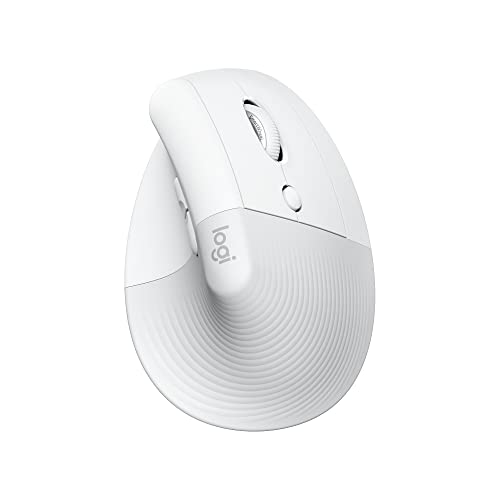
- Designed for macOS and iPadOS
- 57-degree ergonomic handshake angle
- Up to two years from one AA battery
Best For: Small- to medium-handed Mac users seeking a dedicated Bluetooth mouse
Best Multi-Device Pick
UGREEN Ergonomic Vertical Mouse

- Bluetooth and 2.4G wireless support for up to three devices
- Rechargeable 500mAh battery with up to 135 hours of use
- Five DPI settings from 1,000 to 4,000
Best For: Mac users who want rechargeable power and multi-device flexibility
Best Budget Classic

- Handshake-style design for a more neutral wrist position
- Three DPI settings up to 1,600
- USB receiver with next and previous buttons
Best For: Right-handed Mac users who want simple wireless operation
Best Quiet Option
TECKNET 4800 DPI Vertical Mouse

- Nearly silent left and right clicks
- Bluetooth and 2.4GHz connectivity for up to three devices
- Six DPI settings up to 4,800
Best For: Mac users who want quiet primary clicks and high sensitivity
Best Overall – Logitech MX Vertical
For shoppers comparing vertical mice for Mac, the Logitech MX Vertical is a polished wireless option with a 57-degree design, a high-resolution sensor, and compatibility with macOS and iPadOS. Its handshake-style grip is intended to reduce wrist pressure and hand movement during everyday work.
Best For: Mac users who want a premium right-handed ergonomic mouse for extended office use.
Pros:
- 57-degree angle and thumb rest support a more natural wrist posture.
- 4000 DPI sensor and cursor-speed switch allow adjustable tracking.
- Wireless operation, USB receiver, USB-C cable, and compatibility with macOS.
Cons:
- Right-handed design is not suitable for left-handed users.
- Its vertical shape may require an adjustment period compared with a standard mouse.
The MX Vertical stands out for its combination of ergonomic shaping, precise tracking, and broad Mac compatibility. It is a strong choice when comfort and reduced hand movement matter more than a compact design.
Best Wired Value – J-Tech Digital V628
The J-Tech Digital V628 is a wired choice among vertical mice for Mac, offering a USB connection, adjustable 600/1000/1600 DPI sensitivity, and a pronounced ergonomic shape. Its detachable palm rest and thumb buttons add support and control for desk-based work.
Best For: Right-handed users who prefer a wired ergonomic mouse with multiple buttons and simple sensitivity controls.
Pros:
- Wired USB connection avoids battery charging or replacement.
- Seven-button layout includes thumb controls for navigation.
- Adjustable sensitivity and a removable palm rest provide flexibility.
Cons:
- The supplied compatibility details emphasize Windows and Linux rather than macOS.
- Corded operation may be less convenient for clean or portable Mac setups.
With its wired design and adjustable palm support, the V628 is geared toward users who want an ergonomic vertical shape without managing wireless power. Verify Mac compatibility and button support for your specific setup before buying.
Best Quiet Multi-Device – UGREEN Ergonomic Wireless Mouse
The UGREEN Ergonomic Wireless Mouse is a flexible option for vertical mice for Mac, combining Bluetooth and 2.4G wireless connections with compatibility across macOS and other operating systems. Quiet clicks, four DPI levels, and support for switching between up to three devices make it practical for shared or multi-device workspaces.
Best For: Medium- to large-handed Mac users who need quiet operation and multi-device wireless connectivity.
Pros:
- Supports both Bluetooth and 2.4G wireless connections.
- Can switch between up to three devices with a range of up to 10 meters.
- Quiet clicks, five buttons, four DPI levels, and PTFE glide feet support daily productivity.
Cons:
- The manufacturer notes that it may not fit small hands.
- It requires one AA battery.
- Right-handed design limits hand orientation.
The UGREEN offers a useful mix of quiet operation, connection flexibility, and adjustable tracking. Its main buying consideration is fit, so medium- and large-handed Mac users should check the manufacturer’s hand-size guidance.
Best for Small to Medium Hands – Logitech Lift Vertical Mouse
The Logitech Lift is a comfortable pick among vertical mice for Mac, designed specifically for small to medium right hands. Its 57-degree shape, textured grip, quiet clicks, customizable buttons, and Bluetooth or Logi Bolt connectivity make it well suited to long work sessions.
Best For: Small- to medium-handed right-handed Mac users seeking a quiet, long-battery-life ergonomic mouse.
Pros:
- Ergo-certified vertical design promotes a more natural forearm posture.
- Bluetooth Low Energy and Logi Bolt support macOS and other listed systems.
- Whisper-quiet clicks, SmartWheel scrolling, and up to two years of battery life.
Cons:
- It is intended for right hands and may not suit left-handed users.
- The compact hand fit may be less comfortable for large hands.
Lift is a particularly approachable choice when standard vertical mice feel too large. Its quiet controls and long stated battery life make it a practical Mac office companion, especially for users with smaller or medium-sized hands.
Flexible Multi-Device Pick – TECKNET 3-Device Vertical Mouse
The TECKNET vertical mouse is a practical option among vertical mice for Mac if you want flexible connectivity and adjustable sensitivity. It pairs with two Bluetooth devices and one 2.4GHz USB-A receiver, though its side buttons are not compatible with macOS.
Best For: Mac users who need to switch between multiple devices and prefer battery-powered wireless operation.
Pros:
- Connects with up to three devices using Bluetooth and 2.4GHz USB-A.
- Offers six DPI levels from 800 to 4800 for adjustable tracking.
- Quiet left and right clicks suit shared or quiet workspaces.
- Includes a 36-month warranty when registered.
Cons:
- Side buttons do not work with macOS.
- Requires two AAA batteries, which are not included.
- Designed for right-handed use only.
Choose this model if connection flexibility and DPI adjustment matter more than full macOS button support. Its near-vertical shape may help reduce wrist pressure, while the battery design avoids regular charging.
Rechargeable Comfort Pick – ProtoArc EM11 NL Vertical Mouse
The ProtoArc EM11 NL is one of the vertical mice for Mac to consider if you want a rechargeable design and multi-device pairing. It is intended for hands under 7.5 inches long, and its forward and back buttons are not compatible with Mac OS.
Best For: Small- to medium-handed Mac users who want a rechargeable vertical mouse for up to three devices.
Pros:
- Connects to up to three devices through dual Bluetooth and USB-A 2.4G.
- Built-in 500mAh battery recharges through the included USB-C cable.
- Vertical design encourages a more natural wrist and forearm position.
- Quiet left and right clicks help limit distractions.
Cons:
- Forward and back buttons are not compatible with Mac OS.
- The USB receiver is USB-A; no USB-C receiver is included.
- Users may need one to two weeks to adjust to the vertical shape.
The EM11 NL makes the most sense when rechargeable power and a compact hand fit are priorities. Confirm your hand length before buying, and expect a short adjustment period with the ergonomic shape.
Mac-Focused Choice – Logitech Lift for Mac Vertical Mouse
The Logitech Lift for Mac is purpose-built for Apple computers and tablets, making it a straightforward choice among vertical mice for Mac. Its 57-degree angle, quiet controls, Bluetooth Low Energy connection, and included AA battery focus on comfortable everyday use.
Best For: MacBook, iMac, and iPad users with small to medium hands who want a dedicated Bluetooth ergonomic mouse.
Pros:
- Designed for macOS and iPadOS devices through Bluetooth Low Energy.
- 57-degree vertical angle supports a natural handshake position.
- Whisper-quiet clicks and a silent magnetic SmartWheel reduce noise.
- One AA battery provides up to two years of battery life.
Cons:
- Designed for right-handed use only.
- Uses Bluetooth rather than offering a USB receiver option.
- Includes four customizable buttons, fewer than some multi-button alternatives.
This is the strongest fit for shoppers who want a Mac-specific setup with minimal compatibility guesswork. Its smaller-hand design and long battery life make it especially practical for all-day use, provided Bluetooth connectivity meets your needs.
Best Multi-Device Pick – UGREEN Ergonomic Vertical Mouse
If you need vertical mice for Mac that can move between computers, the UGREEN Ergonomic Vertical Mouse combines a handshake-style shape with Bluetooth and 2.4G wireless connectivity. It supports up to three devices, includes a rechargeable battery, and offers adjustable cursor speeds for everyday work.
Best For: Mac users who want rechargeable power and flexible multi-device connectivity.
Pros:
- Natural vertical design helps keep the hand in a more neutral position.
- Connects to up to three devices through Bluetooth or the USB-A receiver.
- 500mAh rechargeable battery provides up to 135 hours of continuous use.
- Five DPI levels range from 1,000 to 4,000 for adjustable cursor control.
Cons:
- Right-handed design may not suit left-handed users.
- The USB receiver uses a USB-A connection.
With macOS support, a Mac mode switch, and broad operating-system compatibility, this is a versatile option for people who regularly work across multiple devices. Its rechargeable battery also avoids the need for replacement batteries.
Best Budget Classic – Anker 2.4G Vertical Mouse
The Anker 2.4G Wireless Ergonomic Mouse is a straightforward choice among vertical mice for Mac. Its handshake-style shape is designed to support a neutral wrist position, while the USB receiver provides a simple wireless connection for compatible computers.
Best For: Right-handed Mac users who prefer a simple USB receiver and replaceable batteries.
Pros:
- Vertical ergonomic shape promotes a neutral handshake-style wrist position.
- Adjustable 800, 1,200, and 1,600 DPI tracking settings.
- Next and previous buttons support convenient webpage navigation.
- Power-saving mode activates after eight minutes of inactivity.
Cons:
- Uses a 2.4G USB receiver rather than Bluetooth.
- Requires two AAA batteries, which are not included.
- Clicks are not silent.
This Anker model keeps the feature set focused and practical. It can work with Mac hardware through its USB receiver, but buyers should confirm they have a suitable USB connection and remember to supply the two AAA batteries.
Best Quiet Option – TECKNET 4800 DPI Vertical Mouse
For quieter workspaces, the TECKNET Ergonomic Mouse stands out among vertical mice for Mac with nearly silent left and right clicks. It offers Bluetooth and 2.4GHz connectivity, six DPI settings, and switching between three devices, although its side buttons are not compatible with macOS.
Best For: Right-handed Mac users who prioritize quiet primary clicks and high adjustable sensitivity.
Pros:
- Nearly silent left and right clicks suit libraries and shared workspaces.
- Bluetooth and 2.4GHz modes support up to three connected devices.
- Six DPI levels range from 800 to 4,800.
- Deep sleep mode helps conserve battery power during inactivity.
Cons:
- Side buttons are not compatible with macOS.
- Only the left and right clicks are silent; other function buttons are not.
- Requires two AAA batteries, which are not included.
The TECKNET is a strong fit for Mac users who value quiet clicking and flexible connectivity. Its macOS limitation is important, however, so it makes more sense if you mainly need the primary buttons rather than the side controls.
How We Picked the Best Vertical Mice for Mac
We focused on the features that matter most for Mac users who spend significant time browsing, writing, designing, or working in productivity apps. Each model was assessed for ergonomic shape, connection options, tracking control, button layout, hand comfort, and practical desk use.
Mac compatibility is more than simply having a Bluetooth label. We favored mice that offer dependable Bluetooth or USB connectivity, straightforward controls, and enough sensitivity adjustment for both detailed work and everyday navigation. Rechargeable batteries, quiet clicks, and multi-device pairing also received extra consideration where available.
Quick Comparison
| Best For | Look For |
|---|---|
| Overall comfort | A well-supported palm and moderate vertical angle |
| MacBook users | Bluetooth connectivity without relying on a USB-A receiver |
| Multiple computers | Two- or three-device switching |
| Quiet workspaces | Low-noise or silent-click buttons |
| Value shoppers | Reliable wireless performance and adjustable DPI at a lower price |
Key Buying Factors for Vertical Mice for Mac
Connection and MacOS Compatibility
Bluetooth is usually the most convenient choice for a MacBook because it avoids adapters and keeps your desk uncluttered. A 2.4GHz receiver can provide a stable connection, but check whether your Mac requires a USB-A hub or adapter. Models with both Bluetooth and receiver support offer more flexibility.
Shape, Size, and Wrist Position
Vertical mice vary in height, width, thumb-rest design, and tilt angle. Your hand should rest naturally with your thumb supported and your wrist relaxed rather than twisted. Smaller hands may prefer a compact design, while larger hands often need a taller body and longer palm area. Right-handed and left-handed users should also confirm the orientation before buying.
Tracking, DPI, and Buttons
Adjustable DPI lets you choose slower, more precise movement or faster cursor travel across a large display. Extra thumb buttons can help with browser navigation and shortcuts, but they are not essential for every user. Check whether button customization works through macOS-compatible software or requires a separate utility.
Power and Portability
Rechargeable models reduce disposable battery use and are convenient for frequent travel, but they need periodic charging. Replaceable-battery mice may run longer between changes. If you switch between a Mac, tablet, and Windows PC, prioritize multi-device pairing and an easy device-selection button.
Who Should Buy Which Vertical Mice for Mac?
Choose a comfort-focused Logitech-style vertical design if you want a polished everyday mouse for extended office work. A Bluetooth model is the simplest fit for MacBook owners who prefer a clean, adapter-free setup. If you regularly move between several computers, select a three-device mouse with dedicated switching controls.
Budget shoppers can save money with a wired or basic wireless option, especially for a fixed desk. Pick a rechargeable model if you dislike replacing batteries or want a more travel-friendly setup. Finally, users with hand, wrist, or forearm discomfort should prioritize fit and a relaxed grip over high DPI numbers or extra buttons. No vertical mouse eliminates the need for breaks and good posture, but the right fit can make daily cursor work feel less demanding.