The best USB MIDI interfaces make it simple to connect keyboards, synthesizers, drum machines, and other MIDI hardware to a computer for recording, editing, and playback.
This roundup compares 10 compact USB MIDI cables and multi-port interfaces, focusing on connection type, port configuration, compatibility, and practical studio use.
Best 10 USB Midi Interfaces Picks for 2026
Extended-Reach Pick

- 6.5-foot MIDI-to-USB cable
- Plug-and-play PC and Mac support
- Up to 32 MIDI inputs or outputs
Best For: Longer studio connections and extensive MIDI setups
Routing Powerhouse

- Standalone 3-in/3-out MIDI routing
- Merge, split, filter, and map functions
- Works across major desktop and mobile OS
Best For: Complex MIDI rigs and advanced signal management
Compact Name-Brand Option

- One MIDI input and one output
- USB bus-powered integrated cable
- Mac, Windows, and iPad compatibility
Best For: Simple single-device MIDI connections
Budget Plug-and-Play Pick

- No driver installation required
- 6.5-foot USB-A cable with LEDs
- Compatible with Windows, Mac, iOS, and Android
Best For: Basic MIDI recording and editing on a budget
Best Premium Pick

- Driver-free operation across major desktop and mobile platforms
- Filtering, routing, and mapping through included UxMIDI Tools
- Low-latency 1-in/1-out MIDI connection with 16 channels
Best For: Advanced MIDI control and reliable cross-platform performance
Best USB-C Option
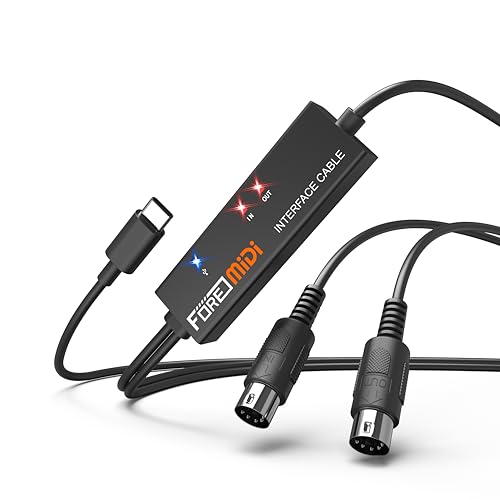
- USB-C-focused connection for phones, tablets, and computers
- Plug-and-play setup with power and signal LED indicators
- Supports 16 channels and common recording software
Best For: Mobile and computer recording with USB-C devices
Best USB-C MIDI Cable
LEKATO MIDI to USB-C Interface

- USB-C plug-and-play connection
- 16-channel input and output support
- LED indicators for power and signal
Best For: USB-C computers and standard MIDI setups
Best 2-in-1 MIDI Adapter

- MIDI input and output connections
- 16 channels in and out
- Power and signal indicator lights
Best For: Computer-based recording with MIDI keyboards
Best Plug-and-Play MIDI Cable

- Built-in driver for Windows and Mac
- 16-channel MIDI input and output
- LED status monitoring
Best For: Home studios using electronic keyboards or pianos
Extended-Reach Pick – ESI MIDIMATE eX
The ESI MIDIMATE eX is a practical choice for shoppers comparing usb midi interfaces for a longer, uncomplicated connection between MIDI hardware and a PC or Mac. Its 6.5-foot cable, plug-and-play setup, and support for major DAWs suit recording, editing, and larger MIDI arrangements.
Best For: Extended studio setups, digital pianos, synthesizers, and users who want broad MIDI connectivity.
Pros:
- 6.5-foot cable provides useful placement flexibility.
- Plug-and-play compatibility with PC and Mac, with USB 3.0, 2.0, and 1.1 support.
- Supports up to 32 MIDI inputs or outputs and major DAWs.
- Includes an optional Windows driver for multi-device and multi-client operation.
Cons:
- Its cable-style design may be less convenient than a compact standalone box.
- The optional advanced driver is specified for Windows rather than all platforms.
Choose the MIDIMATE eX when cable length and flexible MIDI integration matter more than having built-in routing controls. A two-year warranty adds reassurance for regular studio or performance use.
Routing Powerhouse – CME U6MIDI Pro
The CME U6MIDI Pro stands out among usb midi interfaces for users who need more than basic computer connectivity. It works as a standalone 3-in/3-out MIDI router, offering merge, split, thru, filtering, and mapping through its configuration software.
Best For: Multi-device rigs, advanced MIDI routing, and musicians working across computers, mobile devices, and standalone hardware.
Pros:
- Provides 3 MIDI inputs and 3 MIDI outputs for flexible setups.
- Supports routing, merging, splitting, filtering, and mapping.
- Compatible with macOS, iOS, Windows, Android, Linux, and Chrome OS.
- Designed for low latency, no jitter, and support for broad MIDI message types including MPE and SysEx.
Cons:
- Advanced configuration requires the UxMIDI Tools software.
- Its one-year manufacturer warranty is shorter than some alternatives.
The U6MIDI Pro is the strongest fit here for complex MIDI signal management. If you only need one keyboard connected to a computer, its routing features may be more capability than necessary.
Compact Name-Brand Option – Roland UM-ONE-MK2
The Roland UM-ONE-MK2 is a straightforward usb midi interface for connecting one MIDI device to a computer. Its integrated cable design, USB bus power, and input/output data indicators keep the setup compact and easy to monitor.
Best For: Simple keyboard-to-computer connections, home recording, and users who prefer a compact Roland interface.
Pros:
- One MIDI input and one MIDI output with low-latency FPT processing.
- USB bus-powered, so no separate power supply is needed.
- Works with Mac, Windows, and iPad through the Apple iPad Camera Connection Kit.
- Input and output indicators show MIDI activity.
Cons:
- Limited to one MIDI input and one MIDI output.
- iPad use requires the Apple iPad Camera Connection Kit.
- Does not provide the advanced routing features found on multi-port interfaces.
For a single MIDI controller or instrument, the UM-ONE-MK2 keeps the signal path simple and portable. It is less suitable for a larger hardware rig that needs multiple simultaneous MIDI connections.
Budget Plug-and-Play Pick – FORE MIDI USB Interface
The FORE MIDI USB Interface is a practical entry-level option among usb midi interfaces for recording and editing MIDI from a keyboard, synthesizer, drum machine, or other five-pin device. It uses a 6.5-foot cable, requires no extra driver installation, and includes LED status indicators.
Best For: Budget-conscious musicians who need a basic MIDI in/out connection for a computer or compatible mobile device.
Pros:
- Plug-and-play operation with built-in driver support.
- Provides 16 MIDI input and output channels through one MIDI in and one MIDI out.
- Compatible with Windows, Mac, iOS, and Android devices.
- 6.5-foot USB-A cable and LED indicators support flexible setup and signal monitoring.
Cons:
- The included connection is USB Type-A; a USB A-to-C adapter is not included.
- It is limited to one MIDI input and one MIDI output.
- Mobile compatibility may require additional adapters depending on the device.
The FORE interface covers the essentials for connecting one MIDI instrument to recording software without a complicated setup. Check your computer or phone port before buying, especially if you need USB-C connectivity.
Best Premium Pick – CME U2MIDI Pro
The CME U2MIDI Pro is a premium choice among usb midi interfaces for musicians who want broad operating-system compatibility and advanced MIDI control. Its 1-in/1-out design supports 16 channels, while included software adds filtering, routing, and mapping options.
Best For: Producers and performers who need accurate MIDI transmission, flexible routing, and wide device compatibility.
Pros:
- Works without drivers on macOS, iOS, Windows, Android, Linux, and ChromeOS.
- Supports all MIDI channels and messages, including clock, sysex, MTC, and MPE.
- Includes smart LED indicators, a 6.5-foot cable, and UxMIDI Tools software.
- Uses a 32-bit processor and high-speed optocoupler for low-latency transmission.
Cons:
- Provides one MIDI input and one MIDI output rather than multiple ports.
- Uses a USB-A connection, so some newer devices may require an adapter.
The U2MIDI Pro stands out when advanced MIDI management and dependable cross-platform operation matter more than keeping the setup basic. It is a strong long-term option for computer, mobile, and hardware-based MIDI workflows.
Best USB-C Option – FORE T1 MIDI USB Interface
The FORE T1 is a practical usb midi interface for connecting a MIDI keyboard, synthesizer, drum machine, or other five-pin MIDI device to a USB-C-equipped phone, tablet, or computer. It offers plug-and-play setup, status LEDs, and 1-in/1-out connectivity.
Best For: Mobile musicians and home-recording users who want a USB-C-ready MIDI cable for editing and recording.
Pros:
- Compatible with iOS, Android, Windows, and macOS systems.
- Supports 16 MIDI input and output channels with high-speed data transmission.
- Built-in driver and LED indicators simplify setup and signal monitoring.
- Works with software including GarageBand, FL Studio, Cubase, Sonar, and CoreMIDI.
Cons:
- The included USB A-C adapter is not included, despite the USB-C-oriented design.
- It has a 1-in/1-out configuration rather than expanded MIDI connectivity.
For a modern mobile or laptop setup, the FORE T1 offers useful compatibility and straightforward operation. Confirm which USB connection your device uses before buying, especially if you need an adapter for a USB-A port.
Best Budget Cable – NUOSIYA MIDI to USB Interface
The NUOSIYA MIDI to USB cable is a straightforward option among usb midi interfaces for sending MIDI from a piano, keyboard, or arranger to a PC or Mac. Its 1-in/1-out design supports 16 channels and includes indicator lights for checking connection and data activity.
Best For: Basic keyboard-to-computer recording and MIDI editing on Windows or Mac systems.
Pros:
- Connects five-pin MIDI instruments to compatible computers for recording and editing.
- Supports Windows 10/8/7/Vista/XP and Mac OS X systems.
- Offers 16 MIDI input and output channels with a high-performance processing chip.
- Includes a USB-to-Type-C adapter for connecting to compatible mobile devices.
Cons:
- Mobile compatibility may require the supplied adapter and depends on the device.
- Some older audio equipment with RCA-only connections may need an additional adapter.
- The listed cable length varies from 4.5 to 6 feet.
The NUOSIYA is best suited to uncomplicated MIDI transfers rather than complex routing or studio expansion. It covers the essentials for connecting a traditional keyboard to a computer while keeping the setup cable-based and simple.
Best USB-C MIDI Cable – LEKATO MIDI to USB-C Interface
For musicians comparing USB MIDI interfaces, this LEKATO cable is a practical USB-C option for connecting keyboards, synthesizers, drum pads, and other MIDI equipment to a Windows computer, Mac, or iPad. Its built-in driver, LED monitoring, and 6.5-foot cable are designed for straightforward recording and editing setups.
Best For: USB-C-equipped computers and standard MIDI setups requiring one input and one output.
Pros:
- USB-C connection with plug-and-play support for Windows and macOS.
- 1 MIDI input and 1 MIDI output support up to 16 channels each.
- LED indicators help monitor power and MIDI signal activity.
- Shielded, low-latency design supports stable MIDI transmission.
Cons:
- Older or certain vintage instruments may require specific driver settings or proprietary interfaces.
- Compatibility should be checked before purchase, especially for unusual MIDI hardware.
This is a convenient choice when your setup uses USB-C and you want visible connection feedback. Buyers with older instruments should verify compatibility first.
Best 2-in-1 MIDI Adapter – TENINYU USB to MIDI Cable
This TENINYU adapter is a straightforward pick among USB MIDI interfaces for connecting a keyboard or synthesizer to a Windows PC or Mac. It includes MIDI in and out connections, indicator lights, and a 6.5-foot cable for recording, overdubbing, editing, and mixing with compatible software.
Best For: Computer-based music recording with standard MIDI keyboards and synthesizers.
Pros:
- Provides MIDI input and output through a USB Type-A computer connection.
- Supports up to 16 MIDI channels in and 16 channels out.
- LED lights indicate power, MIDI input, and MIDI output activity.
- Compatible with a broad range of Windows versions and Mac OS.
Cons:
- Some setups require both MIDI plugs to be connected.
- Does not support hot-swapping; devices and audio software should be turned off before connecting.
- iOS use requires an authentic Camera Connection Kit and may not work otherwise.
Its clear indicators and two-way MIDI design make it useful for traditional computer recording rigs. The connection procedure is less convenient if you frequently swap equipment or use iOS devices.
Best Plug-and-Play MIDI Cable – LEKATO USB MIDI Interface
For a simple keyboard-to-computer connection, this LEKATO cable offers the core features many buyers want from USB MIDI interfaces: one MIDI input, one MIDI output, built-in driver support, and LED status monitoring. It is intended for editing and recording with Windows or Mac systems and includes a 6.5-foot cable.
Best For: Home studios connecting electronic pianos, keyboards, or synthesizers to Windows or Mac computers.
Pros:
- Plug-and-play design with a built-in driver for Windows and Mac.
- Supports 16 input and 16 output MIDI channels.
- LED indicators make power and signal activity easier to monitor.
- Soft copper cable and interference-resistant design support stable, low-latency transmission.
Cons:
- Designed around standard MIDI connections rather than specialized proprietary interfaces.
- The supplied notes do not specify support for iOS devices.
This cable is a sensible everyday option for recording MIDI from common electronic instruments. Its status lights are particularly helpful when troubleshooting a basic home-studio connection.
How We Picked the Best USB Midi Interfaces
We selected these USB Midi Interfaces based on the features that matter most in everyday music production: reliable MIDI input and output, straightforward computer connection, compatibility with common keyboards and synthesizers, and ease of setup. We also considered whether each model uses USB-A or USB-C, supports plug-and-play operation, and offers useful extras such as MIDI filtering, routing, merging, or mapping.
Because these products serve different users, the list includes simple one-cable adapters as well as more capable multi-port interfaces. A basic cable may be sufficient for connecting one keyboard to a computer, while a router-style interface is better suited to several hardware instruments or a more complex MIDI setup.
Quick Comparison
- Best for simple connections: A compact USB-to-MIDI cable with clearly labeled input and output plugs.
- Best for USB-C devices: A Type-C interface that connects directly to newer laptops, tablets, or computers.
- Best for multiple instruments: A multi-port interface with routing, merging, or filtering controls.
- Best for broad compatibility: A plug-and-play model that works with standard USB computers and traditional five-pin MIDI equipment.
Key Buying Factors for USB Midi Interfaces
Port Configuration
Check whether you need MIDI In, MIDI Out, or both. A one-in/two-out cable can handle many basic keyboard setups, but a device with several inputs and outputs is more flexible for connecting multiple synthesizers, controllers, or hardware sequencers.
USB Connector Type
USB-A remains common on desktop computers and older laptops, while USB-C is increasingly standard on newer devices. Choose a matching connector when possible to avoid adapters and potential compatibility issues.
Routing and Filtering
Advanced interfaces can merge signals, route data between ports, or filter unwanted MIDI messages. These features are valuable in hardware-heavy studios but unnecessary if you only need to record notes from one keyboard.
Plug-And-Play Compatibility
Driver-free operation can make setup faster, but confirm operating-system compatibility before buying. Also check that the cable direction is clearly labeled: MIDI In connects to a device’s MIDI Out, and MIDI Out connects to its MIDI In.
Who Should Buy Which USB Midi Interfaces?
Choose a basic USB MIDI cable if you want to record a keyboard or synthesizer into a computer with minimal setup and low cost. These models are compact and easy to keep in a gig bag.
Choose a USB-C model if your computer has limited USB-A ports or you want a direct connection to a modern laptop or tablet. This is especially convenient for mobile recording setups.
Choose a multi-port MIDI interface if you use several hardware instruments, need MIDI merging, or want filtering and mapping controls. The extra flexibility can reduce the need to reconnect cables as your setup grows.
Before ordering, verify the connector, MIDI port count, cable length, and intended operating system. The right choice is the simplest interface that supports all of the equipment you plan to connect.