Replacing a Windows drive is easier when you can clone the original disk instead of reinstalling the operating system and applications from scratch. The right duplicator can copy a SATA HDD or SSD directly, often without requiring special software.
This roundup compares 10 hard drive duplicators for Windows, from straightforward dual-bay SATA docks to versatile models that also support M.2 NVMe drives. We focus on compatibility, standalone cloning, connection speed, capacity, and practical desktop use.
Best 10 Hard Drive Duplicators for Windows Picks for 2026
Best Value SATA Dock
SABRENT Dual-Bay HDD/SSD Cloner

- Offline cloning without drivers
- Supports 2.5-inch and 3.5-inch SATA drives
- USB 3.0 with UASP support
Best For: Budget-conscious users cloning standard SATA drives
Best for IT Workflows
StarTech Dual-Bay SATA Duplicator

- Sector-by-sector standalone copying
- Supports SATA drives of any capacity
- USB 3.2 Gen 2, 4Kn, and TRIM support
Best For: IT professionals and advanced SATA-drive users
Best Compact Option
Inateck RGB SATA Offline Clone Dock
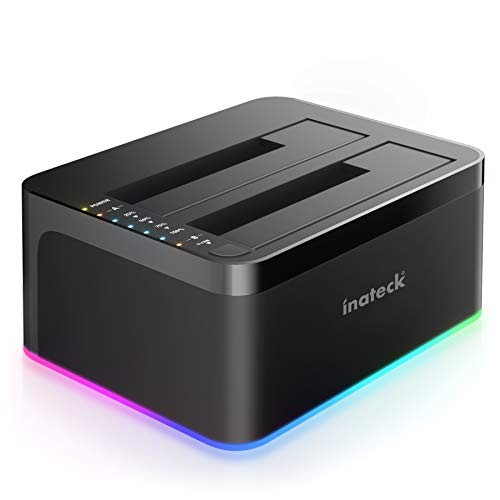
- Offline cloning without a computer
- Handles two 2.5-inch or 3.5-inch SATA drives
- USB 3.0 with UASP support
Best For: Home users needing a lightweight SATA cloning dock
Best Multi-Format Dock
FIDECO Three-Bay NVMe/SATA Cloner

- Supports M.2 NVMe and 2.5/3.5-inch SATA drives
- Offline NVMe-to-NVMe and SATA-to-NVMe cloning
- 10Gbps USB 3.2 Gen 2 and cooling fan
Best For: Users managing both NVMe and SATA storage
Best Manual-Switch Dock

- Offline cloning without a computer
- Manual switch separates cloning and PC modes
- Supports two 2.5- or 3.5-inch SATA drives
Best For: Windows users wanting clear controls and status LEDs
Best USB-C Value
FIDECO Dual-Bay Offline Clone Dock

- Includes USB-C and USB-A cables
- Offline cloning with no computer required
- Supports 2.5- and 3.5-inch SATA drives
Best For: Windows users needing flexible USB-C connectivity
Best High-Capacity Dock

- Supports up to 32TB per drive
- Offline cloning without a computer
- Cooling, dust cover, and anti-slip protection
Best For: Windows users managing large-capacity SATA drives
Most Versatile
ICY BOX Triple-Bay NVMe/SATA Cloner

- Clones NVMe and SATA drives
- Three tool-free bays
- 10Gbps USB 3.2 Gen 2
Best For: Mixed-drive Windows setups and frequent migrations
Best SATA Capacity
MAIWO Dual-Bay HDD/SSD Duplicator

- Handles 2.5- and 3.5-inch SATA drives
- Offline cloning without a computer
- Three-port USB 3.0 hub
Best For: SATA backups and desktop data processing
Best Simple Pick
Rosewill Triple-Bay NVMe/SATA Cloner

- Supports NVMe and SATA drives
- Offline, tool-free cloning
- Compact 10Gbps design
Best For: Portable mixed-drive cloning and reading
Best Value SATA Dock – SABRENT Dual-Bay HDD/SSD Cloner
For shoppers comparing hard drive duplicators for windows, the SABRENT EC-HD2B is a straightforward dual-bay option for cloning or accessing 2.5-inch and 3.5-inch SATA HDDs and SSDs. It works without drivers and can also function as a USB 3.0 drive dock.
Best For: Home users who need an affordable, plug-and-play SATA drive cloner and reader.
Pros:
- Supports both 2.5-inch and 3.5-inch SATA HDDs and SSDs.
- Offline cloning works without a computer or additional software.
- USB 3.0 supports transfer speeds up to 5Gbps, with UASP support.
- Includes a power supply, USB 3.0 cable, and one-year warranty, extendable to two years with registration.
Cons:
- Limited to two SATA drives at a time.
- Supplied notes list support for hard drives up to 10TB, despite a 20TB storage-capacity listing.
- Does not support M.2 NVMe drives.
The SABRENT is a practical choice when you want basic SATA cloning and USB access without extra setup. Its simple design suits routine backups, upgrades, and drive-to-drive copying.
Best for IT Workflows – StarTech Dual-Bay SATA Duplicator
The StarTech SDOCK2U313R stands out among hard drive duplicators for windows for its standalone, sector-by-sector copying and professional-oriented features. It supports 2.5-inch and 3.5-inch SATA drives and can operate without a computer during duplication.
Best For: IT professionals and advanced users who need sector-by-sector SATA cloning, drive recovery, or frequent disk handling.
Pros:
- Copies drives sector by sector, including empty sectors, and supports any file format.
- Works with 2.5-inch and 3.5-inch SATA HDDs and SSDs of any capacity.
- Supports SATA III, USB 3.2 Gen 2, 4Kn, TRIM, and tool-free drive insertion.
- Includes eject buttons, status LEDs, two USB cable options, and a two-year warranty.
Cons:
- The target drive must be equal to or larger than the source drive.
- Sector-by-sector copying may take longer because empty sectors are copied too.
- IDE drives require a separately sold adapter.
With its broad SATA compatibility and detailed duplication approach, the StarTech is a strong fit for structured drive migration and maintenance tasks. It is more specialized than a basic consumer dock, but that added functionality benefits demanding workflows.
Best Compact Option – Inateck RGB SATA Offline Clone Dock
The Inateck SA02003 is a compact choice for shoppers seeking hard drive duplicators for windows that can clone standard SATA drives offline. Its dual-bay design handles both 2.5-inch and 3.5-inch HDDs and SSDs, while USB 3.0 and UASP support help with everyday file transfers.
Best For: Casual users who want a lightweight SATA dock with offline cloning and simple drive access.
Pros:
- Supports two 2.5-inch or 3.5-inch HDDs and SSDs.
- Offline cloning operates independently from a computer.
- USB 3.0 and UASP support provide faster data transfers than standard USB connections.
- RGB lighting indicates drive activity and sleep or removal status.
Cons:
- Supports SATA drives only and does not accommodate M.2 NVMe SSDs.
- The plastic enclosure may feel less rugged than a heavier professional dock.
- Includes a one-year warranty.
The Inateck offers the essential features for occasional cloning and drive reading in a relatively small enclosure. It is a sensible pick for home offices and users who appreciate visual activity indicators.
Best Multi-Format Dock – FIDECO Three-Bay NVMe/SATA Cloner
For users comparing hard drive duplicators for windows across newer and older storage formats, the FIDECO MS02 offers three bays for M.2 PCIe NVMe SSDs and 2.5-inch or 3.5-inch SATA drives. It supports offline cloning between compatible drive types and connects through USB-C with an attached USB-A adapter.
Best For: Professionals and enthusiasts managing NVMe and SATA storage in one tool.
Pros:
- Supports two M.2 NVMe SSDs plus one 2.5-inch or 3.5-inch SATA drive simultaneously.
- Offers offline NVMe-to-NVMe and SATA-to-NVMe cloning without software.
- USB 3.2 Gen 2 provides up to 10Gbps transfer speeds for NVMe drives.
- Includes a foldable cooling fan and works with Windows, macOS, and Linux.
Cons:
- Offline cloning requires the target drive to be equal to or larger than the source.
- NVMe cloning is limited to the supported M-Key or M+B-Key formats.
- New drives may need initialization before a computer recognizes them.
The FIDECO is the most versatile option in this lineup for mixed storage environments. Its extra bay, cooling fan, and 10Gbps USB connection make it especially useful for users regularly working with NVMe SSDs as well as SATA disks.
Best Manual-Switch Dock – SSK Dual-Bay SATA Cloner
The SSK DK103 is a practical choice among hard drive duplicators for Windows when you want both offline cloning and computer-connected file transfers. Its manual mode switch helps separate cloning from PC use, while the dual bays accommodate 2.5- and 3.5-inch SATA HDDs or SSDs.
Best For: Windows users who want a dual-bay SATA dock with a physical mode switch, status LEDs, and aluminum heat dissipation.
Pros:
- Clones drives offline without connecting to a computer.
- Supports two 2.5- or 3.5-inch SATA HDDs or SSDs, with stated support up to 20TB per drive.
- Manual switching helps prevent accidental mode changes between cloning and PC transfer.
- Aluminum construction, LED indicators, and UASP support add practical convenience.
Cons:
- Does not support hot-plugging.
- Uses USB-B 3.0 rather than a native USB-C connection.
Choose the SSK if clear physical controls and drive-status indicators matter more to you than hot-swapping. It is a well-rounded Windows-compatible dock for occasional cloning and routine SATA drive access.
Best USB-C Value – FIDECO Dual-Bay Offline Clone Dock
The FIDECO YPZ220C is a flexible option among hard drive duplicators for Windows, especially if you use USB-C and USB-A computers. It supports offline cloning between two SATA drives and includes both cable types for direct access to files from a desktop or laptop.
Best For: Windows users who need USB-C connectivity, broad operating-system compatibility, and a simple two-drive offline cloning workflow.
Pros:
- Includes both USB-C-to-USB-C and USB-C-to-USB-A cables.
- Supports offline cloning without a computer.
- Works with 2.5- and 3.5-inch SATA I/II/III HDDs and SSDs.
- UASP-enabled USB 3.2 Gen 1 supports transfer rates up to 5Gbps.
Cons:
- The target drive must have capacity equal to or greater than the source drive.
- Its enclosure is plastic rather than aluminum.
FIDECO is a sensible pick when connection flexibility is a priority. The included cables and no-driver setup make it convenient for Windows systems, while the source-to-target slot layout keeps offline cloning straightforward.
Best High-Capacity Dock – UGREEN 48TB Dual-Bay Cloner
The UGREEN CM198 is built for large storage workloads, making it a strong option among hard drive duplicators for Windows. Its dual bays support 2.5- and 3.5-inch SATA drives, while offline cloning lets you copy from a source drive to a larger or equal-capacity target without using a computer.
Best For: Windows users handling high-capacity SATA drives who want dual-drive access, offline cloning, and extra cooling and dust protection.
Pros:
- Supports two drives with a stated maximum capacity of 32TB per drive.
- Offline cloning works without connecting to a computer.
- Accommodates both 2.5- and 3.5-inch SATA I/II/III drives.
- Includes surround cooling, a dust cover, anti-slip pads, and a USB-C data cable.
Cons:
- The target drive must be equal to or larger than the source drive for cloning.
- USB 3.0 transfer speeds are rated up to 5Gbps.
The UGREEN stands out when capacity and physical protection are more important than maximum interface speed. Its large-drive support and cooling-focused design make it a practical choice for backups, upgrades, and bulk SATA drive management on Windows.
Most Versatile – ICY BOX Triple-Bay NVMe/SATA Cloner
If you need hard drive duplicators for Windows that can handle more than standard SATA drives, the ICY BOX is a flexible choice. Its three tool-free bays support M.2 PCIe NVMe, 2.5-inch SATA, and 3.5-inch SATA drives, with offline cloning available without installing software.
Best For: Windows users managing mixed NVMe and SATA storage, multiple drives, or frequent migrations.
Pros:
- Supports cloning between NVMe and SATA drive types.
- Triple-bay design lets you connect up to three drives simultaneously.
- USB 3.2 Gen 2 provides transfer speeds up to 10 Gbps.
- Includes both USB-C and USB-A connectivity through the supplied cable.
Cons:
- The enclosure is plastic rather than metal.
- Its broad drive support may be more than needed for users with SATA-only drives.
The ICY BOX stands out for Windows environments with varied storage hardware. Offline cloning and tool-free access make it convenient, while the three-bay layout adds useful flexibility for technicians and power users.
Best SATA Capacity – MAIWO Dual-Bay HDD/SSD Duplicator
For Windows users focused on 2.5- and 3.5-inch SATA drives, the MAIWO provides a straightforward hard drive duplicator with offline cloning and high stated capacity. It also works as a USB 3.0 dock and adds three USB Type-A hub ports for connected accessories.
Best For: SATA HDD and SSD backups, drive processing, and desktop setups needing extra USB ports.
Pros:
- Supports 2.5-inch and 3.5-inch SATA HDDs and SSDs.
- Offline cloning works without connecting to a computer.
- Each bay supports drives up to 24TB, with 48TB total stated capacity.
- Includes three USB 3.0 hub ports, including one with 2.4A phone charging.
Cons:
- It does not support M.2 NVMe drives.
- USB 3.0 transfer speeds are rated up to 5 Gbps, below newer 10Gbps docks.
- The product listing has differing capacity details, so verify requirements before purchase.
The MAIWO is a practical SATA-focused option for Windows desktops. Its offline cloning, independent power supply, and integrated USB hub suit backup and data-handling tasks, though NVMe users will need a different model.
Best Simple Pick – Rosewill Triple-Bay NVMe/SATA Cloner
The Rosewill RS-N2S-CL is a compact choice among hard drive duplicators for Windows, combining offline cloning with docking-station functionality. Its tool-free triple-bay design supports M.2 NVMe, 2.5-inch drives, and 3.5-inch HDDs while connecting over USB 3.2 Gen 2×1.
Best For: Windows users who want a portable mixed-drive cloner and reader with 10Gbps connectivity.
Pros:
- Supports M.2 NVMe, 2.5-inch, and 3.5-inch drives.
- Performs offline cloning without a host computer.
- USB 3.2 Gen 2×1 supports transfer speeds up to 10 Gbps.
- Tool-free design makes drive installation and removal simple.
Cons:
- The plastic enclosure may offer less ruggedness than a metal design.
- It has a one-year warranty, shorter than some competing options.
Rosewill balances broad drive compatibility with a lightweight, compact form factor. It is a strong fit for Windows users who need both standalone cloning and computer-connected drive access without a bulky setup.
How We Picked These Hard Drive Duplicators for Windows
We selected models based on the features that matter most during drive upgrades, recovery work, and routine backups. Each option supports at least one common Windows storage format, such as 2.5-inch or 3.5-inch SATA HDDs and SSDs. Several also support M.2 NVMe drives, giving users more flexibility as newer PCs move away from SATA storage.
We also considered whether a dock can clone drives offline, meaning the source and destination disks can be copied without installing cloning software. Other factors include USB transfer standards, sector-by-sector copying, maximum stated capacity, bay layout, power requirements, and extra functions such as drive reading or USB hub ports.
Quick Comparison
- Best for simple SATA cloning: Choose a dual-bay dock with clearly labeled source and target bays and one-button offline cloning.
- Best for faster modern storage: Look for USB 3.2 or USB-C connectivity, while remembering that actual speeds depend on the drive and computer.
- Best for NVMe flexibility: Select a triple-bay model that supports M.2 NVMe as well as 2.5-inch and 3.5-inch SATA drives.
- Best for large desktop drives: Check the manufacturer’s capacity limit and confirm that the included power adapter supports both inserted drives.
Key Buying Factors for Hard Drive Duplicators for Windows
Drive and Interface Compatibility
Confirm the exact drive type before buying. SATA docks generally accept 2.5-inch laptop drives and 3.5-inch desktop drives, but an M.2 NVMe SSD requires a compatible M-key or specified NVMe slot. SATA M.2 and NVMe M.2 are not interchangeable in every dock.
Offline Cloning Versus Software Cloning
Offline duplicating is convenient for a direct disk replacement, but the destination drive usually must be at least as large as the source drive. Software cloning is more flexible when moving to a smaller drive or adjusting partitions. For Windows system disks, check whether the process copies all partitions, including EFI and recovery partitions.
Speed, Connections, and Capacity
USB 3.0 can handle everyday cloning and file access, while USB 3.2 Gen 2 or 10Gbps connections may reduce transfer time with fast SSDs. The advertised interface speed is not a guarantee: the slowest drive, USB port, cable, or controller sets the practical limit.
Who Should Buy Which Hard Drive Duplicators for Windows?
Choose a basic dual-bay SATA dock if you mainly upgrade Windows laptops or desktops using 2.5-inch and 3.5-inch SATA drives. These models are usually the simplest and most affordable choice.
Choose an NVMe/SATA triple-bay dock if you work with multiple drive formats, build PCs, or want one station for current and older storage. Verify the supported M.2 key type and whether simultaneous cloning is supported.
Choose a higher-speed USB-C model if the dock will also serve as a regular external drive reader and your computer has a matching high-speed port. For occasional disk replacement, a lower-cost USB 3.0 model may be sufficient.