A good flight simulator joystick can make flying more immersive without taking over your entire workspace. For small desks, the best options balance a compact footprint with useful controls, comfortable ergonomics, and straightforward PC or console compatibility.
This roundup compares 10 flight sticks and HOTAS-style controllers for different budgets and setups, from simple USB joysticks to programmable systems with separate throttles. Use the guide below to narrow your choice by space, simulator, and control needs.
Best 10 Flight Simulator Joysticks for Small Desks Picks for 2026
Compact HOTAS Control

- Detachable stick and throttle
- 14 programmable buttons
- PC and Xbox compatible
Best For: Flexible HOTAS setups on desks or laps
Feature-Rich Desk Stick

- 27 programmable buttons
- OLED flight-management display
- Ambidextrous Xbox and PC design
Best For: Advanced control from one desk-mounted stick
Full HOTAS Simulation

- Dedicated stick and throttle
- LCD and illuminated buttons
- Adjustable throttle resistance
Best For: PC sim enthusiasts with room for a two-piece setup
Simple Space-Saving Stick
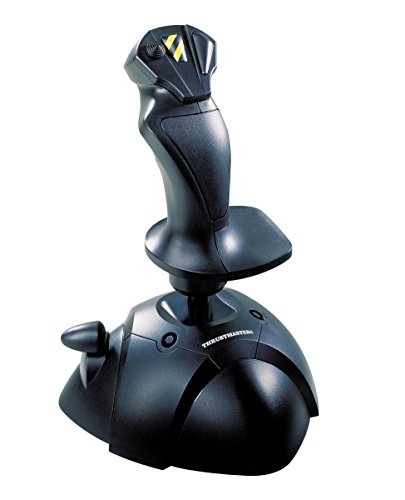
- Single-stick desktop design
- Three axes plus POV button
- Ergonomic Windows joystick
Best For: Basic flight control on very limited desks
Best Value
PXN-2119Pro Compact Flight Controls

- Separate throttle with damping feel
- Suction-cup base helps prevent sliding
- 16 programmable keys and vibration feedback
Best For: Budget-minded PC pilots needing a stable joystick-and-throttle setup
Best Compact All-in-One
Thrustmaster TCA Sidestick Airbus Edition

- Integrated throttle, reverser, and rudder control
- Contactless magnetic sensors resist drift
- 17 buttons with customizable layout
Best For: Airbus-focused PC pilots with limited desk space
Best for Advanced Control
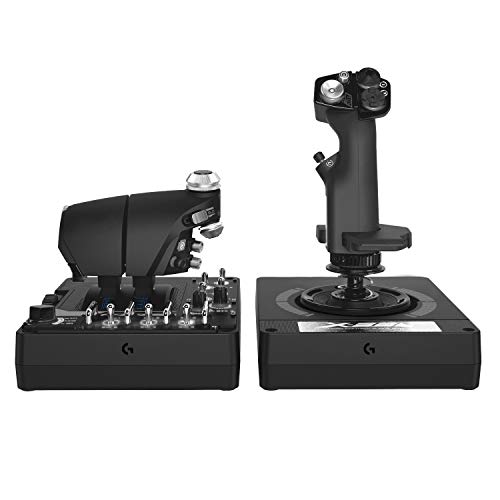
- Twin throttles with friction adjustment
- Adjustable stick force and Hall-effect axes
- Extensive programmable controls with RGB lighting
Best For: Advanced PC or VR sim players who value customization over compactness
Best with Extra Features
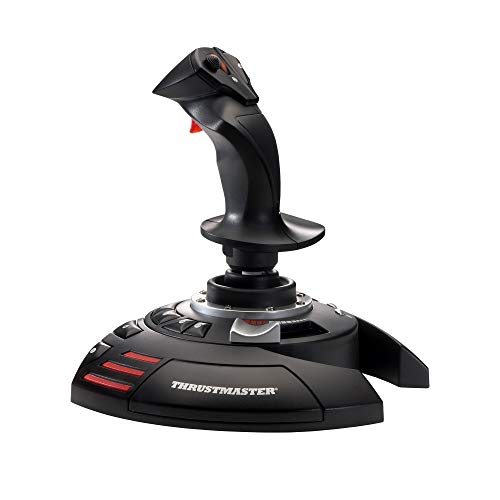
- Integrated throttle and twist rudder
- Weighted base with adjustable resistance
- 12 programmable buttons and presets
Best For: PC or PlayStation 3 users needing complete controls in one unit
Premium Modular Pick

- Metal body with military-inspired design
- 30 configurable input signals
- Modular pogo-pin expansion system
Best For: PC pilots building a compact, customizable cockpit setup
Budget Desk-Grip Pick
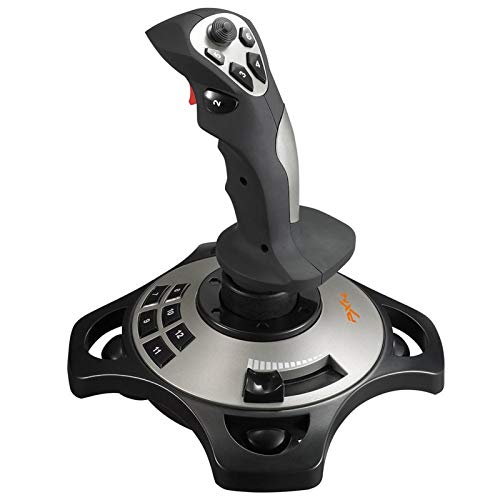
- Four suction cups help secure smooth desks
- 12 programmable buttons and four axes
- Integrated throttle and vibration function
Best For: Windows PC users wanting a stable single-hand controller
Compact HOTAS Control – T-Flight Hotas One
For shoppers comparing flight simulator joysticks for small desks, the Thrustmaster T-Flight Hotas One offers a flexible stick-and-throttle layout without requiring a permanent cockpit installation. Its detachable design lets you use the controls together on a desk or separately on your lap.
Best For: PC and Xbox pilots who want an adjustable HOTAS setup for flight simulators.
Pros:
- Detachable throttle supports desk, lap, or modular setups.
- Adjustable joystick resistance and an ergonomic grip provide adaptable control.
- Includes 14 programmable buttons, a responsive trigger, and a hat switch.
- USB plug-and-play compatibility works with Windows PC and Xbox consoles.
Cons:
- Its separate stick-and-throttle layout may use more desk space than a basic joystick.
- Rudder pedals are an optional extra rather than included accessories.
This is a practical small-desk HOTAS choice when flexibility matters. You can separate the components when space is tight, while still retaining dedicated throttle control for commercial aircraft, combat jets, and helicopters.
Feature-Rich Desk Stick – VelocityOne Flightstick
The Turtle Beach VelocityOne Flightstick is a feature-rich option for flight simulator joysticks for small desks. Its integrated controls combine throttle and flap levers, navigation controls, and a flight-management display in one joystick-focused unit.
Best For: PC and Xbox users who want extensive controls in a single ambidextrous flightstick.
Pros:
- Compact joystick format measures 6.46 by 8.54 by 9.07 inches.
- Provides 27 programmable buttons and eight axes for detailed control.
- Includes an OLED flight-management display, configuration wheel, and touchpad.
- Ambidextrous design suits different users and flying styles.
Cons:
- Its extensive controls may be more than beginners need.
- It does not provide a separate throttle unit.
With many controls integrated into one footprint, the VelocityOne Flightstick can help keep a compact desk organized. It is especially appealing if you want programmable inputs and display feedback without adding a separate HOTAS throttle.
Full HOTAS Simulation – X52 Pro Flight Control System
The Logitech G Saitek X52 Pro delivers a dedicated stick-and-throttle experience for PC pilots, but its two-piece footprint deserves careful measuring when shopping for flight simulator joysticks for small desks. It adds an LCD display, illuminated buttons, and adjustable throttle resistance for a more involved simulation setup.
Best For: PC flight-simulation enthusiasts with enough desk space for a dedicated HOTAS system.
Pros:
- Separate stick and throttle provide dedicated flight controls.
- Progressive throttle includes resistance adjustment and afterburner and idle detents.
- LCD display and illuminated buttons support in-game control visibility.
- Adjustable handle positions and a contoured grip accommodate different hand sizes.
Cons:
- Its 14.57-by-9.84-inch listed dimensions and 5.1-pound weight make it less compact than a basic joystick.
- Requires two USB 2.0 ports for the system.
- It is compatible with PC only.
The X52 Pro is best treated as a full simulation station rather than a minimal desk accessory. It can work in a small room if the desk has sufficient surface area, but buyers should confirm both dimensions and available USB ports first.
Simple Space-Saving Stick – Thrustmaster USB Joystick
The Thrustmaster USB Joystick is a straightforward choice for flight simulator joysticks for small desks. Its single-stick design keeps the setup simple, with three axes, a point-of-view button, four buttons, and a trigger for essential flight control.
Best For: Windows users who want an uncomplicated joystick for basic flight gaming.
Pros:
- Single-unit design is easier to fit on a limited desk than a separate HOTAS system.
- Point-of-view button supports camera control and immersion.
- Three axes, four buttons, and one trigger cover basic control needs.
- Ergonomic handle and enlarged rest support comfortable use.
Cons:
- It lacks a separate throttle for more detailed engine management.
- Only four buttons are listed, limiting programmable control options.
- Compatibility is limited to Windows.
This joystick makes the most sense when desk space, simplicity, and basic controls matter more than advanced simulation features. It is a compact starting point for Windows users who do not need a separate throttle or extensive button layout.
Best Value – PXN-2119Pro Compact Flight Controls
For shoppers comparing flight simulator joysticks for small desks, the PXN-2119Pro offers a joystick-and-throttle setup with a practical footprint and desk-gripping suction cups. Its wired USB connection, programmable controls, and vibration feedback make it a versatile PC option for several flight games.
Best For: Budget-conscious PC pilots who want a separate throttle and a firmly anchored desk setup.
Pros:
- Separate throttle with linear damping feel for more precise power control.
- Heavy-duty base and suction cups help reduce sliding during maneuvers.
- Includes 16 programmable keys, an 8-way POV hat, four axes, and dual-vibration feedback.
- Joystick can be used independently when desk space is limited.
Cons:
- Driver installation may be required if the PC does not recognize the controller.
- Some games require manual joystick-mode selection or button mapping.
- Compatibility details focus on Windows PCs rather than current consoles.
The PXN-2119Pro is a strong small-desk value when you want more control separation than a basic stick provides. Just allow time for driver and in-game configuration if plug-and-play recognition is incomplete.
Best Compact All-in-One – Thrustmaster TCA Sidestick Airbus Edition
The Thrustmaster TCA Sidestick Airbus Edition is a smart choice among flight simulator joysticks for small desks because it combines stick, throttle, thrust reverser, and rudder functions in one PC controller. Its compact all-in-one design reduces the need for additional peripherals.
Best For: Airbus fans and small-desk users who want realistic controls without a separate throttle unit.
Pros:
- Officially licensed, 1:1-scale Airbus A320 sidestick design.
- Built-in throttle, thrust reverser, and rotating rudder control save desk space.
- Contactless magnetic sensors are designed for drift-free precision and durability.
- Offers 17 action buttons, four swappable head modules, and 12 remappable buttons.
Cons:
- Designed for Windows PCs and does not include a separate throttle quadrant.
- Its Airbus-focused styling may be less appealing to users seeking a generic stick.
- Adding more Thrustmaster accessories would require additional desk space.
This sidestick is especially practical when every inch matters. It delivers a realistic Airbus layout and several control functions in one unit, making it easier to build a capable simulator station around a compact desk.
Best for Advanced Control – Logitech G X56 H.O.T.A.S.
The Logitech G X56 H.O.T.A.S. is aimed at pilots who want extensive customization rather than the smallest possible setup. For flight simulator joysticks for small desks, its separate stick and throttle units offer substantial control access, but the 6.9-pound system and two-USB connection deserve careful desk planning.
Best For: Advanced PC and VR sim players who prioritize programmable controls and HOTAS flexibility over minimal footprint.
Pros:
- Provides twin throttles with friction adjustment and a throttle lock.
- Offers adjustable stick force through a four-spring system.
- Uses 16-bit aileron and elevator axes with Hall-effect sensors.
- Includes RGB lighting and extensive programmable controls for complex simulations.
Cons:
- Separate stick and throttle units require more desk area than an all-in-one controller.
- Requires two USB 2.0 ports on the PC.
- The 6.9-pound weight makes it less convenient to move or store after use.
The X56 can work on a small desk if you have room to position both modules and leave them connected. It is best suited to users who will take advantage of its advanced customization, twin throttles, and adjustable controls.
Best with Extra Features – Thrustmaster T-Flight Stick X
For flight simulator joysticks for small desks, the Thrustmaster T-Flight Stick X is a practical all-in-one option. Its integrated throttle and twist rudder provide core flight controls without requiring separate pedals or a standalone throttle, while the weighted base helps keep it steady during play.
Best For: PC or PlayStation 3 users who want programmable controls and integrated flight functions in one desk-friendly setup.
Pros:
- Integrated throttle and twist rudder reduce the need for extra desk hardware.
- Weighted base and adjustable resistance support stable, controlled inputs.
- Twelve programmable buttons, presets, and plug-and-play USB setup add flexibility.
Cons:
- Its listed dimensions may still take noticeable room on especially narrow desks.
- Compatibility is limited to PC and PlayStation 3.
The T-Flight Stick X balances controls, stability, and customization in one unit. It is a strong choice when conserving desk space matters more than using a separate throttle and rudder-pedal arrangement.
Premium Modular Pick – MOZA MH16 Flightstick
The MOZA MH16 is worth considering among flight simulator joysticks for small desks when a compact, modular control setup is the priority. Its metal construction, removable components, and cable-free pogo-pin expansions offer a streamlined way to build out compatible controls.
Best For: PC pilots who value a realistic military-inspired design, durable metal construction, and extensive input customization.
Pros:
- Metal body provides a robust build with claimed mechanical resistance and thermal stability.
- Removable modular components connect through pogo pins without extra cables.
- Offers 30 configurable input signals and an 8-way ALPS hat switch.
Cons:
- It is listed as PC-compatible only.
- Direct plug-and-play integration is specifically noted for the MOZA AB9; other systems may require adapters.
The MH16 is best suited to a focused cockpit-style setup where build quality and customization matter. Its modular design can help reduce cable clutter, though broader compatibility may depend on adapters and supporting hardware.
Budget Desk-Grip Pick – PXN 2113PRO PC Joystick
The PXN 2113PRO is a practical candidate for flight simulator joysticks for small desks, especially where keeping the controller firmly positioned is important. Four suction cups help secure it to smooth surfaces, and the single-hand layout combines throttle, buttons, and flight axes in one controller.
Best For: Windows PC users seeking an affordable, single-hand flight stick with vibration, programmable buttons, and a secure desk grip.
Pros:
- Four bottom suction cups help hold the joystick on smooth desks.
- Provides four axes, an 8-way hat switch, 12 programmable buttons, and a rapid-fire trigger.
- Includes a throttle, vibration function, and driver-based customization.
Cons:
- Only supports Windows 7, 8, 10, and 11 on PC; Mac, consoles, and Apple devices are not supported.
- Vibration may be difficult to feel below 20% strength and requires the switch to be on.
- Force feedback is not supported.
The PXN 2113PRO emphasizes desk stability and broad control access at the expense of platform flexibility. It is a sensible small-desk pick for Windows users who want many inputs without adding separate flight peripherals.
How We Picked These Flight Simulator Joysticks for Small Desks
We focused on controllers that can work in constrained gaming areas without sacrificing the controls most flight simulator players use. Our comparison considers overall footprint, whether the throttle is integrated or separate, button and hat-switch access, ergonomics, connection type, platform support, adjustability, and setup complexity.
Compact single-stick models generally suit casual pilots and desks where every inch matters. HOTAS systems provide more dedicated controls but require additional surface area. Programmable buttons and adjustable resistance can be valuable for advanced simulators, although they may add cost and setup time.
Quick Comparison
- Smallest and simplest: A single USB joystick is usually easiest to place, store, and configure.
- Best for throttle control: Integrated-throttle or HOTAS designs provide more natural power management.
- Best for console flexibility: Check explicit Xbox compatibility before buying; PC support alone is not enough.
- Best for advanced customization: Systems with programmable controls offer more flexibility for complex simulator profiles.
- Best for Airbus-style layouts: Sidestick designs can provide a more aircraft-specific experience.
Key Buying Factors for Flight Simulator Joysticks for Small Desks
Desk Footprint and Storage
Measure the usable area beside your keyboard and monitor stand, not just the width of the desk. Separate throttle units need room next to the stick, while compact models can often be moved aside when not in use. A stable base is important, but an oversized base may be impractical on a narrow surface.
Control Layout
Look for the functions you actually use: a trigger, hat switch, rudder control, throttle, trim controls, and enough buttons for landing gear or view changes. An integrated throttle keeps the setup compact; a separate throttle is generally easier to operate independently.
Compatibility and Software
Confirm support for your operating system, console, and preferred simulator. Some controllers work immediately through standard USB input, while programmable models may benefit from manufacturer software and custom profiles. Compatibility claims can vary by platform and game.
Comfort and Stability
A stick should feel natural during longer sessions and remain planted during aggressive movements. Consider grip shape, reach to buttons, resistance settings, and whether the base includes useful non-slip support. A compact controller is not a good choice if it slides around or causes wrist strain.
Who Should Buy Which Flight Simulator Joysticks for Small Desks?
Choose a basic USB joystick if you want an affordable, space-saving controller for occasional flying or arcade-style games. Choose an integrated-throttle stick if you need more control while keeping the footprint modest. Choose a separate HOTAS system if you regularly play detailed combat or civilian simulators and have enough desk space for two control units.
Choose a programmable premium system if you want extensive bindings, multiple profiles, and room to grow. Choose an aircraft-inspired sidestick if immersion and a specific cockpit layout matter more than maximum button count. Before ordering, verify dimensions, platform support, included cables, and the return policy so the controller fits both your desk and your simulator setup.