Copying the same files to multiple USB drives can become slow, repetitive, and difficult to manage with a standard computer. The right standalone duplicator streamlines bulk transfers while reducing manual steps and maintaining a more consistent process.
These 10 USB duplicators cover small office jobs, event and classroom distribution, media production, drive sanitization, and higher-volume commercial use. Below, compare port capacity, speed, supported media, and workflow features before choosing a model.
Best 10 USB Duplicators for Bulk Copying Picks for 2026
Compact IT Workhorse

- Standalone 1-to-2 cloning and erasing
- Sector, file, and system copy modes
- LCD monitoring with Copy & Compare
Best For: Technicians and small-team USB workflows
Seven-Drive Production Hub

- Duplicates up to seven drives
- Synchronous and asynchronous modes
- Standalone bit-by-bit copying
Best For: Small recurring business batches
Flexible High-Capacity Copier

- Copies to up to 15 USB devices
- Supports flash drives, HDDs, and SSDs
- Four copy and four erase modes
Best For: High-volume mixed-media duplication
Large-Batch Output Station

- Duplicates up to 31 drives
- Standalone bit-by-bit copying
- Synchronous and asynchronous modes
Best For: Large business deployment batches
Compact Starter
BestDuplicator UB300 1:2 USB Duplicator

- Copies one USB drive to two targets without a computer
- Offers Quick Copy and bit-for-bit Whole Media Copy
- Includes testing, verification, and erase functions
Best For: Small-scale duplication, field work, schools, and IT technicians
Touchscreen Workhorse
EZ Dupe SOHO Touch 1:10 USB Duplicator

- Copies to up to ten USB drives at once
- Uses a touchscreen for copy, compare, format, and erase
- Supports USB 2.0, 3.0, and 3.1 media
Best For: Frequent multi-drive duplication and daily media management
High-Output Utility
StarTech 1:5 USB Duplicator Eraser

- Duplicates to five USB drives without a computer
- Supports file, system, and sector-by-sector copying
- Adds erase, overwrite, testing, and copy verification modes
Best For: IT teams handling USB distribution, boot media, and sanitization
Best Compact 1-to-4 Pick

- Copies up to four USB drives simultaneously
- Standalone and portable design
- Supports asynchronous copying and drives above 2TB
Best For: Portable small-batch USB duplication
Best High-Capacity Professional Pick
StarTech 1-to-15 USB Duplicator

- Handles up to 15 USB drives at once
- Includes copy, erase, and overwrite modes
- LCD monitoring and copy verification
Best For: IT departments and high-volume USB workflows
Best Mid-Size Sanitizing Pick
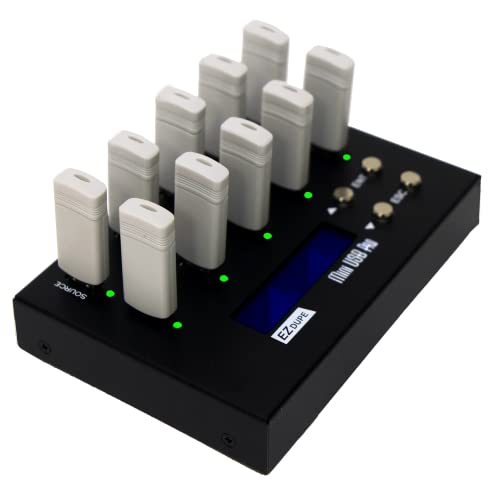
- Copies up to nine USB drives simultaneously
- Offers quick and sector-by-sector copy modes
- Includes two erase functions
Best For: Small-batch duplication with occasional sanitizing
Compact IT Workhorse – StarTech 1:2 USB Duplicator
For technicians seeking usb duplicators for bulk copying without a computer, the StarTech USBDUP12 provides a compact 1-to-2 setup for cloning, erasing, and verifying USB drives. It supports system-and-file or sector-by-sector copying, with a stated transfer rate of up to 1.5 GB per minute.
Best For: IT technicians and small teams that need occasional USB duplication, sanitizing, or boot-drive preparation.
Pros:
- Standalone operation requires no computer.
- Supports USB 2.0 and 3.0 flash media and external USB storage.
- Offers sector-by-sector copying, multiple erase modes, and Copy & Compare verification.
- Asynchronous mode lets finished drives be replaced without interrupting the process when source content is under 64 MB.
Cons:
- Only duplicates two target drives at a time.
- Asynchronous copying is limited to source content under 64 MB.
- Some external USB devices may require their own power source.
This is a practical, feature-rich choice for lower-volume duplication and secure drive handling. Its small footprint and LCD controls are useful where portability and verification matter more than maximum output.
Seven-Drive Production Hub – Systor 1:7 USB Duplicator
The Systor SYS-USBD-7 is built for teams that need usb duplicators for bulk copying across seven target drives. It works without a computer or software, supports bit-by-bit duplication, and maintains a stated speed of up to 2 GB per minute as the number of loaded drives increases.
Best For: Small business, media, and IT operations producing several identical USB drives in repeat batches.
Pros:
- Copies to up to seven USB drives simultaneously.
- Supports USB 1.1, 2.0, and 3.0 flash drives.
- Includes synchronous and asynchronous copy modes.
- Provides hot-swappable operation and lifetime technical support.
Cons:
- The listed transfer rate is 33 MB per second, so large batches may still take time.
- The unit weighs 10 pounds, making it less convenient to move frequently.
- Its supplied interface information centers on USB 1.1.
With seven target bays and consistent stated speed regardless of load count, this Systor is a sensible middle-ground machine for recurring duplication jobs. Its support coverage also adds reassurance for business use.
Flexible High-Capacity Copier – EZ Dupe USB Cyclone 1:15
For broader production needs, the EZ Dupe USB Cyclone supports usb duplicators for bulk copying across as many as 15 USB flash drives or external HDDs and SSDs. It offers independent bandwidth per channel, multiple copy modes, and four erase options, including DoD 3-pass and 7-pass modes.
Best For: Businesses and media workflows that need high-volume duplication across mixed USB flash and external-drive media.
Pros:
- Supports up to 15 target USB devices.
- Handles USB 1.0 through 3.1 media and external HDDs or SSDs.
- Offers Essential Files, Full, Partitioned, and Percentage Copy modes.
- Supports drives above 2TB and includes slow-drive alerts to help protect overall throughput.
Cons:
- Its maximum stated speed is 45 MB per second per USB slot, depending on the drive.
- The unit weighs 7 pounds and has a one-year manufacturer warranty.
- External hard drives may need to stay within the listed 5V-per-slot power support.
This is the most flexible option in the group for mixed media and larger batches. Its independent channel design and broad copy and erase modes make it well suited to production environments where capacity and control are priorities.
Large-Batch Output Station – Systor 1:31 USB Duplicator
The Systor SYS-USBD-31 is designed for organizations that need usb duplicators for bulk copying at a much larger scale. Its 31-target layout performs bit-by-bit duplication without a computer or software, with synchronous and asynchronous modes and a stated speed of up to 2 GB per minute.
Best For: Business teams producing large batches of identical USB drives for distribution, deployment, or internal operations.
Pros:
- Provides up to 31 target USB connections.
- Standalone operation simplifies repeated production runs.
- Supports synchronous and asynchronous copying.
- Hot-swappable design can make managing completed drives more convenient.
Cons:
- The stated transfer rate is 33 MB per second.
- Its large 31-drive capacity is likely excessive for occasional or small-batch use.
- The supplied compatibility details are less expansive than those of some newer USB duplicators.
When output volume is the deciding factor, this Systor offers the largest target capacity in the lineup. It is best justified by regular, high-volume production rather than occasional copying.
Compact Starter – BestDuplicator UB300 1:2 USB Duplicator
For users comparing usb duplicators for bulk copying, the BestDuplicator UB300 offers a compact standalone way to copy one USB flash drive to two targets at once. It supports both data-only Quick Copy and bit-for-bit Whole Media Copy, with no computer required.
Best For: IT technicians, schools, small businesses, and field deployments needing two simultaneous USB copies.
Pros:
- Copies one source drive to two target drives independently of a computer.
- Supports Quick Copy and Whole Media Copy for flexible duplication.
- Includes capacity checks, device information, speed tests, and erase functions.
- Compact LCD-and-button design is portable and easy to monitor.
Cons:
- Limited to two target drives per duplication cycle.
- Designed primarily for USB 1.1 and USB 2.0 media.
- Additional card-media duplication requires a compatible USB card reader.
The UB300 is a practical choice when portability and simple standalone operation matter more than high output volume. Its verification and maintenance tools also help prepare drives before distribution.
Touchscreen Workhorse – EZ Dupe SOHO Touch 1:10 USB Duplicator
The EZ Dupe SOHO Touch is built for higher-volume usb duplicators for bulk copying workflows, with one source port feeding up to ten USB targets. Its touchscreen menu combines copying, comparison, formatting, and erasing in a straightforward standalone interface.
Best For: Teams performing frequent USB duplication, comparison, formatting, or erasure tasks across multiple drives.
Pros:
- Duplicates to up to ten USB drives simultaneously.
- Touchscreen controls simplify Copy, Compare, Format, and Erase operations.
- Supports USB 2.0, 3.0, and 3.1 thumb drives and all file formats, file sizes, and drive capacities.
- Designed with a durable construction for daily operation.
Cons:
- At 3 pounds, it is less portable than compact duplicator options.
- The supplied notes specify a 35 MB-per-second duplication speed, which may not suit every high-throughput workflow.
- It requires external power rather than battery operation.
With its ten-target capacity and touchscreen controls, the SOHO Touch is oriented toward repeatable daily production rather than occasional copying. Compare and erase functions add useful quality-control and media-preparation flexibility.
High-Output Utility – StarTech 1:5 USB Duplicator Eraser
For usb duplicators for bulk copying that also need drive sanitization, the StarTech USBDUP15 combines five-target duplication with erasing and verification features. It operates without a computer and supports both file-level copying and sector-by-sector cloning.
Best For: IT professionals managing boot media, team distribution, drive wiping, and copy verification.
Pros:
- Copies one source to five USB targets without requiring a computer.
- Supports system and file copy plus whole-drive sector-by-sector duplication.
- Offers Quick Erase, single-pass, and three-pass overwrite options, including DoD/NIST SP 800-88 Rev. 1 Clear.
- LCD controls, drive testing, error scanning, and Copy & Compare support quality checks.
Cons:
- Five target ports provide less simultaneous output than ten-port models.
- Asynchronous copying is limited to source content under 64 MB.
- Some external USB storage devices may need their own power source.
The USBDUP15 stands out when duplication and secure media handling belong in the same workflow. Its multiple copy modes and overwrite choices make it especially useful for technical teams that need both distribution and sanitization.
Best Compact 1-to-4 Pick – EZ Dupe Mini USB Plus MK II
For shoppers comparing usb duplicators for bulk copying, the EZ Dupe Mini USB Plus MK II is a compact standalone option that can copy to up to four USB drives at once. Its updated design claims faster performance than the original version and supports USB 1.0, 2.0, and 3.0 flash media.
Best For: Home users, small teams, and portable copying jobs involving up to four USB drives simultaneously.
Pros:
- Copies to up to four USB flash drives at the same time.
- Standalone operation requires no computer.
- Supports asynchronous copying, allowing finished drives to be replaced without waiting for a full batch.
- Supports drives above 2TB and can use a power bank or USB power source.
Cons:
- Its four-drive capacity is smaller than larger professional duplicators.
- External USB storage devices require their own power source.
- Actual speed depends on the connected drives.
With a compact 6-inch-by-2.3-inch footprint and a listed speed of up to 2.5GB per minute, this model is a practical choice when portability matters more than maximum batch size.
Best High-Capacity Professional Pick – StarTech 1-to-15 USB Duplicator
For usb duplicators for bulk copying at a larger scale, the StarTech 1-to-15 model provides 15 target ports plus duplication and erasure functions. It works without a computer and includes an LCD interface for monitoring drive information, performance, errors, and bad sectors.
Best For: IT professionals and technicians managing multiple boot drives, data distribution, or USB sanitization tasks.
Pros:
- Duplicates or erases up to 15 USB drives simultaneously.
- Offers file/system copying and sector-by-sector whole-drive copying.
- Includes quick erase, single-pass, and three-pass overwrite options.
- Copy-and-Compare mode can verify cloned drives after copying.
Cons:
- At 3.9 pounds, it is less portable than compact duplicators.
- Listed system and file copy speed is 1.5GB per minute.
- Asynchronous copying is limited to source content under 128MB.
This is the most capable option here for larger batches and workflow control, especially when erasing, verification, and multiple copy modes are as important as duplication speed.
Best Mid-Size Sanitizing Pick – EZ Dupe MiniUSB Pro 1-to-9
The EZ Dupe MiniUSB Pro balances batch capacity and size for shoppers seeking usb duplicators for bulk copying. It can copy to up to nine USB drives simultaneously, supports quick and whole-media copy modes, and also provides two erase functions for basic data-sanitizing workflows.
Best For: Small businesses, event teams, and users who need more capacity than a four-port duplicator without moving to a 15-port professional unit.
Pros:
- Copies to up to nine USB flash drives at the same time.
- Supports both essential-file copying and sector-by-sector whole-media copying.
- Includes two erase functions for data-sanitizing tasks.
- Works with USB 1.0, 2.0, and 3.0 media and USB devices.
Cons:
- Its listed speed is lower than the updated four-port model.
- External USB hard drives up to 2TB need their own power source.
- It provides fewer target ports than the StarTech 1-to-15 unit.
With a listed copy rate of 2GB per minute and a 1-to-9 layout, this model is a sensible middle ground for recurring batches that also require occasional drive erasure.
How We Picked the Best USB Duplicators for Bulk Copying
We focused on standalone duplicators that can copy USB media without requiring a computer for every operation. Our selection includes compact two-port models, midrange systems with several target bays, and high-capacity units designed for repeated production runs. We also considered advertised transfer speed, USB-generation compatibility, cloning and erasing functions, display usability, portability, and the practical difference between simultaneous copying and sequential workflows.
Because performance depends on the source drive, target drives, file sizes, and data type, rated speeds should be treated as comparisons rather than guaranteed real-world results. Drive quality and consistency matter just as much as the duplicator itself.
Quick Comparison
- Small batches: Two- and four-target models suit occasional office, classroom, repair, or field use.
- Regular distribution: Five- to 10-target systems offer a useful balance of capacity, footprint, and cost.
- High-volume jobs: Fifteen- and 31-target duplicators minimize operator time when many identical drives are required.
- Mixed USB media: Models advertising USB 2.0, 3.0, and 3.1 support provide greater flexibility, but the slowest connected device can limit the batch.
- Sanitization needs: Erase and verification tools are valuable when drives are reused, reassigned, or prepared for secure handling.
Key Buying Factors for USB Duplicators for Bulk Copying
Target-Port Capacity
Choose capacity based on your normal batch size, not the largest job you might run once a year. More ports can improve throughput, but they also increase cost, desk space, and the number of drives you must manage at one time.
Speed and Workflow
Check the advertised rate, but also consider whether the unit copies to every target simultaneously and whether it supports asynchronous operation. Fast source and target drives, small file counts, and large sequential files can produce very different results.
Compatibility
Confirm support for your drive types, capacities, file systems, and USB standards. If you regularly use external SSDs or hard drives, verify that the selected model is intended for those devices rather than only thumb drives.
Controls, Verification, and Erasing
An LCD or touchscreen can simplify source selection, copy status, comparison, and error reporting. Built-in verification helps identify incomplete copies, while dedicated erase or sanitizer functions are useful for repeatable media preparation.
Reliability and Support
For production work, prioritize clear documentation, warranty coverage, replacement availability, and a stable enclosure over the lowest purchase price. Labeling drives and maintaining a repeatable source-image process can prevent costly mistakes.
Who Should Buy Which USB Duplicators for Bulk Copying?
Choose a compact two- or four-target duplicator if you need portability or only produce small batches. A five- or 10-target unit is a practical fit for schools, offices, installers, photographers, and event teams that duplicate media regularly. Select a 15- or 31-target system when labor savings and batch throughput matter more than footprint. If reused drives require routine wiping, favor a model with dedicated sanitizing and verification controls. For mixed fleets of newer and older USB devices, confirm the stated standard support before ordering.