The right microphone can make voiceover recordings sound clearer, fuller, and easier to edit. This roundup compares 10 condenser microphones for voiceover across USB, XLR, and hybrid setups.
Whether you are building a home studio, recording podcasts, or creating videos, the best choice depends on sound quality, room conditions, connectivity, and the controls you actually need.
Best 10 Condenser Microphones for Voiceover Picks for 2026
Best Complete XLR Vocal Kit
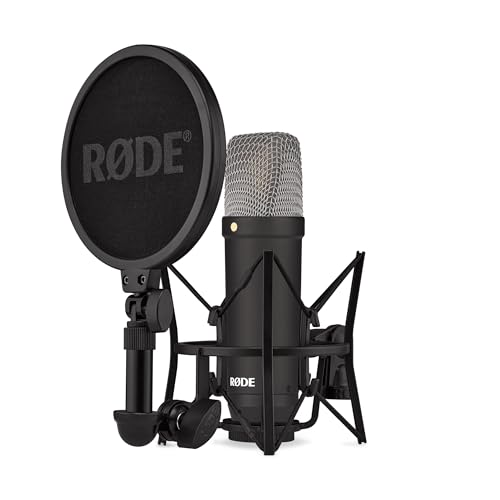
- 4.5 dBA self-noise for quiet capture
- Cardioid large-diaphragm condenser voicing
- Shock mount, pop filter, and XLR cable included
Best For: Interface-based voiceover studios
Best USB Flexibility
ZealSound K66 Podcast Microphone

- Plug-and-play USB with computer and mobile adapters
- Selectable noise reduction mode
- Zero-latency monitoring with onboard controls
Best For: Mobile-friendly voiceover and podcasting
Best Budget Studio Standard
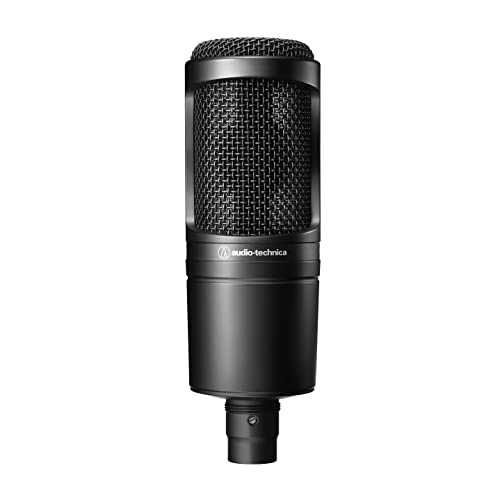
- Cardioid XLR condenser for home studios
- High SPL handling and wide dynamic range
- Stand mount and protective pouch included
Best For: Entry-level interface-based voiceover
Best for Streamlined USB Processing

- Clipguard 2.0 and Auto Gain simplify level control
- Onboard enhancer, compressor, and EQ
- USB-C, headphone monitoring, and Wave Link support
Best For: Processed voiceover and streaming workflows
Classic XLR Value

- Detailed large-diaphragm sound
- Cardioid XLR design
- Includes shock mount and case
Best For: Home studios with 48V phantom power
Plug-and-Play Starter Kit

- USB computer connectivity
- 192 kHz/24-bit chipset
- Complete arm and filter kit
Best For: Computer-based voiceover beginners
Adjustable Boom-Arm Setup
FIFINE T669 USB Microphone Kit

- Direct USB plug-and-play setup
- Adjustable 30-inch boom reach
- Includes double pop filter
Best For: Desk-based voiceover and streaming
Best Hybrid Kit

- USB and XLR connectivity
- 192kHz/24-bit USB recording
- Complete arm-stand accessory kit
Best For: Creators wanting plug-and-play recording with an XLR upgrade path
Best for Flexible Pickup

- Four selectable pickup patterns
- Onboard gain and mute controls
- Plug-and-play USB setup
Best For: Voiceover users who also record podcasts, streams, and interviews
Best Budget Desktop Pick

- Simple plug-and-play USB connection
- Cardioid pickup for focused voice capture
- Metal body with tripod and volume knob
Best For: Beginners recording voiceovers directly to a computer
Best Complete XLR Vocal Kit – RØDE NT1 Signature Series
For voiceover artists who want a ready-to-record XLR setup, the RØDE NT1 Signature Series combines the brand’s established large-diaphragm condenser voicing with exceptionally low self-noise. The included shock mount, pop filter, dust cover, and XLR cable reduce the number of accessories you need to buy separately, though an audio interface is still required.
Best For: Voiceover creators building an interface-based home studio and prioritizing quiet vocal recordings.
Pros:
- Very low 4.5 dBA self-noise helps preserve quiet vocal details.
- Cardioid pickup focuses on the speaker and helps reject room sound.
- Includes an SM6 shock mount with pop filter and a 6-meter XLR cable.
- Comes with a 10-year warranty when registered.
Cons:
- Requires an audio interface and phantom-powered XLR setup.
- Less convenient than a USB microphone for direct computer recording.
The NT1 Signature is a strong choice when clean, quiet capture matters more than plug-and-play convenience. Its included accessories make it especially practical for starting a dedicated voiceover setup.
Best USB Flexibility – ZealSound K66 Podcast Microphone
The ZealSound K66 is a practical USB condenser microphone for voiceover users who want simple setup and broad device compatibility. Its cardioid capsule, selectable noise reduction mode, headphone monitoring, and included USB-C and Lightning adapters make it suitable for recording on computers, tablets, and compatible phones.
Best For: Beginners and mobile creators who need voiceover, podcasting, and streaming in one USB microphone.
Pros:
- Plug-and-play connection works with Windows, Mac, PS4, PS5, and selected mobile devices.
- Noise reduction mode targets keyboard clicks, fan noise, air conditioning, and chatter.
- Built-in zero-latency headphone monitoring and independent volume control.
- Dedicated controls provide microphone volume, monitoring volume, echo, and mute adjustment.
Cons:
- USB connectivity does not offer the same interface flexibility as an XLR microphone.
- Noise reduction may be less suitable when preserving a completely natural room tone is the priority.
For accessible condenser microphones for voiceover, the K66 emphasizes convenience and hands-on control. It is a useful fit for creators recording in changing environments or switching between desktop and mobile devices.
Best Budget Studio Standard – Audio-Technica AT2020
The Audio-Technica AT2020 remains a straightforward option for voiceover buyers seeking a conventional cardioid XLR condenser microphone for a project or home studio. Its high SPL handling, wide dynamic range, and low-mass diaphragm are designed to support versatile recording, while the cardioid pattern helps reduce sound from the sides and rear.
Best For: Home-studio voiceover users who already have an audio interface and want a proven entry-level XLR microphone.
Pros:
- Cardioid pattern improves isolation of the intended voice source.
- High SPL handling and wide dynamic range support varied vocal levels.
- Low-mass diaphragm is designed for extended frequency and transient response.
- Includes a stand mount, thread adapter, and protective pouch.
Cons:
- Requires an audio interface and phantom power.
- Does not include a shock mount, pop filter, or XLR cable.
The AT2020 is a sensible foundation for a traditional recording chain. It keeps the feature set focused, making it a good value when you already own the supporting studio hardware.
Best for Streamlined USB Processing – Elgato Wave:3 MK.2
The Elgato Wave:3 MK.2 is a USB condenser microphone built for creators who want voiceover recording with integrated level protection and onboard processing. Clipguard 2.0, Auto Gain, direct headphone monitoring, and Wave Link software help simplify setup, while the multifunction dial provides quick access to everyday controls.
Best For: Streamers and voiceover creators who want USB convenience with automatic gain assistance and software-based audio routing.
Pros:
- USB-C connection works directly with a PC or Mac.
- Clipguard 2.0 helps prevent clipping, while Auto Gain assists with level setup.
- Onboard voice enhancer, compressor, and EQ provide processing options.
- Multifunction dial, tap-to-mute control, LED feedback, and headphone output improve workflow.
Cons:
- Designed for USB use rather than an XLR interface-based upgrade path.
- Its processing and routing features may be more than needed for a simple voiceover setup.
The Wave:3 MK.2 is a strong convenience-focused pick among condenser microphones for voiceover. It is particularly appealing when avoiding clipping and managing monitoring are more important than building a traditional analog signal chain.
Classic XLR Value – MXL 990
The MXL 990 is a practical choice among condenser microphones for voiceover if you already have an audio interface or preamp. Its large-diaphragm capsule, cardioid pattern, and 20 Hz–20 kHz response are suited to detailed vocal recording, while the XLR connection supports a traditional studio setup.
Best For: Home-studio voiceover artists who have 48V phantom power available.
Pros:
- Cardioid pattern helps reduce sound from the sides and rear.
- FET preamp and balanced output provide detailed highs, tight lows, and smooth mids.
- Includes a shock mount, stand adapter, and carrying case.
- Wide frequency response works with male and female voices.
Cons:
- Requires an audio interface or preamp with +48V phantom power.
- XLR connectivity is less direct than a USB microphone for computer recording.
The MXL 990 makes the most sense for buyers building a conventional recording chain rather than seeking an all-in-one computer microphone. Its included accessories add useful value, but phantom power is essential.
Plug-and-Play Starter Kit – MAONO A04 USB Microphone
The MAONO A04 is one of the more convenient condenser microphones for voiceover when you want to record directly to a computer. Its USB connection requires no extra sound card or drivers, and the kit includes a boom arm, shock mount, pop filter, and windscreen for a ready-to-use desktop setup.
Best For: Beginners recording voiceover, podcasts, streams, or online content from a computer.
Pros:
- USB plug-and-play setup works with computers and many listed mobile devices.
- 192 kHz/24-bit chipset supports high-resolution recording.
- Cardioid 16 mm condenser capsule focuses on sound from the front.
- Includes an adjustable arm, shock mount, pop filter, and foam windscreen.
Cons:
- Not compatible with Xbox.
- Frequency range is listed as 30 Hz–16 kHz, narrower than some studio microphones.
- The desk clamp is intended for desktops less than 2.1 inches thick.
For straightforward computer-based voiceover, the A04 offers a complete setup with minimal configuration. Check your operating device and desk thickness before buying, particularly if you plan to use the included clamp.
Adjustable Boom-Arm Setup – FIFINE T669 USB Microphone Kit
The FIFINE T669 is a useful option among condenser microphones for voiceover if you want a USB kit with flexible positioning. It connects directly to a PC or laptop, uses a cardioid capsule for front-focused pickup, and includes a boom arm, shock mount, double pop filter, and long USB cable.
Best For: Voiceover, podcast, gaming, and streaming setups that benefit from an adjustable boom arm.
Pros:
- Plug-and-play USB connection needs no additional hardware or drivers.
- Cardioid condenser capsule helps limit ambient sound from behind and the sides.
- Steel boom arm offers broad adjustment with up to a 30-inch reach.
- Double pop filter helps reduce plosive bursts and unwanted air noise.
Cons:
- Incompatible with Xbox.
- Designed for computer and listed PS4/PS5 use rather than an XLR studio chain.
- Requires a suitable desk edge for the included clamp or desktop mount.
The T669 stands out for users who want the microphone positioned off the desk while recording. Its accessory package is well suited to home voiceover and streaming, though buyers seeking XLR connectivity should consider another model.
Best Hybrid Kit – MAONO A04 Gen2
The MAONO A04 Gen2 is a flexible choice among condenser microphones for voiceover, combining USB plug-and-play convenience with XLR connectivity for a more traditional home-studio setup. Its cardioid 16mm capsule, included pop filter, and adjustable arm stand make it ready for recording out of the box.
Best For: Voiceover creators who want both USB simplicity and an upgrade path to an audio interface or mixer.
Pros:
- Offers both USB and XLR connectivity.
- Supports up to 192kHz/24-bit recording in USB mode.
- Includes an arm stand, shock mount, pop filter, and windscreen.
- MAONO Link provides gain, noise reduction, EQ, compressor, and limiter controls in USB mode.
Cons:
- XLR operation requires phantom power, and an XLR cable is not included.
- Software features are limited to USB mode.
- Its desk clamp is designed for surfaces under 2.1 inches thick.
Choose the A04 Gen2 if you want a complete voiceover setup today without giving up the option to move to XLR equipment later. The included accessories and software controls add practical value for home recording.
Best for Flexible Pickup – Logitech Creators Blue Yeti
The Blue Yeti is a versatile USB option among condenser microphones for voiceover, with four selectable pickup patterns and onboard controls for quick adjustments. Its plug-and-play design works with Mac or PC and includes a desktop stand for straightforward recording.
Best For: Voiceover users who also record podcasts, streams, interviews, or multiple sound sources.
Pros:
- Provides cardioid, omnidirectional, bidirectional, and stereo pickup patterns.
- Includes onboard gain, mute, pattern, and headphone-volume controls.
- Supports zero-latency monitoring through headphones.
- Blue VO!CE software adds vocal effects and processing options.
Cons:
- Uses USB connectivity rather than XLR.
- The included desktop stand may take more workspace than a compact mic setup.
- It is substantially heavier than a small desktop microphone at 3.5 pounds.
The Blue Yeti is a strong fit when voiceover is only one part of your recording workload. Its pattern selection and physical controls make it especially adaptable, while the desktop stand keeps setup simple.
Best Budget Desktop Pick – FIFINE K669B
The FIFINE K669B is a straightforward USB choice among condenser microphones for voiceover. Its cardioid pattern focuses on sound from the front, while the metal body, included tripod, and built-in volume knob keep the setup practical for desktop recording.
Best For: Beginners, streamers, and remote workers seeking an uncomplicated USB voiceover microphone.
Pros:
- Plug-and-play USB setup requires no 48V phantom power.
- Cardioid pickup is designed to focus on the main voice source.
- Includes a stable tripod stand and a 5.9-foot USB cable.
- Built-in volume control can quickly lower or mute the output.
Cons:
- It does not support phones or Xbox devices.
- USB connectivity limits expansion to an XLR recording setup.
- Application settings such as automatic volume adjustment may need to be disabled for steadier levels.
The K669B keeps voiceover recording simple and affordable, with the essentials built into a compact desktop package. It is a practical starting point for computer-based narration, meetings, streaming, and online video.
How We Picked These Condenser Microphones for Voiceover
We selected models that cover the main needs of voiceover creators, including studio recording, podcasting, streaming, online courses, and home narration. Our evaluation focuses on microphone type, pickup pattern, connection options, included accessories, monitoring features, ease of setup, and stated recording specifications.
The list includes proven XLR microphones for users who already have an audio interface, USB microphones for plug-and-play recording, and hybrid models that can support either workflow. Because microphone performance also depends heavily on room acoustics, mic placement, and speaking technique, we prioritized practical flexibility rather than treating specifications as a guarantee of sound quality.
Quick Comparison
- Best for studio-focused recording: RØDE NT1 Signature Series and Audio-Technica AT2020.
- Best for USB convenience: Elgato Wave:3 MK.2, Logitech Blue Yeti, and MAONO A04 models.
- Best for a low-cost starter kit: FIFINE T669, FIFINE K669B, or ZealSound.
- Best for flexible upgrades: MAONO A04 Gen2, with USB and XLR connectivity.
- Best for traditional XLR value: MXL 990.
Key Buying Factors for Condenser Microphones for Voiceover
USB, XLR, or Both
USB microphones connect directly to a computer and are usually the simplest choice for beginners. XLR microphones require an audio interface, mixer, or compatible preamp, but they can integrate more naturally into a dedicated studio and make future equipment upgrades easier. Hybrid microphones provide the most flexibility when your setup may change.
Pickup Pattern and Room Noise
Most microphones here use a cardioid pattern, which emphasizes sound from the front and reduces pickup from the rear. That helps with voiceover, but it does not eliminate keyboard noise, fans, reflections, or traffic. A quiet, treated room often improves results more than moving to a more expensive microphone.
Monitoring and Gain Control
A headphone output, mute button, onboard gain control, and latency-free monitoring can make USB recording more convenient. Features such as clipping protection or automatic gain assistance are useful for streaming and changing speaking levels, while manual gain control may suit more controlled studio work.
Accessories and Placement
A pop filter helps reduce plosive bursts from sounds such as “P” and “B.” A shock mount can limit handling noise, while a boom arm makes it easier to keep the microphone at a consistent distance. Check what is included before budgeting for accessories separately.
Who Should Buy Which Condenser Microphones for Voiceover?
Choose a USB model if you want fast setup for a computer, podcast, meetings, or streaming. Choose an XLR microphone if you already own an interface or want a more expandable recording chain. A hybrid model is a sensible middle ground for creators who need USB convenience now but may move to an interface later.
For professional-sounding narration, prioritize a quiet room, a stable stand, pop protection, and consistent microphone technique. Among these Condenser Microphones for Voiceover, the best match is the one that fits your recording environment and workflow—not necessarily the model with the most features or highest resolution.